
Mission Replay Viewer

Desperados 3
- Status
- Released
- Year
- 2020
- Genre
- Strategy
- Platforms
- Windows, macOS, Linux
1. Summary
Post-mission replay viewer that converts the completed mission into an overhead tactical map with character paths, event markers, kill markers, playback controls, replay speed, and Save Replay/Continue actions.
Overview
The Mission Replay Viewer is a full-screen post-mission analysis screen. It presents the completed mission on an overhead tactical map, with colored character routes, skull/event markers, counters, and replay playback controls layered over a dark parchment-like frame.
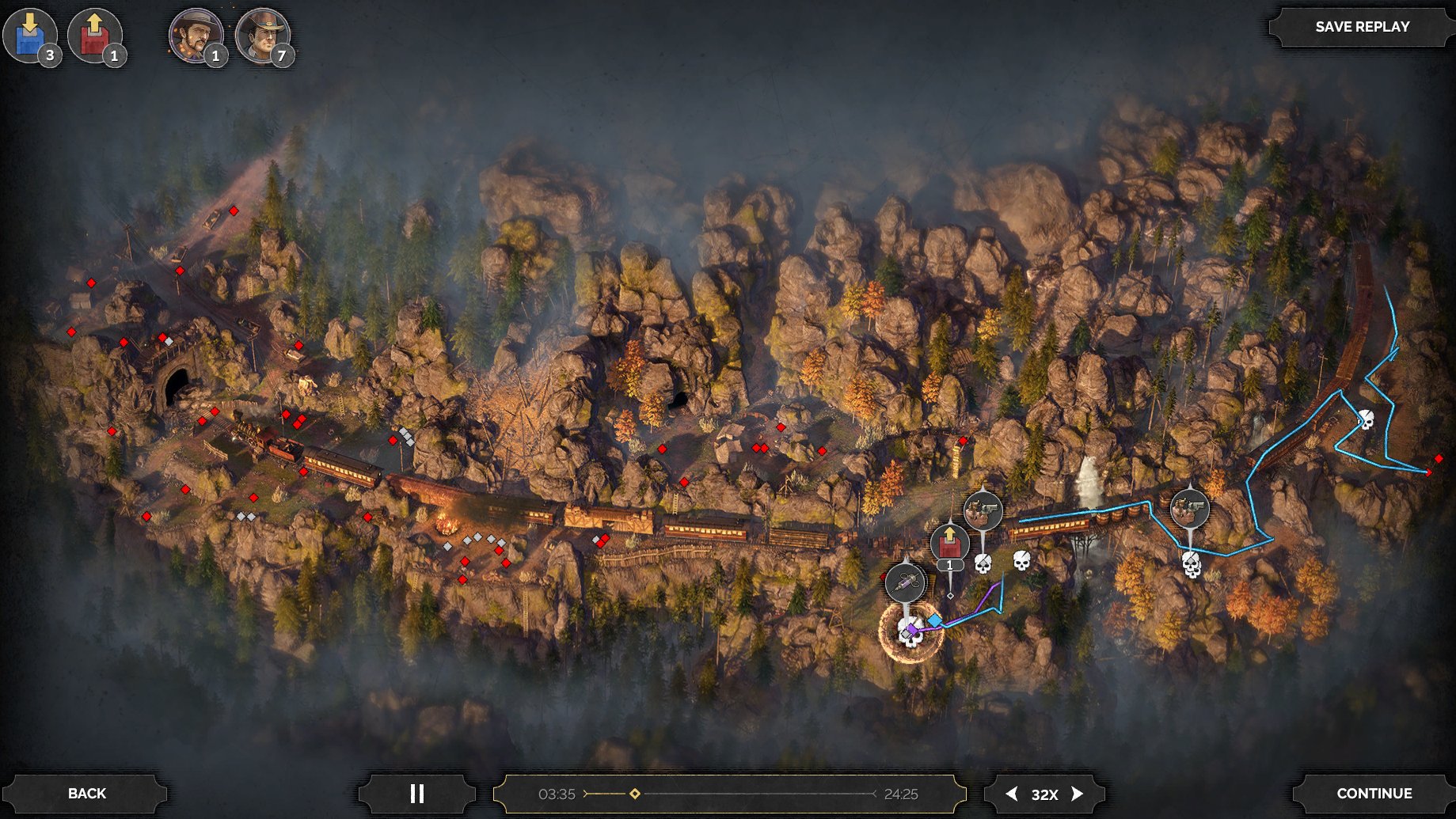
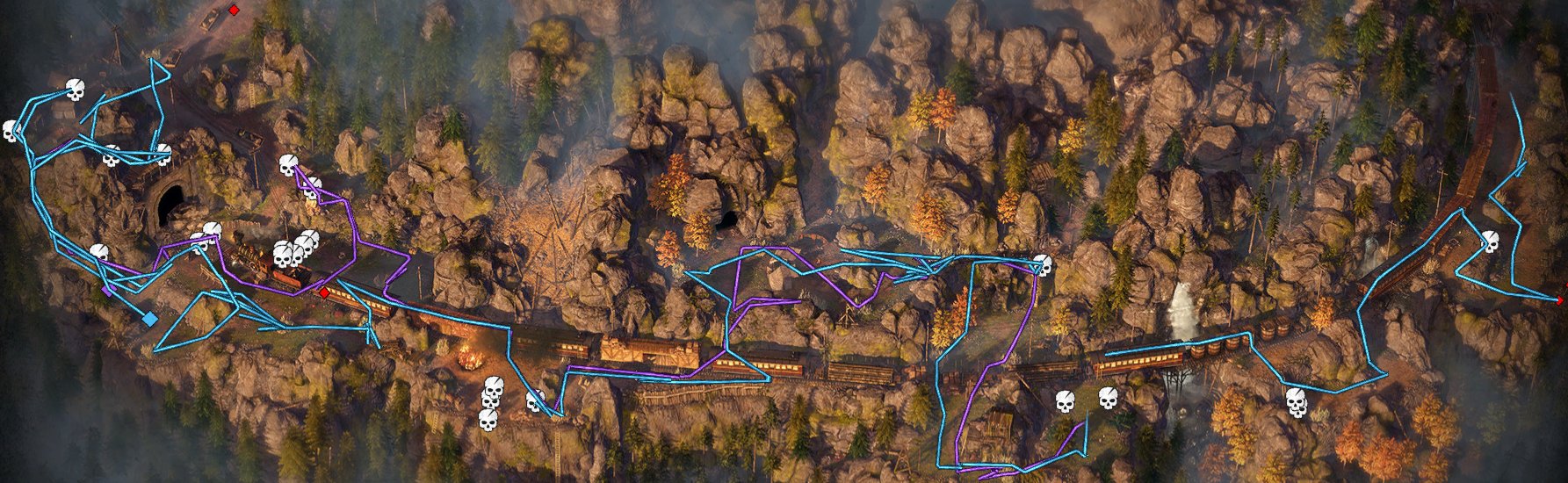
The core content is the map history: colored lines show character routes through the mission space, while skull and red markers identify kills or notable replay events. This makes the screen a review tool rather than a live control HUD.
The screen also exposes focused controls for replay management and exit flow.

Job Story
When I finish a mission and want to understand how it played out, I want to watch an overhead replay with paths, markers, timing, and save/continue controls, so that I can review my tactical route, preserve a notable run, or move on to the next post-mission step.
Classification
- diegesis: Non-diegetic
- functional_type: Management screen
- component_type: Progress bar/slider
Wireframe
+------------------------------------------------------------------------------+
| [event counters] [character counters]                         [SAVE REPLAY]   |
|                                                                              |
|                                                                              |
|                    OVERHEAD TACTICAL REPLAY MAP                               |
|             route lines, skull/event markers, character nodes                 |
|                                                                              |
|                                                                              |
| [BACK]             [play/pause] [time scrubber] [speed]          [CONTINUE]   |
+------------------------------------------------------------------------------+
Components
- Full-screen replay map canvas.
- Character route overlays in distinct colors.
- Kill/event markers, including skull icons and red markers.
- Top-left character and event counters.
- Top-right SAVE REPLAY button.
- Bottom-left BACK button.
- Center-bottom play/pause control.
- Center-bottom timeline scrubber with current time and total duration.
- Bottom speed selector, shown as a multiplier such as 32X.
- Bottom-right CONTINUE button.
Parameters & Audio
| Parameter | Value | Type | Notes |
|---|---|---|---|
| Visual feedback is panel-driven rather than diegetic | beveled dark buttons, bright white uppercase labels, colored path lines, and high-contrast skull/event icons over the terrain map. The timeline handle and time labels should update immediately during playback or scrubbing. Button activation should use the game's standard menu click/hover audio and subtle highlight states. | Text | — |
Dependencies & Logic
- Requires completed mission replay telemetry.
- Requires the current mission's tactical map or replay-renderable map image.
- Requires time-series character position data to draw route lines.
- Requires event/death/kill records to draw map markers and top counters.
- Requires save-slot or replay-storage availability for SAVE REPLAY.
- Depends on post-mission flow state for Back and Continue destinations.
BDD Scenarios
Scenario: Review completed mission replay
- Given
- the player has completed a mission with replay telemetry
- When
- the replay viewer opens
- Then
- the overhead tactical map is shown with character paths, markers, counters, and playback controls
Scenario: Control replay playback
- Given
- the replay viewer is visible
- When
- the player uses play/pause, scrubs the timeline, or changes speed
- Then
- the replay time and map annotations update to match the selected playback state
Scenario: Save replay
- Given
- the replay viewer is visible and replay saving is available
- When
- the player selects `SAVE REPLAY`
- Then
- the current mission replay is saved or the player receives save feedback
Scenario: Continue post-mission flow
- Given
- the replay viewer is visible
- When
- the player selects `CONTINUE`
- Then
- the interface exits the replay viewer and advances to the next post-mission step
Edge Cases
- Missing telemetry: show the post-mission flow without replay playback, or disable replay-specific controls.
- No save capacity or save failure: keep the replay visible and present save failure feedback.
- Very long missions: timeline labels and scrubber precision must remain readable.
- Dense events: markers should remain legible without hiding the route lines completely.
- Multiple characters: route colors and character counter icons must remain distinguishable.
QA Notes
- Verify that path lines, skull/event markers, top counters, current/total time, speed multiplier, and button labels match the completed mission data. Test play, pause, scrub, speed changes, Save Replay, Back, and Continue in the post-mission flow. Confirm marker density remains readable on wide maps and that saved replays can be reopened if that flow is supported.
Mechanic Links
- Mission Challenges, Badges, and Replay Goals - The Mission Replay Viewer provides the post-badge tactical review surface, showing color-coded character paths, kill markers, and playback controls that let the player analyze their run before advancing to statistics.
References
- 1.
Desperados III (L194-204 of 283)
- 2.
- 3.