![Visual reference from Desperados 3 Let's Play Gameplay Walkthrough Pt 2 Troublemakers In Flagstone [1440p w/ Commentary] at 0:02-0:48](/published/media/desperados-3/source-323-preview-f7f54a3c85.jpg)

Loading And Mission Briefing Screen

Desperados 3
- Status
- Released
- Year
- 2020
- Genre
- Strategy
- Platforms
- Windows, macOS, Linux
1. Summary
Non-diegetic frontend loading and mission briefing interface used between menu/mission selection and playable content. It has a minimal black loading state with bottom-center progress feedback and a mission briefing state that places a narrative carousel over a parchment-style map with a bottom-center Continue action.
Overview
The loading and mission briefing screen appears between frontend mission actions and playable content. It has two observed variants: a minimal black loading screen with bottom-center progress feedback, and a mission briefing screen for Troublemakers in Flagstone that overlays a dark narrative carousel on a parchment-style regional map.
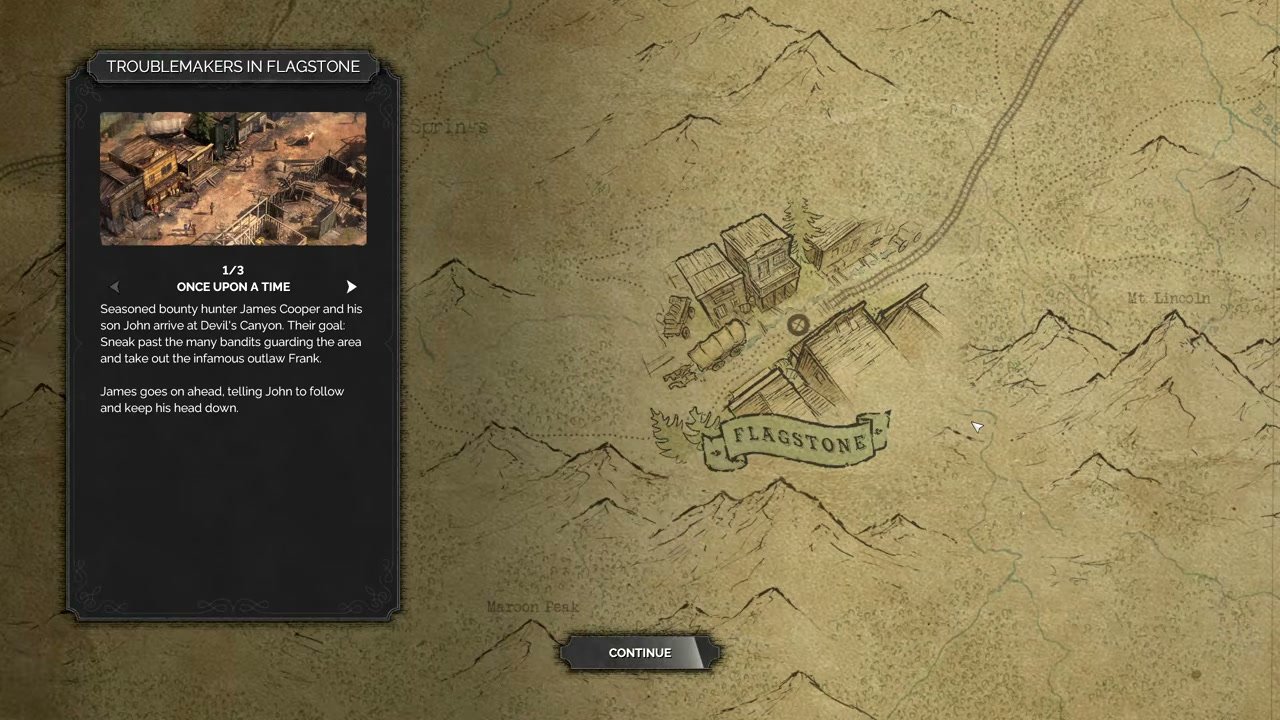
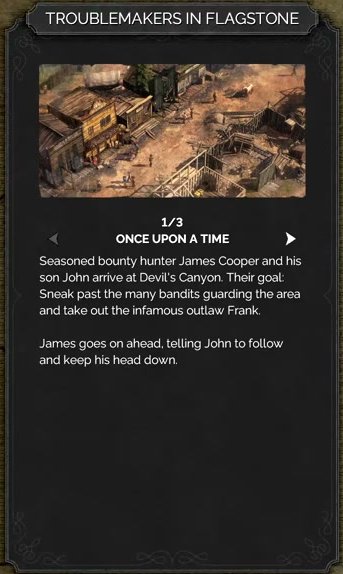
The briefing card is the primary reading surface. It contains the mission title tab, a location/mission illustration, carousel slide count with arrow controls, a slide headline, and body copy explaining the mission setup.
The separate black loading state removes all narrative/contextual art and keeps only a small status group at the bottom center: LOADING... above a horizontal progress bar.

Job Story
When I start or continue a mission, I want loading feedback and a short mission briefing, so that I know the game is progressing and understand the narrative setup before control is handed to me.
Classification
- diegesis: Non-diegetic
- functional_type: Frontend shell
- component_type: Progress bar/slider
Wireframe
+--------------------------------------------------------------------------------+
| parchment mission map background                                                |
|                                                                                |
|  +------------------------+                                                     |
|  | TROUBLEMAKERS IN       |                                                     |
|  | FLAGSTONE              |                                                     |
|  | [mission thumbnail]    |                    map landmark / region art        |
|  | <  1/3                >|                                                     |
|  | ONCE UPON A TIME       |                                                     |
|  | briefing body copy     |                                                     |
|  +------------------------+                                                     |
|                                                                                |
|                                  [ CONTINUE ]                                   |
+--------------------------------------------------------------------------------+

Black loading variant:
+--------------------------------------------------------------------------------+
|                                                                                |
|                                                                                |
|                                  LOADING...                                     |
|                              [ progress bar ]                                   |
+--------------------------------------------------------------------------------+
Components
- Full-screen background layer: black for minimal loading, parchment map for mission briefing.
- Loading status label: LOADING....
- Horizontal loading progress bar.
- Mission briefing card with dark ornamental frame.
- Mission title tab, e.g. TROUBLEMAKERS IN FLAGSTONE.
- Mission thumbnail illustration.
- Slide count, e.g. 1/3, plus left/right arrow controls.
- Slide headline and narrative body copy.
- Bottom-center CONTINUE button.
Parameters & Audio
| Parameter | Value | Type | Notes |
|---|---|---|---|
| Loading progress uses a compact horizontal fill bar with high contrast against black. | Loading progress uses a compact horizontal fill bar with high contrast against black. | Text | — |
| Mission briefing uses parchment texture, muted sepia map art, and a dark left card to separate readable text from the background. | Mission briefing uses parchment texture, muted sepia map art, and a dark left card to separate readable text from the background. | Text | — |
| Continue button uses a beveled dark plate with bright centered uppercase text. | Continue button uses a beveled dark plate with bright centered uppercase text. | Text | — |
| No unique audio cue is visible in the inspected evidence; any transition audio should be treated as part of the surrounding frontend/menu flow rather than a required element of this UI spec. | No unique audio cue is visible in the inspected evidence; any transition audio should be treated as part of the surrounding frontend/menu flow rather than a required element of this UI spec. | Text | — |
Dependencies & Logic
- Current mission identifier determines the briefing title, thumbnail, map region, slide text, and number of slides.
- Loading state depends on asset/scene streaming progress.
- Continue availability depends on the briefing state being ready and, for pure loading, on load completion.
- Input mode must route focus to carousel arrows and the Continue button in the briefing state.
BDD Scenarios
Scenario: Black loading progress is shown
- Given
- the player has started a mission or triggered a load
- When
- the next scene is still loading
- Then
- the screen shows a black background
- And
- the bottom-center area shows `LOADING...` above a horizontal progress bar
Scenario: Mission briefing is shown before mission entry
- Given
- the selected mission has briefing content
- When
- the mission briefing screen opens
- Then
- the parchment map background is visible
- And
- the left briefing card shows the mission title, thumbnail, slide count, headline, and body text
- And
- the bottom-center `CONTINUE` button is available
Scenario: Briefing carousel content changes
- Given
- the mission briefing card shows multiple slides
- When
- the player activates a carousel arrow
- Then
- the slide count, headline, and body text update
- And
- the briefing card remains anchored on the left
Scenario: Continue exits the briefing
- Given
- the mission briefing screen is ready
- When
- the player activates `CONTINUE`
- Then
- the UI transitions toward the mission cinematic or gameplay
Edge Cases
- If loading takes longer than expected, the black loading state should remain readable and not appear frozen; the progress bar should continue to represent progress where possible.
- If mission briefing content has fewer or more than three slides, slide count and arrow availability must match the actual content set.
- Long localized briefing text must fit the left card without overlapping arrows, slide count, or Continue navigation.
- If a user changes input device, focus/highlight should remain recoverable for carousel arrows and Continue.
- If a mission lacks briefing text, the flow should fall back to a clear loading/continue state rather than showing empty panel content.
QA Notes
- Verify both variants: pure black loading and parchment mission briefing.
- Check LOADING... and progress bar placement at 16:9 and any supported ultrawide/safe-area settings.
- Confirm the left card remains readable over the map and preserves contrast for title, headline, slide count, arrows, and body text.
- Confirm carousel arrows change slide content and do not move the panel.
- Confirm CONTINUE is bottom-centered and exits to the expected next state.
- Run localization checks against the briefing body and title tab.
Mechanic Links
- Trial-and-Error Save Iteration Loop - Loading and mission briefing screens are used when quickload, manual load, restart, or mission entry transitions return the player to a saved or reset state.
References
- 1.
Desperados III (L34-44 of 283)
- 2.
Desperados 3 Let's Play Gameplay Walkthrough Pt 2 Troublemakers In Flagstone [1440p w/ Commentary] (0:02-0:48)