![Visual reference from Desperados 3 Let's Play Gameplay Walkthrough Pt 1 Prologue & Byers Pass [1440p w/ Commentary] at 30:56-31:02](/published/media/desperados-3/source-322-preview-601cb466d0.jpg)
![Visual reference from Desperados 3 Let's Play Gameplay Walkthrough Pt 4 O'Hara Ranch [1440p w/ Commentary] at 18:50-19:02](/published/media/desperados-3/source-325-preview-bdbd72bca7.jpg)

Trial-and-Error Save Iteration Loop
Base
Desperados 3
- Status
- Released
- Year
- 2020
- Genre
- Strategy
- Platforms
- Windows, macOS, Linux
1. Summary
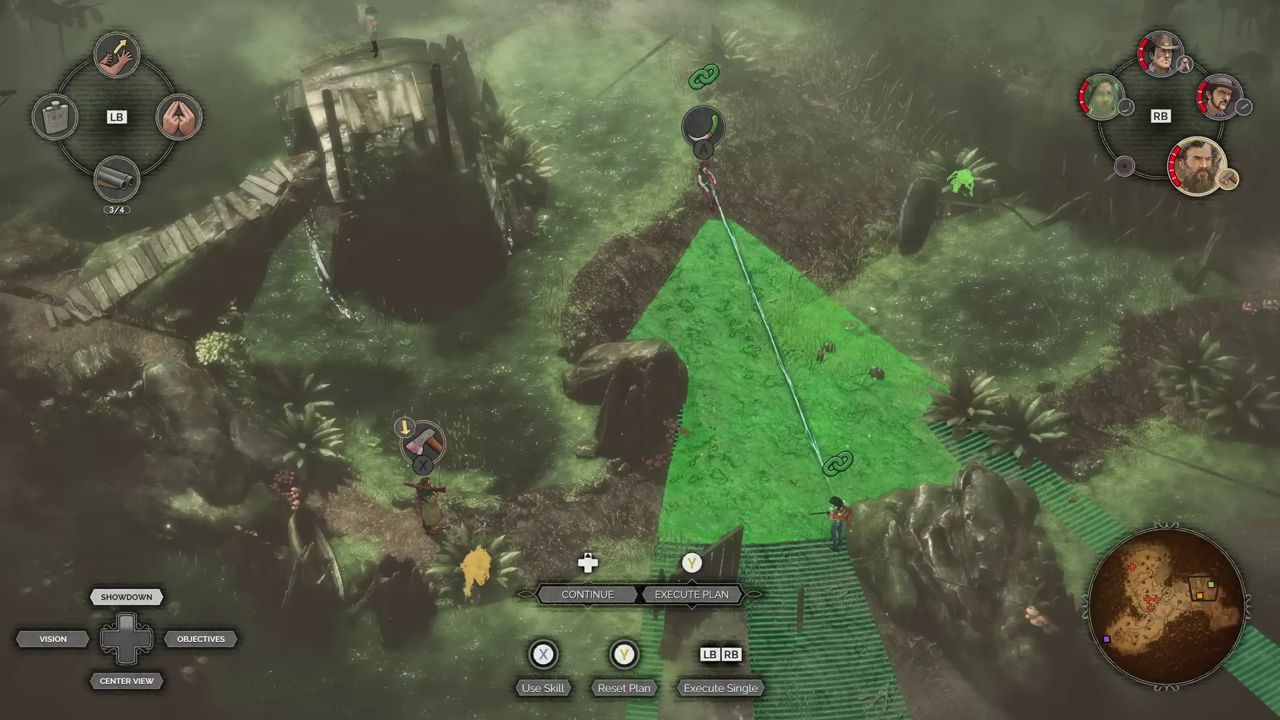
The game expects repeated planning, failure, quicksaving, reloading, and refinement as part of its core tactical rhythm. Dense guard coverage, alarms, reinforcements, difficulty settings, and challenge constraints mean the player often tests a plan, observes why it failed, reloads, and executes a cleaner version. This iteration loop supports the game's puzzle-like stealth design without turning it into reflex-based action.
3. Design Intent / Job Story
When I am solving a dense stealth encounter and my plan breaks down, I want to quickly save, reload, and revise my route or timing, so that I can turn failure feedback into a cleaner tactical solution without replaying the whole mission.
4. Role in Gameplay Loop
- Makes experimentation an expected part of high-density stealth encounters rather than an exceptional failure recovery path.
- Lets players rehearse patrol timing, view-cone boundaries, ability sequencing, and body handling until a plan is executable.
- Converts detection, alarms, reinforcements, and failed challenge conditions into diagnostic feedback for the next attempt.
- Supports optional badge and speedrun play by letting players train routes with quicksave, then execute cleaner low-save or no-save runs.
- Reduces frustration in large missions by letting players preserve hard-won progress before attempting risky micro-plans.
5. Preconditions
- An active mission or mission segment is loaded.
- Saving and loading are available in the current gameplay state.
- The player has reached a state worth preserving, such as a safe position, cleared sub-area, or pre-execution setup.
- The mission contains meaningful failure or degradation risks, such as detection, alarm escalation, reinforcements, death, resource loss, badge failure, or route timing errors.
- The UI exposes save/load commands or recovery routes, such as the persistent Quicksave and Quickload shortcuts.
- A previous save exists before quickload or manual-load recovery can return the player to an earlier state.
6. Parameters
| Parameter | Value | Type | Notes |
|---|---|---|---|
| Quicksave Command | F5 in verified PC HUD | input binding | Shortcut that stores the current mission state when saving is allowed. |
| Quickload Command | F8 in verified PC HUD | input binding | Shortcut that loads the latest quicksave when one exists. |
| Save Availability | Unlimited / limited / none, difficulty- or challenge-dependent | enum | Governs whether and how often the player can create saves during a mission. |
| Save Slot Type | Quicksave / manual save / autosave / recent recovery save | enum | Save categories that can participate in iteration or recovery flows. |
| Restore Scope | Mission state at save time | state set | State restored on load, including squad, enemies, objectives, resources, bodies, alarms, and relevant UI. |
| Reload Trigger | Manual command or recovery-screen selection | player action | How the player initiates a return to a prior saved state. |
| Failure Feedback Source | Detection, alarm, reinforcement, death, objective failure, badge failure, poor timing | enum set | Observable outcome that teaches the player why the previous plan failed. |
| Iteration Cadence | Per encounter, per sub-area, or per risky action | player-controlled | How frequently the player saves and retries while solving a mission. |
| Challenge Save Policy | Allowed / discouraged / counted / forbidden | enum | How optional badges or difficulty modifiers interpret save usage. |
| Speedrun Timer Load Behavior | Timer may continue across quickload/normal load | rule | Challenge behavior that makes training saves useful but final route execution stricter. |
7. Core Rules
- The player may create a quicksave during active mission play when saving is allowed by the current difficulty and mission state.
- Quickload returns the mission to the latest quicksave and restores tactical state from that save, including character positions, enemy states, resources, bodies, objectives, and alarms as captured.
- The loop is player-directed: the game does not require a failed attempt before saving or loading, and players may save proactively before risky execution.
- Detection, alarm escalation, reinforcements, death, failed badges, resource waste, or poor timing can all be valid reasons to reload and revise a plan.
- A reload should preserve the saved state rather than partially preserving consequences from the failed attempt.
- The top quick menu keeps Quicksave and Quickload visible during gameplay so iteration remains a first-class tactical affordance.
- Difficulty and challenge rules can restrict or score save usage; a normally valid quicksave habit may invalidate no-save goals or reduce speedrun efficiency.
- For speedrun badge attempts, quickload or normal load may not reset the active timer, so the optimal training loop can differ from the final scoring attempt.
- Manual saves and main-menu loading can be used to segment difficult routes where the rules allow it.
- The loop should reward learning: after each reload, changed route choice, timing, ability order, or positioning should be able to produce a different outcome.
8. BDD Scenarios
Scenario: Preserve a risky setup
- Given
- the player has positioned the squad before a risky stealth execution
- When
- the player triggers quicksave
- Then
- the current mission state is stored as the latest quicksave
- And
- the player can attempt the plan without replaying earlier safe progress if it fails
Scenario: Reload after detection escalates
- Given
- the player has a recent quicksave
- When
- the player triggers quickload
- Then
- the game transitions through the loading flow
- And
- a guard detects an illegal action and raises an alarm
- And
- the mission resumes from the saved state before the alarm occurred
Scenario: Refine a failed encounter plan
- Given
- an attempted route causes detection, reinforcements, death, or objective failure
- When
- the player reloads and changes timing, positioning, or ability order
- Then
- the same encounter can resolve with a different stealth outcome
Scenario: Train for a constrained badge
- Given
- a mission badge rewards limited saves, no saves, speed, or clean execution
- When
- the player practices a route by repeatedly quicksaving and quickloading
- Then
- the player can learn the route before attempting the constrained run under the badge rules
Scenario: Speedrun timer persists across quickload
- Given
- a speedrun challenge timer is active
- When
- the player quickloads or normal-loads during the run
- Then
- the timer continues according to the challenge rule
- And
- the player must account for save/load behavior when optimizing the attempt
9. Edge Cases
- Quickload is requested before any valid quicksave exists.
- Saving is disabled or restricted by difficulty settings, mission rules, or a no-save challenge.
- The player accidentally quicksaves after entering a bad or unwinnable tactical state.
- The player quickloads during an alarm, detection animation, mission failure transition, or loading transition.
- A saved state includes moving patrols, queued actions, thrown objects, bodies, traps, environmental hazards, or mission objective changes.
- A challenge timer or badge counter treats quickload differently from main-menu loading.
- The player relies on quickload reflexively during a no-save or limited-save objective and invalidates the run.
- Manual saves, autosaves, and quicksaves compete for which save is shown or loaded in recovery UI.
- Reloading after a failure must not leave stale UI indicators, alarm icons, detection states, or cooldown/resource changes from the discarded attempt.
10. QA Notes
- Verify Quicksave F5 and Quickload F8 work from active gameplay and match the top quick menu labels.
- Verify quickload restores characters, enemies, patrol timing, objectives, alarms, bodies, resources, cooldowns, camera state, and HUD state from the saved point.
- Test quicksave before and after detection, alarms, body discovery, objective updates, resource use, Showdown execution, and character death.
- Test failure recovery loading from recent saves and confirm it returns to the expected saved state.
- Test difficulty settings that alter amount of saves and confirm restricted save usage is enforced and communicated.
- Test badge and speedrun conditions against quicksave, quickload, manual load, restart, and main-menu load paths.
- Verify no-save or limited-save challenges fail or score correctly when the player saves by hotkey, menu, or recovery flow.
- Verify load transitions do not duplicate enemies, bodies, environmental state changes, audio, alerts, or objective notifications.
- Regression-test accidental bad saves by confirming the player still has access to older manual/recent saves where the recovery UI promises them.
11. Mechanic Dependencies
- Tactical Stealth Mission Loop (The tactical stealth mission loop provides the guarded mission spaces, objective pressure, alarm risk, and repeated encounter solving that the save-iteration loop supports.)
- Showdown Synchronized Planning (Showdown synchronized planning creates complex queued executions that often require rehearsal, quicksaving before execution, and reloading when timing or targeting fails.)
- Enemy Perception and Alarm AI (Enemy perception, detection, alarms, and reinforcements create the failure feedback that causes players to reload and refine plans.)
- Mission Challenges, Badges, and Replay Goals (Mission badges, save restrictions, speedrun goals, and replay challenges depend on players practicing routes with saves and then optimizing execution under stricter constraints.)
12. UI Links
- Difficulty Selection Dialog - Difficulty selection exposes the amount-of-saves parameter, which can change how freely players rely on the save iteration loop.
- Loading And Mission Briefing Screen - Loading and mission briefing screens are used when quickload, manual load, restart, or mission entry transitions return the player to a saved or reset state.
- Mission Failed Recovery Screen - The mission failed recovery screen provides recent-save loading and restart options when a hard failure forces recovery through the save iteration loop.
- Mission Badges Results Screen - The mission badges results screen displays challenges such as no-save, speedrun, and difficulty goals that influence how players train and then constrain save usage.
- Top Quick Menu Bar - The top quick menu bar exposes persistent Quicksave F5 and Quickload F8 shortcuts during live gameplay, making the iteration loop immediately available.
References
- 1.
Desperados 3 Review (3:36-4:47)
- 2.
Desperados 3 Review (0:15-0:43)
- 3.
Desperados 3 Let's Play Gameplay Walkthrough Pt 1 Prologue & Byers Pass [1440p w/ Commentary] (30:56-31:02)
- 4.
Desperados 3 Let's Play Gameplay Walkthrough Pt 4 O'Hara Ranch [1440p w/ Commentary] (18:50-19:02)
- 5.
Steam Community :: Guide :: All Badges + Mission-by-Mission Achievements Guide (L28-45 of 932)
- 6.
Steam Community :: Guide :: All Badges + Mission-by-Mission Achievements Guide (L40-55 of 932)