![Visual reference from Desperados 3 Let's Play Gameplay Walkthrough Pt 1 Prologue & Byers Pass [1440p w/ Commentary] at 30:57-30:58](/published/media/desperados-3/source-322-preview-601cb466d0.jpg)

Top Quick Menu Bar

Desperados 3
- Status
- Released
- Year
- 2020
- Genre
- Strategy
- Platforms
- Windows, macOS, Linux
1. Summary
Persistent top-center HUD strip that exposes immediate keyboard-accessible commands for Menu, Quicksave, and Quickload during live tactical gameplay.
Overview
The Top Quick Menu Bar is a slim, persistent HUD strip pinned to the top center of the gameplay screen. In the verified gameplay frame it contains three global shortcuts: MENU with ESC, QUICKSAVE with F5, and QUICKLOAD with F8. Its compact presentation keeps save/load iteration visible without competing with the character action bar, minimap, alerts, or the tactical playfield.
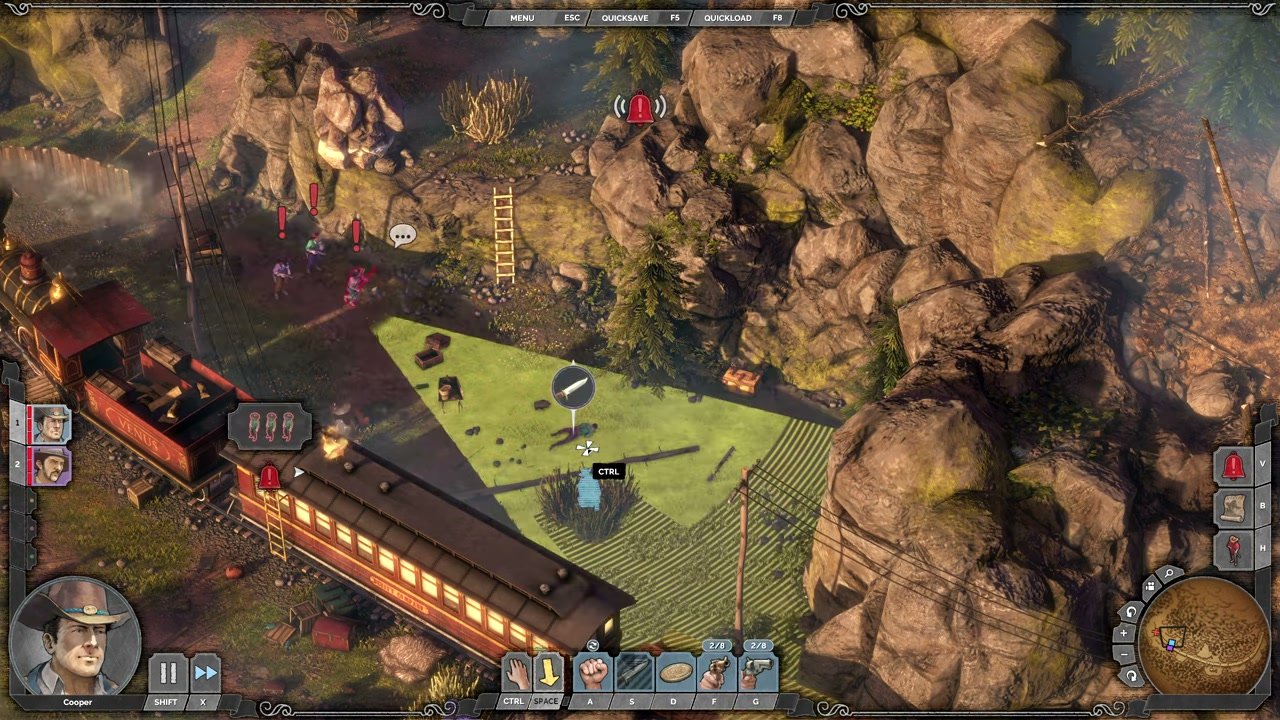

Job Story
When I am iterating through a difficult stealth encounter, I want Menu, Quicksave, and Quickload shortcuts visible at all times, so that I can quickly pause, preserve progress, or retry without losing focus on the tactical field.
Classification
- diegesis: Non-diegetic
- functional_type: HUD
- component_type: Button
Wireframe
+--------------------------------------------------------------------------------+
|                         [ MENU ][ ESC ][ QUICKSAVE ][ F5 ][ QUICKLOAD ][ F8 ]   |
|                                                                                |
|                           isometric tactical playfield                          |
|                                                                                |
| character HUD / action bar                                      minimap / alerts|
+--------------------------------------------------------------------------------+
Components
- Menu label: text command for opening the game menu.
- Menu keycap: ESC shortcut indicator.
- Quicksave label: text command for saving the current mission state.
- Quicksave keycap: F5 shortcut indicator.
- Quickload label: text command for loading the latest quicksave.
- Quickload keycap: F8 shortcut indicator.
- Ornamental frame: slim decorative backing tying the shortcut strip into the HUD border.
Parameters & Audio
| Parameter | Value | Type | Notes |
|---|---|---|---|
| Visual treatment | small uppercase white labels on dark beveled tabs with subtle separators between action labels and keycaps. | Text | — |
| Animation | no evidence of continuous animation in the captured gameplay frame; expected to remain static until a command transition occurs. | Text | — |
| Audio | command feedback is likely handled by the invoked menu/save/load flow, not by this passive HUD strip itself. | Text | — |
Dependencies & Logic
- Depends on active gameplay HUD state, keyboard input handling, save-system availability, and presence of a valid quicksave for quickload. It also depends on global UI layering so modal dialogs, loading screens, or pause menus can supersede the gameplay HUD when a shortcut is used.
BDD Scenarios
Scenario: Open menu from gameplay
- Given
- the player is in active mission gameplay
- When
- the player presses `ESC`
- Then
- the game opens the menu or pause flow
Scenario: Quicksave from gameplay
- Given
- the player is in active mission gameplay and saving is allowed
- When
- the player presses `F5`
- Then
- the current mission state is saved through the quicksave system
Scenario: Quickload from gameplay
- Given
- the player is in active mission gameplay and a quicksave exists
- When
- the player presses `F8`
- Then
- the game begins loading the latest quicksave state
Edge Cases
- If saving is temporarily disallowed, the quicksave command should fail gracefully through existing feedback without altering the bar layout.
- If no quicksave exists, quickload should not silently fail; feedback should come from the associated load/notification flow.
- If another modal is active, top-bar shortcuts should not conflict with modal-specific controls.
- On non-keyboard input schemes, shortcut labels may need platform-specific equivalents or be hidden/replaced by controller prompts.
QA Notes
- Verify the bar remains top-centered and unobtrusive across gameplay cameras and common HUD states.
- Verify ESC, F5, and F8 match the displayed labels and trigger the correct flows.
- Verify the bar is hidden or superseded cleanly by pause menus, loading screens, failure screens, and modal confirmations.
- Verify localization does not overflow the compact grouped tabs.
Mechanic Links
- Tactical Stealth Mission Loop - The top quick menu bar keeps Menu, Quicksave, and Quickload visible during live play, supporting the loop’s expected retry cadence.
- Trial-and-Error Save Iteration Loop - The top quick menu bar exposes persistent Quicksave F5 and Quickload F8 shortcuts during live gameplay, making the iteration loop immediately available.
References
- 1.
Desperados 3 Let's Play Gameplay Walkthrough Pt 1 Prologue & Byers Pass [1440p w/ Commentary] (30:57-30:58)
- 2.
Desperados III (L260-264 of 283)
- 3.
Desperados III (L272-276 of 283)