![Visual reference from Desperados 3 Let's Play Gameplay Walkthrough Pt 5 Bridge At Eagle Falls [1440p w/ Commentary] at 6:50-6:53](/published/media/desperados-3/source-326-preview-121bed9a84.jpg)

Character Roster And Selected Portrait

Desperados 3
- Status
- Released
- Year
- 2020
- Genre
- Strategy
- Platforms
- Windows, macOS, Linux
1. Summary
Left-side gameplay HUD that combines a vertical party roster with a larger bottom-left portrait for the currently selected character. It lets the player confirm who is controllable, who is selected, and where that character's action bar context begins.
Overview
The Character Roster And Selected Portrait HUD is the left-side character identity cluster used during missions. It shows the available squad members as small numbered portraits, then repeats the currently selected character as a larger named portrait in the bottom-left corner. In the inspected gameplay frame, McCoy is selected, while Cooper, McCoy, and Kate are visible in the roster.
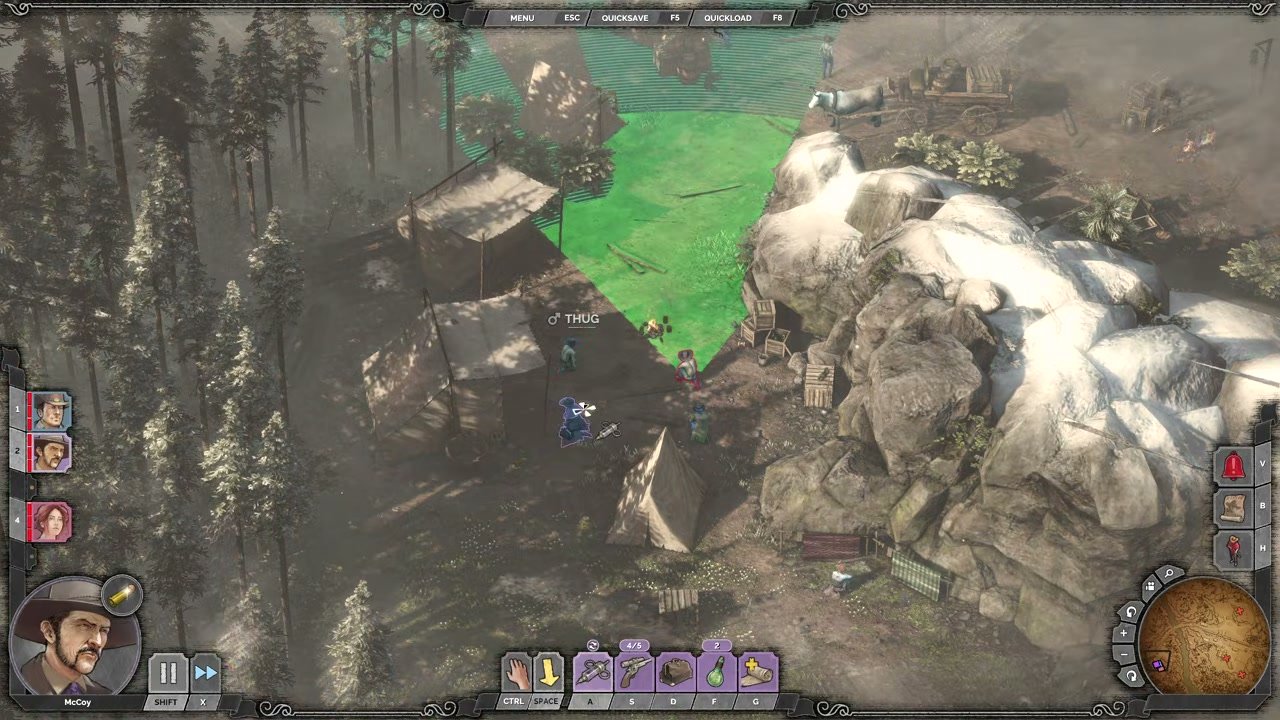
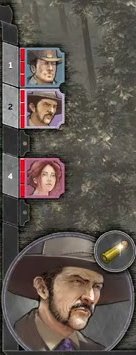
The component is a persistent, non-diegetic gameplay HUD element. Its visual job is to keep party composition, current selection, and character identity visible while the player evaluates the tactical scene and uses the adjacent action controls.
Job Story
When I am controlling a multi-character stealth mission, I want the HUD to show the full controllable roster and the currently selected character, so that I can switch tactics quickly and avoid issuing actions to the wrong squad member.
Classification
- diegesis: Non-diegetic
- functional_type: HUD
- component_type: List/grid
Wireframe
[Left screen edge]
+----+
| 1  | Cooper small portrait
+----+
| 2  | McCoy small portrait
+----+
|    |
+----+
| 4  | Kate small portrait
+----+

+----------------+
| Selected face  |
|     McCoy      |  [time controls] [action bar begins]
+----------------+
Components
- Vertical roster rail attached to the left HUD frame.
- Small character portrait tiles with numeric slot labels.
- Empty/unused slot spacing where a party member slot is not currently occupied.
- Large selected-character portrait panel.
- Character name label below the large portrait.
- Adjacent timing/playback controls and action bar handoff area.
Parameters & Audio
| Parameter | Value | Type | Notes |
|---|---|---|---|
| Visual feedback should prioritize immediate selection recognition | the large portrait/name changes with the selected character, while the roster tile state should visibly mark which character is active. Selection changes should be paired with a short UI confirmation sound or subtle portrait highlight, but no source evidence confirmed the exact audio asset. | Text | — |
Dependencies & Logic
- Depends on the current mission party composition, each character's alive/available state, current selection, and the ability system that populates the adjacent action bar. It also depends on input bindings for direct character selection and any Showdown/planning mode state that must preserve selected-character context.
BDD Scenarios
Scenario: Display current party roster
- Given
- a gameplay mission has multiple controllable characters available
- When
- the HUD is visible
- Then
- the left edge shows portrait tiles for the available party members
Scenario: Show selected character
- Given
- McCoy is the currently selected character
- When
- the player looks at the bottom-left HUD panel
- Then
- the large portrait panel shows McCoy's face and name
Scenario: Change selected character
- Given
- more than one character is available in the roster
- When
- the player selects another character portrait or uses the matching hotkey
- Then
- the large portrait panel updates to the newly selected character the adjacent action bar updates to that character's abilities
Scenario: Preserve selection context during planning
- Given
- the player is using tactical planning or Showdown-related controls
- When
- the planning UI is active
- Then
- the selected character portrait remains visible so queued actions stay attributable to the correct character
Edge Cases
- If only one character is available, the roster should avoid implying hidden selectable party members while still showing the selected portrait.
- If a character is downed, captured, absent, or temporarily unusable, the portrait state must communicate that status without reordering other slots unexpectedly.
- Empty roster slots should not be mistaken for disabled characters; spacing or framing must clarify whether the slot is unused.
- If the selected character becomes unavailable, focus should move to a valid character and the large portrait should update immediately.
- During cinematic overlays, menus, or pause/map screens, this HUD may be hidden or superseded by the current interface layer.
QA Notes
- Verify each controllable character appears in the roster with the correct portrait and slot/hotkey label.
- Verify selecting each roster portrait updates the large selected portrait, name label, and adjacent action bar.
- Verify disabled/downed/unavailable character states are visibly different from selectable portraits.
- Verify the roster remains anchored to the left edge and the selected portrait remains in the bottom-left corner across supported aspect ratios.
- Verify the HUD does not obscure critical gameplay targets near the lower-left playfield.
Mechanic Links
- Tactical Stealth Mission Loop - The character roster and selected portrait show which squad member is controlled, allowing the player to switch tactical capabilities during the loop.
- Squad Character Ability System - The character roster and selected portrait expose which squad members are available and which character currently drives the active ability loadout.
- Lethal and Non-Lethal Combat Resource Limits - The character roster and selected portrait communicate which squad member's health, weapons, and combat resources are currently active.
- Cooper's Gunslinger Kit - The Character Roster And Selected Portrait UI identifies when the kit owner is selected, which drives the visible action bar contents and ability context.
- Doc McCoy's Apothecary Sniper Kit - The Character Roster And Selected Portrait identifies when McCoy is selected and drives the action bar context for this kit.
- Hector's Brute Trapper Kit - The roster and selected portrait identify the active character, health state, and whether the brute-trapper kit is currently selected for orders.
- Kate's Femme Fatale Kit - The Character Roster and Selected Portrait UI communicates that Kate is the selected character and determines when her Femme Fatale action bar is active.
- Isabelle's Voodoo Witch Kit - Roster and selected portrait identify Isabelle as active and switch the action bar to her voodoo kit.
References
- 1.
Desperados 3 Let's Play Gameplay Walkthrough Pt 5 Bridge At Eagle Falls [1440p w/ Commentary] (6:50-6:53)
- 2.
Desperados III (L272-282 of 283)