![Visual reference from Desperados 3 Let's Play Gameplay Walkthrough Pt 1 Prologue & Byers Pass [1440p w/ Commentary] at 26:40-26:45](/published/media/desperados-3/source-322-preview-d138cad925.jpg)

Character Action Bar

Desperados 3
- Status
- Released
- Year
- 2020
- Genre
- Strategy
- Platforms
- Windows, macOS, Linux
1. Summary
Bottom-center HUD strip that exposes the selected character's available actions, items, and hotkeys during tactical gameplay. The bar pairs framed ability icons with keyboard labels and counters so the player can choose or queue character-specific actions without leaving the playfield.
Overview
The Character Action Bar is the compact bottom-center HUD strip used to select the current character’s tactical actions. In live gameplay it sits just above the lower decorative frame, visually grouped with the selected portrait on the left and the minimap on the right, while keeping the main playfield unobstructed.
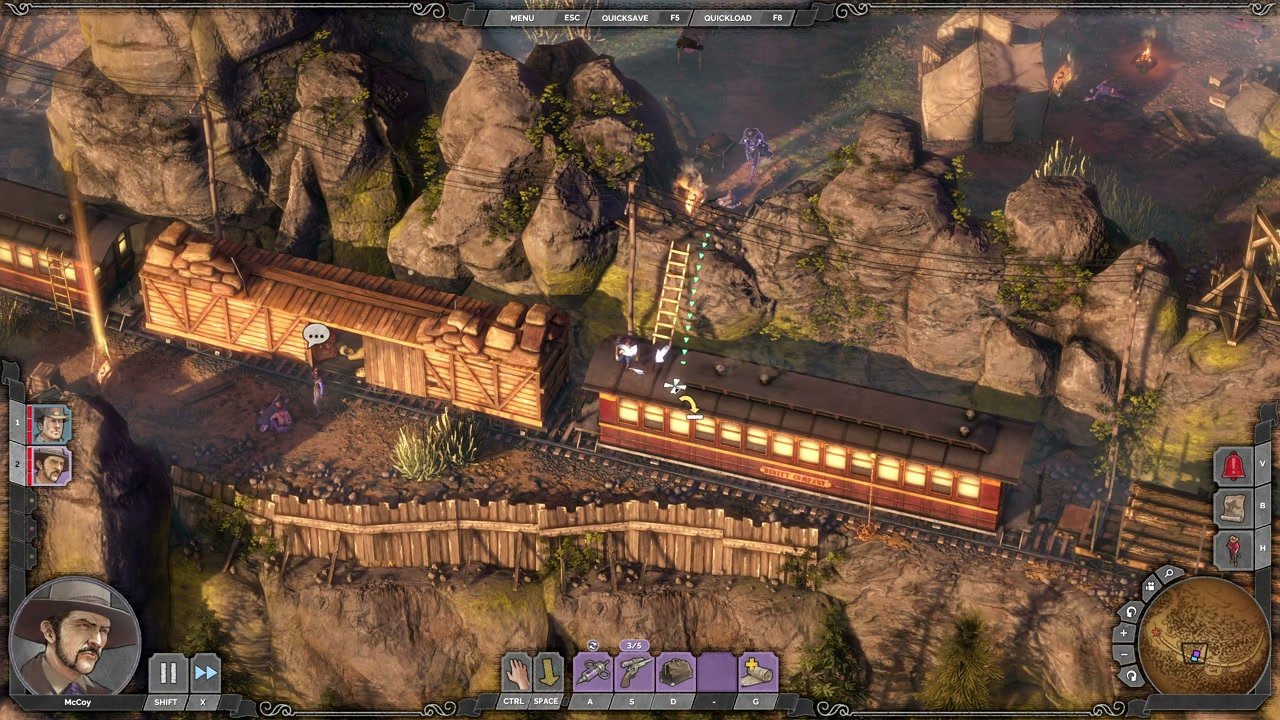
The bar is built from framed ability/item slots. Each slot shows an icon, a keyboard binding label below the icon, and optional counters for limited-use actions. In the McCoy gameplay capture, the visible labels include CTRL, SPACE, A, S, D, and G, with one ability showing a 3/5 counter above the slot.

Because it is character-driven, the bar should be read together with the selected portrait/roster state: changing characters changes the available actions, while Showdown Mode uses the same slots as the player’s entry point for queuing planned actions.
Job Story
When I am controlling a character in a tactical encounter, I want their available actions and hotkeys visible at the bottom of the screen, so that I can quickly select, target, or queue the right ability without losing sight of enemy positions.
Classification
- diegesis: Non-diegetic
- functional_type: HUD
- component_type: List/grid
Wireframe
┌─────────────────────────────────────────────────────────────┐
│                         Playfield                           │
│                                                             │
│ [Roster]                                      [Alerts]      │
│                                                             │
│ [Selected Portrait]   [CTRL][SPACE][ A ][ S ][ D ][ G ] [Map]│
│                       Character Action Bar                  │
└─────────────────────────────────────────────────────────────┘
Components
- Ability/item slots: framed square icons representing character-specific actions.
- Keyboard labels: small bottom tabs showing the bound key for each slot.
- Resource counters: compact numeric overlays for limited-use abilities or item charges.
- Selection/highlight treatment: visual emphasis for the active slot during targeting or queued planning.
- HUD frame: decorative bottom-frame container that aligns the strip with the portrait and minimap HUD elements.
Parameters & Audio
| Parameter | Value | Type | Notes |
|---|---|---|---|
| Visual feedback should include clear hover/selection highlighting, a disabled treatment for unusable actions, and counter changes when charges are spent. Ability selection and invalid-use attempts should have short, distinct UI sounds; Showdown queued actions should provide confirmatory feedback without obscuring the playfield. No haptic-specific behavior is evidenced for this PC HUD capture. | Visual feedback should include clear hover/selection highlighting, a disabled treatment for unusable actions, and counter changes when charges are spent. Ability selection and invalid-use attempts should have short, distinct UI sounds; Showdown queued actions should provide confirmatory feedback without obscuring the playfield. No haptic-specific behavior is evidenced for this PC HUD capture. | Text | — |
Dependencies & Logic
- Selected character determines which slots, icons, labels, and counters are shown.
- Ability availability depends on game state: character status, cooldowns, remaining charges/ammo, target validity, and whether Showdown Mode is active.
- Hotkey labels depend on the current controls configuration.
- The bar coordinates with targeting overlays, enemy perception cones, and queued Showdown actions so that selecting an ability produces the correct spatial affordance in the playfield.
BDD Scenarios
Scenario: Select an available action
- Given
- McCoy is the selected character during gameplay
- When
- the player presses the hotkey shown under an available ability slot
- Then
- that ability becomes the active action for targeting or execution
- And
- the character action bar is visible at the bottom center of the HUD
Scenario: Switch selected character
- Given
- multiple characters are available in the roster
- When
- the player selects a different character
- Then
- the action bar updates to show that character's ability slots, hotkeys, and resource counters
Scenario: Queue an action in Showdown Mode
- Given
- Showdown Mode is active
- When
- the player selects an ability and assigns a valid target
- Then
- the planned action is queued for later synchronized execution
- And
- the selected character has an available ability in the action bar
Scenario: Use a limited-resource ability
- Given
- an ability slot displays a remaining-use counter
- When
- the player successfully uses that ability
- Then
- the counter decreases to reflect the spent charge
- And
- the slot becomes unavailable if no charges remain
Edge Cases
- A character has fewer abilities than the slot layout can support: unused slots should remain empty or hidden without shifting core hotkeys unexpectedly.
- A target is invalid or out of range: the selected slot should remain readable while the targeting affordance communicates the invalid state.
- A limited-use item reaches zero charges: the slot should visibly disable and preserve the spent counter state.
- Control bindings are changed: the label under each slot must update to the current key binding.
- Showdown Mode is entered or exited while an ability is selected: queued/active state must clear or persist according to the planning rules without leaving a stale highlight.
QA Notes
- Verify the bar stays bottom-centered and does not overlap the selected portrait, roster, right-side alert buttons, or minimap at supported aspect ratios.
- Verify hotkey labels match the current key binding configuration for each selected character.
- Verify counters update immediately after using limited-resource abilities.
- Verify selection highlights, disabled states, and Showdown queued states are distinguishable against bright and dark mission environments.
- Verify character switching refreshes icons and counters without carrying over the previous character's active-slot highlight.
Mechanic Links
- Tactical Stealth Mission Loop - The character action bar exposes the selected character’s abilities, resources, and hotkeys used to execute mission plans.
- Disguise and Social Infiltration - The character action bar exposes the disguise toggle icon, Distract ability, Lure ability, perfume vial, and mind control as hotkeyed actions for the selected character, showing cooldown states and availability.
- Showdown Synchronized Planning - The Character Action Bar provides the selected character's abilities, hotkeys, counters, and action selection entry point for queuing Showdown commands.
- Squad Character Ability System - The character action bar is the primary HUD surface for this mechanic, showing selected-character abilities, hotkeys, counters, and availability states.
- Environmental Interaction and Accident Kills - The character action bar exposes the selected character actions and hotkeys used to target, queue, or trigger interactions that set up environmental kills.
- Takedown and Body Control - The character action bar exposes takedown, tie, carry, and character-specific body-control actions as selectable hotkeyed abilities.
- Lethal and Non-Lethal Combat Resource Limits - The Character Action Bar displays selected-character combat actions, hotkeys, limited-use counters, cooldown/unavailable states, and resource consumption feedback.
- Distraction and Noise Manipulation - The character action bar exposes distraction abilities, hotkeys, limited-use counters, and targeting entry points for the selected character.
- Movement, Terrain, and Cover Navigation - The Character Action Bar exposes movement-adjacent commands, posture toggles, terrain interactions, and character-specific ability availability during traversal.
- Cooper's Gunslinger Kit - The Character Action Bar exposes this kit's coin, melee/knockout, throwing knife, and two revolver actions, including hotkeys, counters, cooldown, ammo, and disabled states.
- Doc McCoy's Apothecary Sniper Kit - The Character Action Bar displays the kit's selectable abilities, hotkeys, limited-use counters, cooldown/disabled states, and targeting entry points.
- Hector's Brute Trapper Kit - The character action bar exposes the kit's abilities, hotkeys, ammo counts, cooldown readiness, and tooltips such as melee range, noise radius, and duration.
- Kate's Femme Fatale Kit - The Character Action Bar displays Kate's ability icons, hotkeys, cooldowns, limited ammunition, and disabled states for tools such as Perfume Vial, Derringer, Distract, Lure, and Kick.
- Isabelle's Voodoo Witch Kit - Action bar exposes Isabelle's ability icons, hotkeys, charges, cooldown/unavailable states, and targeting entry points.
References
- 1.
Desperados 3 Let's Play Gameplay Walkthrough Pt 1 Prologue & Byers Pass [1440p w/ Commentary] (26:40-26:45)
- 2.
Desperados III (L208-212 of 283)
- 3.
Desperados III (L260-282 of 283)