![Visual reference from Desperados 3 Let's Play Gameplay Walkthrough Pt 1 Prologue & Byers Pass [1440p w/ Commentary] at 40:56-41:48](/published/media/desperados-3/source-322-preview-f8aab90b3f.jpg)

Mission Badges Results Screen

Desperados 3
- Status
- Released
- Year
- 2020
- Genre
- Strategy
- Platforms
- Windows, macOS, Linux
1. Summary
Post-mission management screen that summarizes mission badge progress and replay challenges. It presents earned or partially completed badge goals, a mission challenge checklist, and a bottom-centered Continue action that advances into the next post-mission flow.
Overview
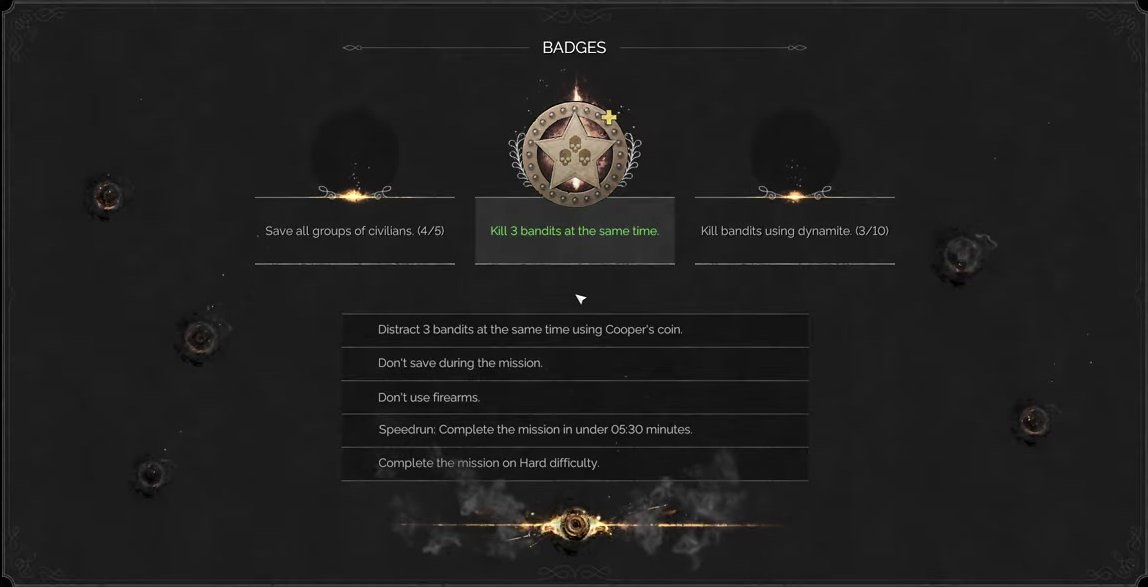
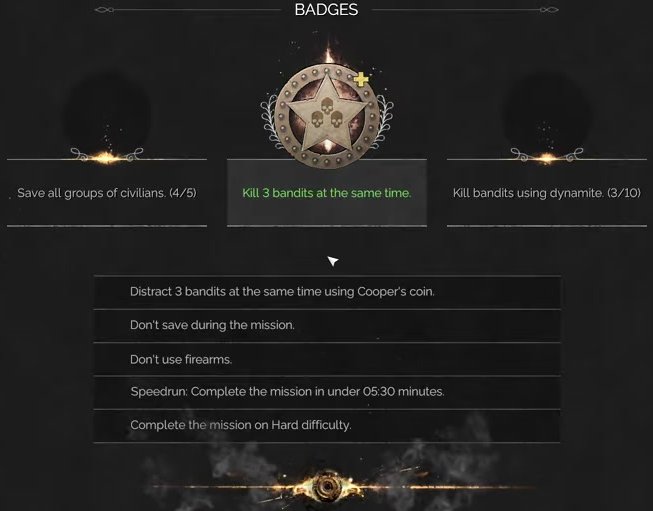
The Mission Badges Results Screen is a post-mission reward and replay-goal screen. It uses a large, dark, centered results panel labeled BADGES, with a prominent star badge medallion, mission-specific badge criteria, partial progress counters, and a bottom-centered CONTINUE button.
Completed badge criteria are called out with green text, while unfinished or informational criteria remain pale gray/white. The example evidence shows goals such as saving civilian groups, killing bandits at the same time, dynamite kill progress, no-save/no-firearms constraints, speedrun timing, and hard difficulty completion.
Job Story
When I finish a mission, I want to see which badges and optional challenges I completed or missed, so that I understand my performance and have clear replay goals before continuing.
Classification
- diegesis: Non-diegetic
- functional_type: Management screen
- component_type: List/grid
Wireframe
+--------------------------------------------------------------------------------+
|                                   BADGES                                       |
|                                                                                |
|                              [large badge medal]                               |
|                                                                                |
|          [badge counter]       [highlighted badge]       [badge counter]       |
|                                                                                |
|                    v                                                           |
|                 +----------------------------------------+                     |
|                 | challenge checklist row                |                     |
|                 | challenge checklist row                |                     |
|                 | challenge checklist row                |                     |
|                 | speedrun / difficulty challenge row    |                     |
|                 +----------------------------------------+                     |
|                                                                                |
|                                  [CONTINUE]                                    |
+--------------------------------------------------------------------------------+
Components
- Framed results panel: dark modal-like container with worn Western ornamentation.
- BADGES title label: top-center section heading.
- Reward medallion: large decorative star badge showing badge reward status.
- Badge progress rows: three upper-row goals with completion text and counters.
- Challenge checklist: stacked rows listing optional mission constraints and replay goals.
- Direction/selection marker: small downward chevron between badge row and checklist.
- Continue button: bottom-centered primary action.
- Decorative effects: smoke, sparks, bullet impacts, and divider flourishes that reinforce the reward-screen theme.
Parameters & Audio
| Parameter | Value | Type | Notes |
|---|---|---|---|
| Visual emphasis | green text indicates completed badge criteria; neutral pale text indicates incomplete or informational criteria. | Text | — |
| Motion/FX | smoke and spark effects decorate the lower medallion area and separators, giving the results panel a celebratory reward feel. | Text | — |
| Button feedback | Continue should provide clear hover/focus/press feedback consistent with the game's beveled menu buttons. | Text | — |
| Audio | likely uses standard menu confirm/hover sounds and post-mission reward stingers; exact audio cues were not isolated in the available visual evidence. | Text | — |
Dependencies & Logic
- Mission completion summary data for the just-finished mission.
- Badge definitions for the mission, including hidden or optional replay objectives.
- Per-badge progress counters, e.g. rescued civilians, dynamite kills, or mission-specific ability goals.
- Challenge condition tracking, including saves, firearms usage, speedrun time, and selected difficulty.
- Post-mission navigation state that determines the next screen after Continue.
BDD Scenarios
Scenario: Completed badge is shown after mission finish
- Given
- the player has completed a mission and satisfied a badge condition
- When
- the mission results reach the Badges screen
- Then
- the completed badge criterion is shown in the upper badge row with highlighted green text
Scenario: Partial badge progress remains visible
- Given
- the player made progress toward a badge but did not finish it
- When
- the Badges results screen is displayed
- Then
- the badge row shows a numeric progress counter such as `3/10`
Scenario: Player continues from badges to post-mission review
- Given
- the Badges results screen is visible
- When
- the player activates the `CONTINUE` button
- Then
- the game advances to the next post-mission screen
Edge Cases
- If no optional badges were completed, the screen should still list available replay goals and avoid implying that the mission failed.
- Long mission challenge text must remain readable inside the centered checklist rows without overlapping separators.
- Multiple partial counters should be visually distinct from completed green criteria.
- Speedrun and difficulty challenges must reflect the actual mission settings and final completion time.
- Continue should remain reachable by the active input method even if the player is reviewing badge rows with mouse/controller focus.
QA Notes
- Complete a mission with at least one earned badge and verify green highlight treatment appears on the correct row.
- Complete a mission with partial badge progress and verify counters persist exactly from tracked gameplay data.
- Verify challenge rows for no-save, no-firearms, speedrun, and difficulty conditions against telemetry or mission summary data.
- Activate Continue and confirm the next post-mission screen loads without losing replay or mission summary data.
- Check 16:9 readability at target resolutions; the panel relies on small text in the central checklist.
Mechanic Links
- Tactical Stealth Mission Loop - The mission badges results screen reports optional challenge outcomes that encourage replay and optimization of the mission loop.
- Trial-and-Error Save Iteration Loop - The mission badges results screen displays challenges such as no-save, speedrun, and difficulty goals that influence how players train and then constrain save usage.
- Environmental Interaction and Accident Kills - The mission badges results screen displays challenge progress and completion for method-specific, simultaneous, or environmental elimination goals.
- Takedown and Body Control - The mission badges results screen reports challenge outcomes affected by lethal kills, no-kill completion, alerts, and cleanup-related constraints.
- Lethal and Non-Lethal Combat Resource Limits - Mission Badges Results can reward or penalize lethal kills, alarms, special constraints, and replay goals affected by combat-resource use.
- Mission Challenges, Badges, and Replay Goals - The Mission Badges Results Screen is the primary display surface for this mechanic — it presents earned star medallions, failed badge slots, progress counters, and the full challenge checklist immediately after mission completion.
References
- 1.
Desperados 3 Let's Play Gameplay Walkthrough Pt 1 Prologue & Byers Pass [1440p w/ Commentary] (40:56-41:48)
- 2.
Desperados III (L188-192 of 283)