![Visual reference from Desperados 3 Let's Play Gameplay Walkthrough Pt 1 Prologue & Byers Pass [1440p w/ Commentary] at 0:41-0:55](/published/media/desperados-3/source-322-preview-4e209057d6.jpg)

Main Menu Navigation

Desperados 3
- Status
- Released
- Year
- 2020
- Genre
- Strategy
- Platforms
- Windows, macOS, Linux
1. Summary
Main menu navigation is the non-diegetic frontend shell menu shown after the title/start screen. It uses a left-side vertical stack of Western-styled text buttons over a scenic background, with a decorative frame marking the currently focused option.
Overview
The main menu navigation appears after the title screen and overlays a Western landscape background. The menu is a compact, left-aligned vertical stack of uppercase text buttons: CONTINUE, LOAD, MISSION SELECT, OPTIONS, and EXIT GAME. The currently focused entry is not color-filled; instead, it is framed by a thin ornamental horizontal bracket, preserving the screen’s sepia/Western art direction while still making focus visible.
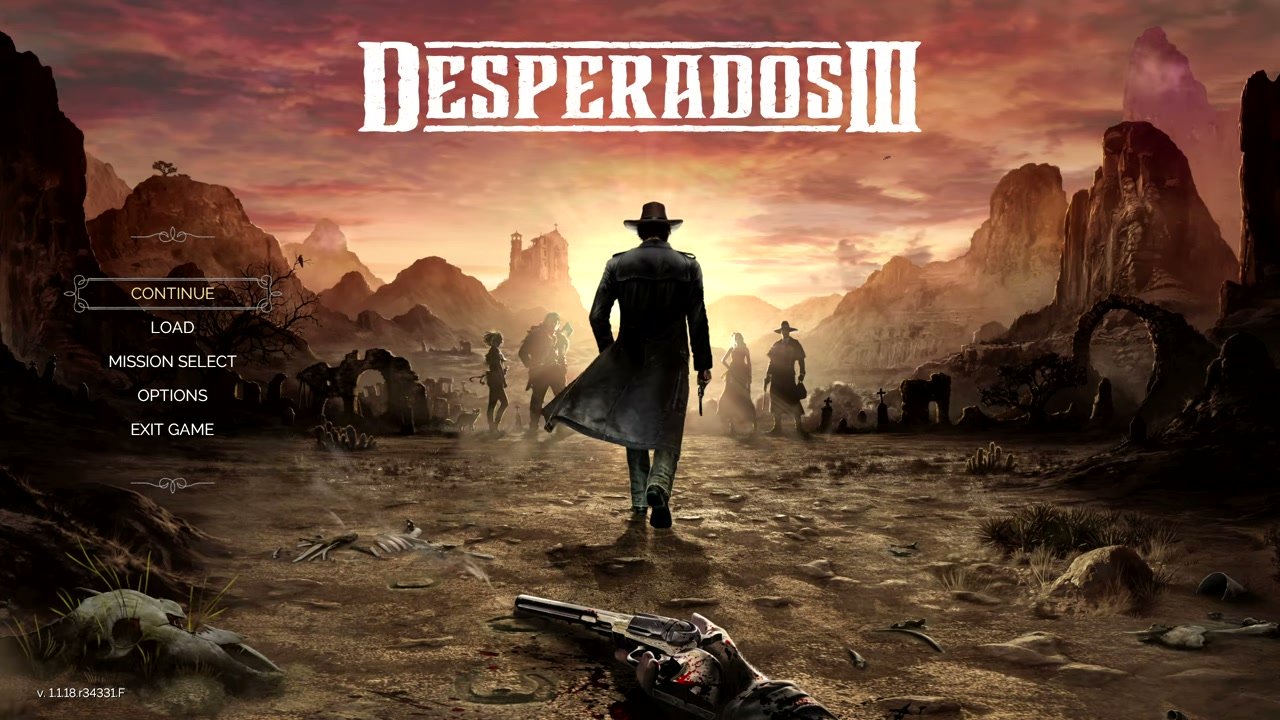
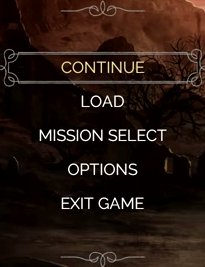
The UI keeps the interaction area away from the central character silhouette and logo, making the background art function as a cinematic shell while the actionable choices remain grouped in one predictable location.
Job Story
When I have passed the title screen, I want a compact menu that lets me continue, load, choose a mission, change options, or exit, so that I can quickly route into the exact game flow I need before entering play.
Classification
- diegesis: Non-diegetic
- functional_type: Frontend shell
- component_type: Button
Wireframe
+--------------------------------------------------------------+
|                         DESPERADOS III                       |
|                                                              |
|                                                              |
|   ~ separator ~                                              |
|   [==== CONTINUE ====]                                       |
|          LOAD                                                |
|      MISSION SELECT                                          |
|         OPTIONS                                              |
|        EXIT GAME                                             |
|   ~ separator ~                                              |
|                                                              |
| v.1118.r34331.F                                              |
+--------------------------------------------------------------+
The menu is intentionally offset left so the central character silhouette and background vista remain readable.
Components
- Game logo: large branded DESPERADOS III wordmark centered near the top.
- Menu option labels: uppercase text buttons for CONTINUE, LOAD, MISSION SELECT, OPTIONS, and EXIT GAME.
- Focus frame: ornamental horizontal bracket around the selected row.
- Decorative dividers: small Western flourishes above and below the option stack.
- Background scene: non-interactive Western landscape used as the menu backdrop.
- Version label: small build/version text in the lower-left corner.
Parameters & Audio
| Parameter | Value | Type | Notes |
|---|---|---|---|
| Visual feedback is primarily the ornamental focus frame moving between menu labels. Expected audio feedback should include subtle menu navigation ticks and activation/confirmation sounds, but source audio was not used for this pass, so exact sound names and mix levels are not specified. | Visual feedback is primarily the ornamental focus frame moving between menu labels. Expected audio feedback should include subtle menu navigation ticks and activation/confirmation sounds, but source audio was not used for this pass, so exact sound names and mix levels are not specified. | Text | — |
Dependencies & Logic
- Save-game state determines whether CONTINUE and potentially LOAD are actionable.
- Mission progression determines which missions are available after MISSION SELECT.
- Platform/input mode may affect focus movement and activation prompts, while the visual menu structure remains the same.
- Localization can change label widths; the ornamental frame must still contain the focused row cleanly.
BDD Scenarios
Scenario: Default main menu focus
- Given
- the player has advanced past the title/start prompt
- When
- the main menu is displayed
- Then
- the vertical menu stack appears on the left side of the screen
- And
- one option is highlighted with the ornamental focus frame
Scenario: Move focus through menu options
- Given
- the main menu is displayed
- When
- the player moves navigation input up or down
- Then
- the ornamental focus frame moves to the next available menu option
- And
- unfocused options remain plain uppercase text labels
Scenario: Open mission selection
- Given
- the main menu is displayed
- When
- the player activates `MISSION SELECT`
- Then
- the game transitions to the mission selection flow
Scenario: Continue depends on save data
- Given
- the main menu is displayed
- When
- save data is available
- Then
- `CONTINUE` can route the player into the latest progress
Scenario: Return from submenu
- Given
- the player opened a submenu from the main menu
- When
- the player backs out of that submenu
- Then
- the main menu navigation stack is shown again over the same title-screen background
Edge Cases
- No save data: CONTINUE should be disabled, hidden, or blocked with clear feedback; exact shipped handling needs build verification.
- Corrupt or incompatible save data: CONTINUE and LOAD should fail safely without trapping the player.
- Long localized labels: the focus frame and left-column spacing must still fit the text without overlapping the background art or dividers.
- Rapid input: focus movement should not skip items unpredictably or activate the wrong row.
- Exit flow: EXIT GAME should guard against accidental quit if the platform/build uses a confirmation modal.
QA Notes
- Verify initial focus target after passing the title screen; observed evidence shows CONTINUE framed.
- Verify keyboard/controller/mouse navigation all move or set the same focused row state.
- Verify CONTINUE, LOAD, MISSION SELECT, OPTIONS, and EXIT GAME route to the correct next screen or confirmation.
- Verify no-save and incompatible-save cases for CONTINUE/LOAD.
- Verify localized text remains centered within the ornamental focus frame.
Mechanic Links
- Mission Challenges, Badges, and Replay Goals - Main Menu Navigation routes players to Mission Select, which is the starting point for accessing mission replay and badge-pursuit content.
References
- 1.
Desperados 3 Let's Play Gameplay Walkthrough Pt 1 Prologue & Byers Pass [1440p w/ Commentary] (0:41-0:55)
- 2.
Desperados III (L16-22 of 283)