![Visual reference from Desperados 3 Let's Play Gameplay Walkthrough Pt 1 Prologue & Byers Pass [1440p w/ Commentary] at 0:20-0:23](/published/media/desperados-3/source-322-preview-1b4a6db2fc.jpg)

Title Start Screen

Desperados 3
- Status
- Released
- Year
- 2020
- Genre
- Strategy
- Platforms
- Windows, macOS, Linux
1. Summary
Desperados III opens on a non-diegetic title start screen: a dark western landscape, the large game logo at the top center, and a single centered "PRESS ANY KEY TO START" prompt near the bottom. The screen acts as a gateway from application launch into the main menu.
Overview
The title start screen is the first interactive frontend state after launch. It presents the DESPERADOS III logo over a dark western landscape and uses a single bottom-center prompt, PRESS ANY KEY TO START, to move the player into the main menu.
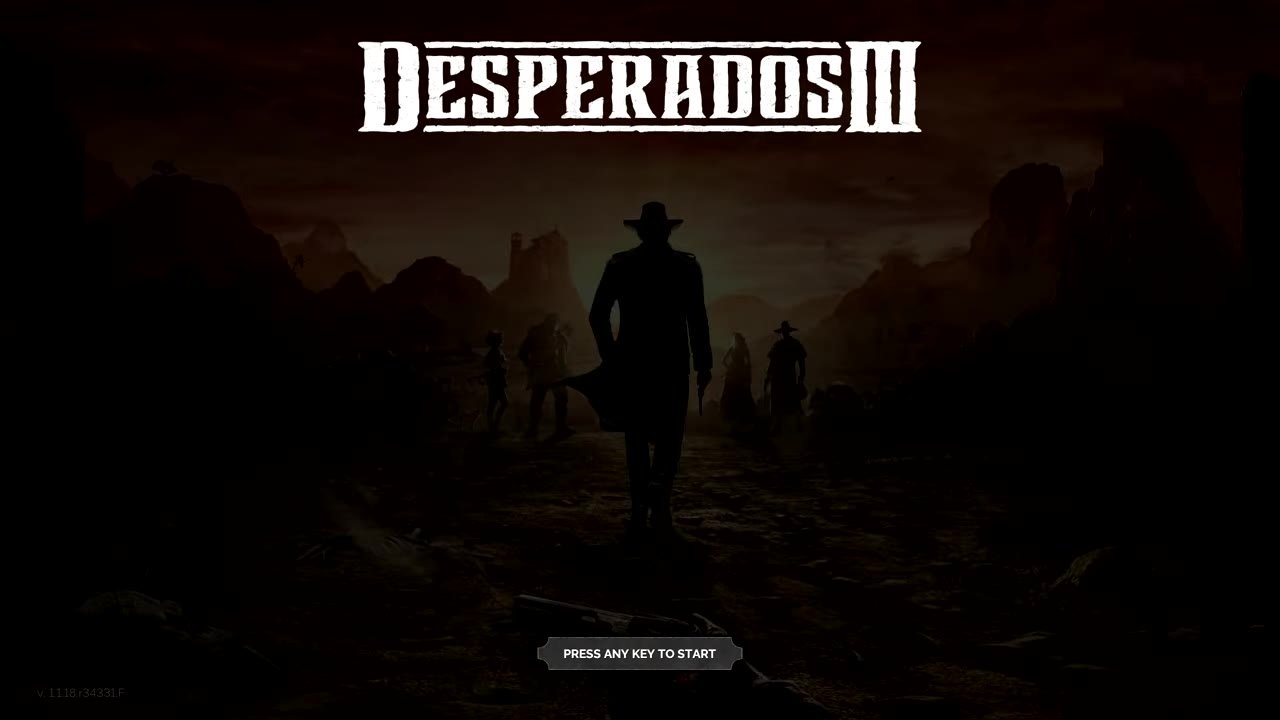
The screen intentionally has no menu list, cursor target, or secondary action in this state. The prompt is styled as a compact framed plaque so it reads as an input affordance while preserving the cinematic splash composition.

Job Story
When I launch the game and arrive at the title splash, I want a clear single start prompt, so that I can enter the main menu without deciding between multiple options yet.
Classification
- diegesis: Non-diegetic
- functional_type: Frontend shell
- component_type: Button
Wireframe
+------------------------------------------------------------+
|                                                            |
|                 [ DESPERADOS III LOGO ]                    |
|                                                            |
|                                                            |
|          dark western landscape / character silhouettes     |
|                                                            |
|                                                            |
|                                                            |
|                       [ PRESS ANY KEY TO START ]            |
| v. build label                                             |
+------------------------------------------------------------+
Components
- Background key art: Dark western canyon/road scene with character silhouettes.
- Game logo: Large distressed white DESPERADOS III wordmark centered at the top.
- Start prompt button: Small centered dark plaque containing PRESS ANY KEY TO START in white uppercase text.
- Version label: Small build/version text in the lower-left corner.
Parameters & Audio
| Parameter | Value | Type | Notes |
|---|---|---|---|
| Visual tone is deliberately low-key and high contrast | bright white logo and prompt over a dark brown/black landscape. | Text | — |
| Prompt text uses uppercase lettering and a framed plaque shape to communicate that it accepts input despite not being a conventional menu selection. | Prompt text uses uppercase lettering and a framed plaque shape to communicate that it accepts input despite not being a conventional menu selection. | Text | — |
| No source evidence confirmed a specific sound effect or animation cadence; verify whether prompt pulse/fade and start-confirm audio exist in a build capture if needed. | No source evidence confirmed a specific sound effect or animation cadence; verify whether prompt pulse/fade and start-confirm audio exist in a build capture if needed. | Text | — |
Dependencies & Logic
- Requires the title screen assets to be loaded: background art, logo, prompt plaque/text, and version label.
- Requires an input listener for keyboard/controller "any key" confirmation.
- Transition target depends on successful handoff to the frontend main menu state.
- Does not depend on mission progress, save-slot state, difficulty, or in-mission gameplay systems while in the start state.
BDD Scenarios
Scenario: Start prompt is visible after launch
- Given
- the title start screen has loaded
- When
- no input has been pressed
- Then
- the Desperados III logo is visible near the top center
- And
- the `PRESS ANY KEY TO START` prompt is visible near the lower center
Scenario: Player enters the main menu
- Given
- the title start screen is waiting for input
- When
- the player presses an accepted keyboard key or controller button
- Then
- the title start screen transitions away
- And
- the main menu navigation options become available
Scenario: Start screen has no competing menu actions
- Given
- the title start screen is visible
- When
- the player has not pressed the start input
- Then
- no menu option list is shown
- And
- the only visible call to action is `PRESS ANY KEY TO START`
Edge Cases
- If input devices are disconnected or unrecognized, the screen may remain on the start prompt until a valid input is detected.
- If title assets load slowly, the prompt should not appear without the background/logo context unless the game intentionally supports a progressive reveal.
- Very dark display calibration can reduce background readability, but the white logo and prompt should remain legible.
- Localization may change prompt wording or input terminology; layout should preserve centered alignment and plaque sizing for longer strings.
QA Notes
- Verify the prompt is horizontally centered and remains clear at target display resolutions.
- Verify any accepted keyboard key and controller button advance to the main menu.
- Verify repeated input during the transition does not skip past the main menu or trigger an unintended option.
- Verify the lower-left version label does not overlap the prompt or safe-area boundaries.
- Verify localized prompt strings fit within the plaque or scale gracefully.
References
- 1.
Desperados III (L10-14 of 283)
- 2.
Desperados 3 Let's Play Gameplay Walkthrough Pt 1 Prologue & Byers Pass [1440p w/ Commentary] (0:20-0:23)