
Tutorial Prompts And Instruction Slides

Desperados 3
- Status
- Released
- Year
- 2020
- Genre
- Strategy
- Platforms
- Windows, macOS, Linux
1. Summary
Non-diegetic tutorial overlays that teach Desperados III controls and stealth rules during play or from the Tutorials menu. They appear either as small contextual prompts in the game world view or as larger instruction slides with text over gameplay context.
Overview
Tutorial prompts and instruction slides teach Desperados III controls and stealth rules without leaving the tactical presentation. The UI appears in two main forms: small contextual prompts placed near the relevant world interaction, and larger tutorial slides that frame a gameplay example with explanatory copy and a close action.
The viewcone tutorial slide uses a full-screen framed teaching layout: the lesson title sits at the top, the gameplay example remains visible in the center, and the explanatory text is placed in a dark panel along the bottom. The slide keeps the HUD context visible, including Cooper’s portrait, action bar, right-side controls, and minimap, so the concept is taught against the actual mission interface.
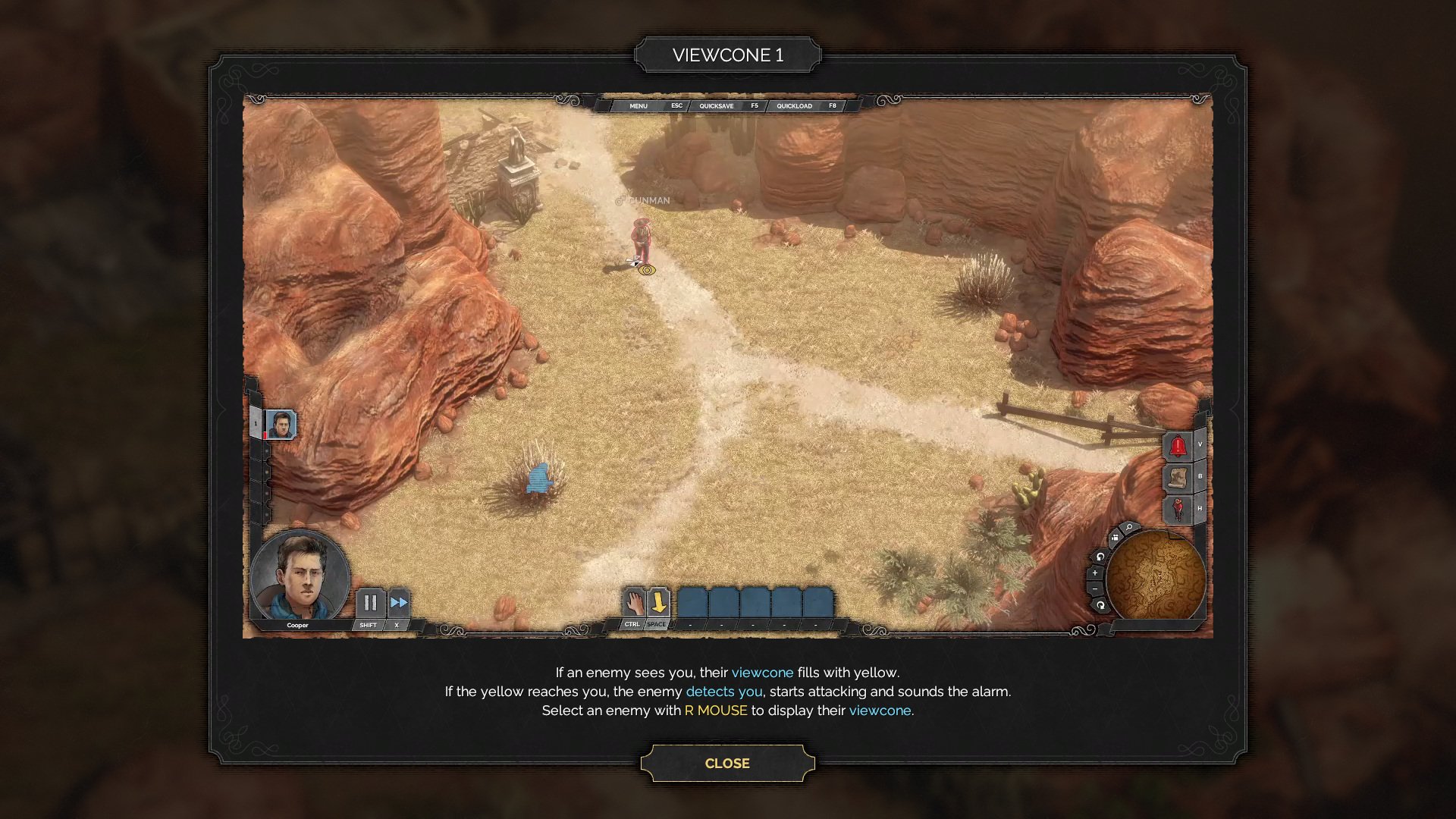

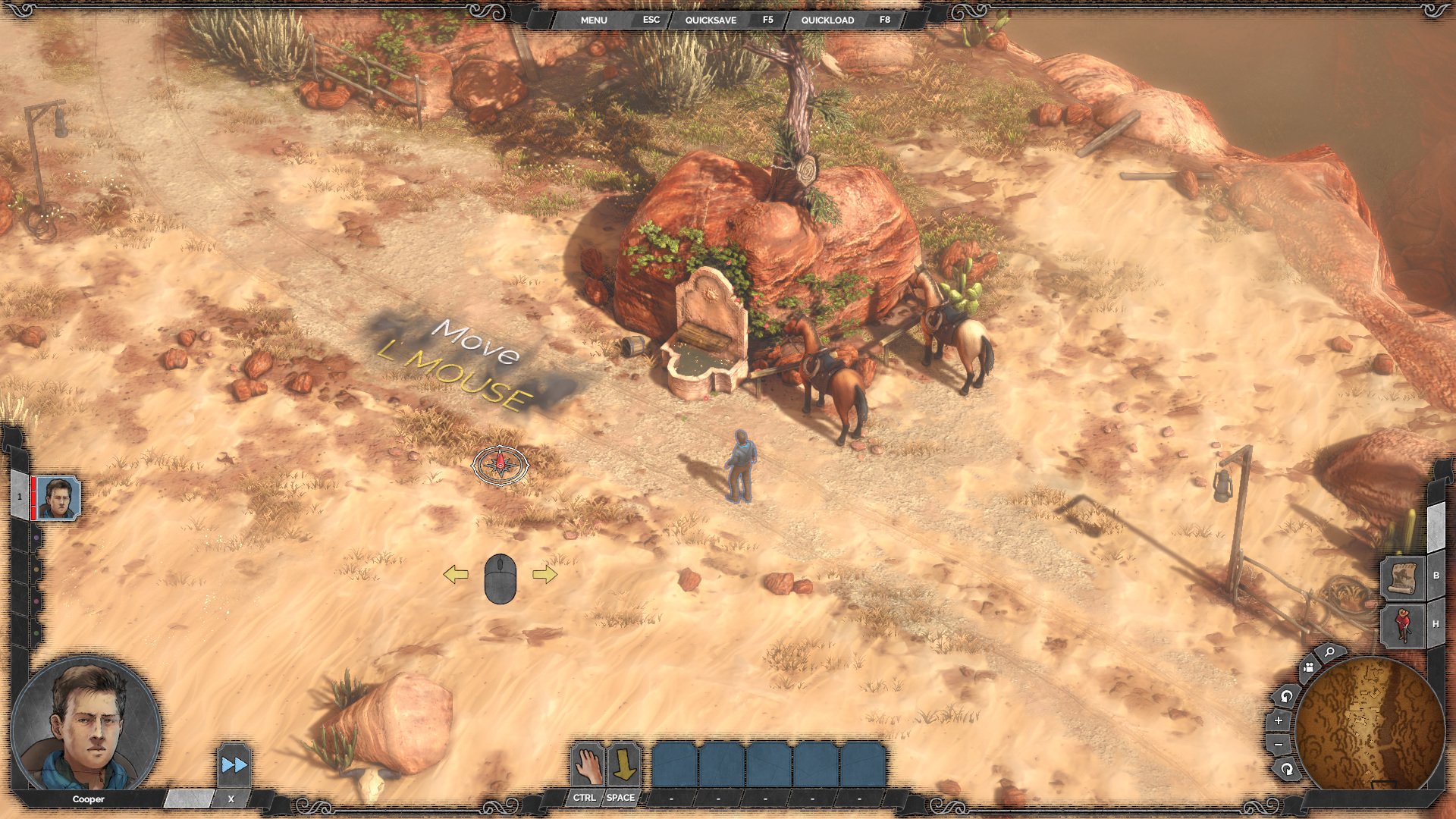
The contextual movement prompt is lighter-weight and appears directly over the gameplay terrain. It points the player toward an immediate control action, using large handwritten-style yellow text over a translucent dark rectangle so it remains readable while preserving situational awareness.
Job Story
When I encounter a new control or stealth concept during a mission, I want the game to show the relevant instruction in context, so that I can understand the required action without leaving the tactical situation.
Classification
- diegesis: Non-diegetic
- functional_type: Feedback notification
- component_type: Tooltip
Wireframe
Small contextual prompt
+------------------------------------------------------+
| Gameplay world view                                  |
|                                                      |
|              [ Move / L MOUSE ]                      |
|                                                      |
| HUD portrait/action bar                    Minimap   |
+------------------------------------------------------+

Instruction slide
+------------------------------------------------------+
|                  [ VIEWCONE 1 ]                      |
| +--------------------------------------------------+ |
| | Gameplay example with HUD and tactical scene      | |
| +--------------------------------------------------+ |
| Instruction text explaining the concept              |
|                     [ CLOSE ]                        |
+------------------------------------------------------+
Components
- Tutorial title/tab: names the current lesson, such as VIEWCONE 1.
- Gameplay example viewport: shows the tactical scene used to explain the lesson.
- Instruction text block: explains the rule or control, with emphasized input/action terms.
- Close button: dismisses the tutorial slide.
- Contextual prompt label: compact floating instruction shown directly over gameplay.
- Input icon/key text: communicates the required control, such as left mouse movement.
- Persistent surrounding HUD: character portrait, action bar, quick menu, alert buttons, and minimap remain visible as context.
Parameters & Audio
| Parameter | Value | Type | Notes |
|---|---|---|---|
| Visual treatment | translucent dark panels over gameplay, pale/yellow instructional text, and framed western ornamental borders matching the rest of the HUD. | Text | — |
| Animation | likely fades or pops in when the tutorial trigger fires; no source evidence confirms exact transition timing. | Text | — |
| Audio | no direct source evidence for tutorial-specific audio cues; treat any sound as optional feedback unless verified in implementation. | Text | — |
Dependencies & Logic
- Mission/tutorial progression determines which prompt or slide appears.
- Control scheme/localization determines the input label shown in the prompt.
- The underlying tactical lesson depends on gameplay systems such as movement, enemy viewcones, takedowns, and noise/alarm behavior.
- Pause-menu tutorial directory data determines which archived tutorial topics are selectable.
BDD Scenarios
Scenario: Movement prompt appears during onboarding
- Given
- the player reaches the first movement tutorial moment
- When
- the game expects the player to move Cooper
- Then
- a floating prompt appears in the gameplay view showing the left mouse movement instruction
Scenario: Tutorial slide explains viewcones
- Given
- the player opens the viewcone tutorial slide
- When
- the slide is displayed
- Then
- the screen shows a framed gameplay example with title, instructional text, and a close button
Scenario: Closing a tutorial slide
- Given
- a tutorial slide is open
- When
- the player activates Close
- Then
- the slide is dismissed and the player returns to the prior gameplay or tutorial menu context
Edge Cases
- Prompt must remain readable over bright terrain and darker canyon backgrounds.
- Tutorial overlays must not obscure required confirmation controls such as Close.
- Reopened tutorial topics should display the correct archived slide even after mission progression has advanced.
- If input bindings or localization change, the prompt text/icon should match the active control scheme and language.
- HUD context behind the overlay should not accept accidental tactical commands while a modal tutorial slide is active.
QA Notes
- Verify contextual prompts appear at the correct mission/tutorial triggers and disappear after completion or dismissal.
- Verify tutorial slides can be opened from the Tutorials and Guides directory and closed reliably.
- Confirm text wrapping and highlighted input labels remain legible at target resolutions.
- Check that tutorial overlays coexist correctly with character portrait, action bar, quick menu, right-side buttons, and minimap.
- Test with remapped controls/localization if supported, because prompt text includes direct input instructions.
Mechanic Links
- Disguise and Social Infiltration - Tutorial prompts and instruction slides explain the disguise mechanic, lure restrictions, and mind control basics when the player first encounters these abilities.
- Hector's Brute Trapper Kit - Tutorial prompts introduce the trap-and-whistle combo and Long Coat rules with embedded gameplay examples and explanatory text.
- Kate's Femme Fatale Kit - Tutorial prompts and instruction slides introduce Kate-specific actions such as Perfume Vial and communicate parameters and special targeting behavior to the player.
References
- 1.
Desperados III (L232-244 of 283)
- 2.
Desperados III (L244-250 of 283)
- 3.
Desperados III (L260-264 of 283)
- 4.
- 5.