
Mission Failed Screen
Shadow Tactics: Blades of the Shogun
- Status
- Released
- Year
- 2016
- Genre
- Indie, Strategy
- Platforms
- Windows, macOS, Linux
1. Summary
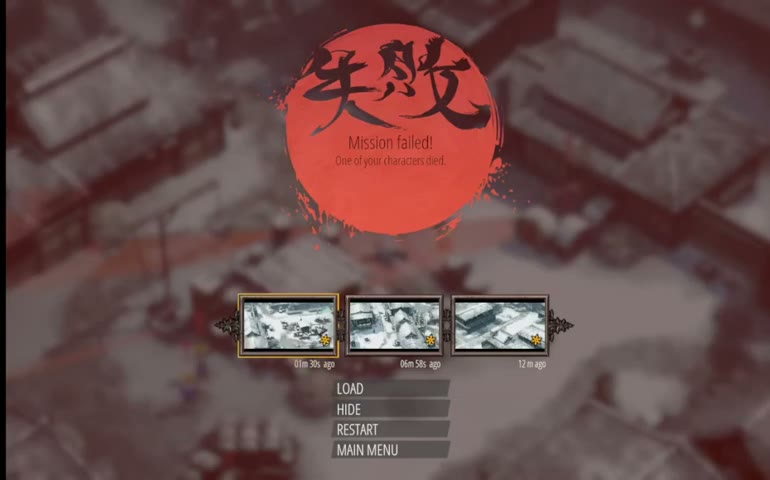
A full-screen failure overlay that appears when a hero dies or the mission is otherwise failed. It displays a prominent red circular seal with Japanese kanji, a localized failure message, and an interactive menu allowing the player to load a recent save, restart the mission, return to the main menu, or hide the overlay to review the failure scene.
Overview
The Mission Failed Screen is a full-screen modal overlay that interrupts active gameplay when a hero dies or a critical mission failure condition is met. It is the primary failure-handling interface in Shadow Tactics: Blades of the Shogun, combining a dramatic visual statement with practical recovery options.
Visual Design
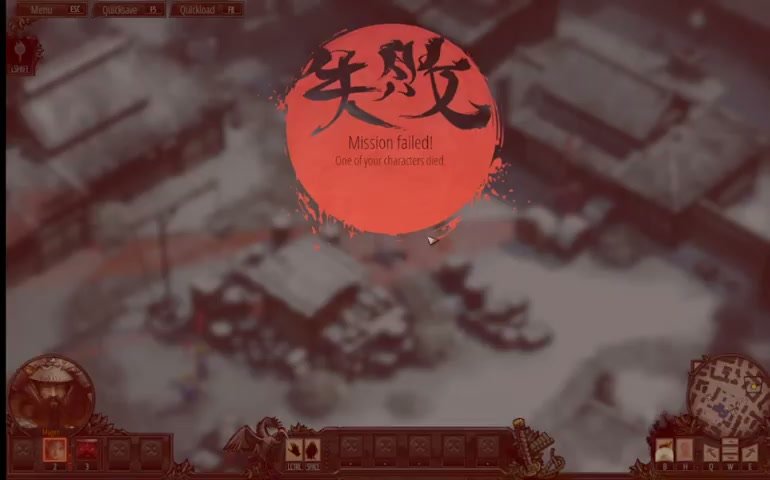
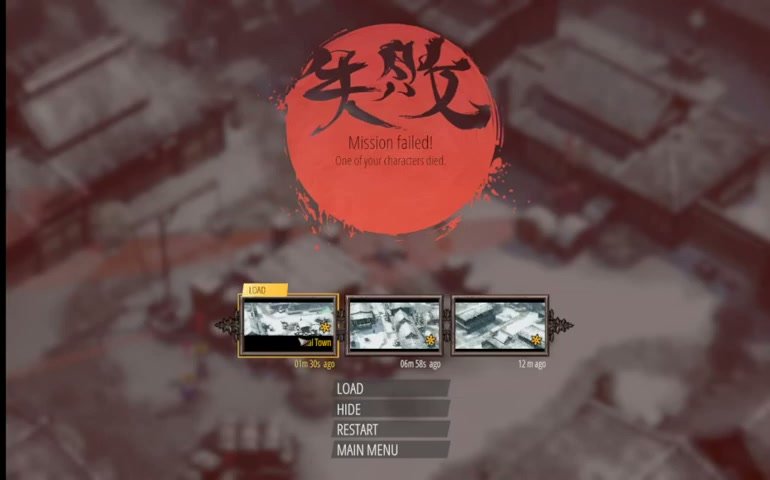
The screen centers on a large red circular seal containing the Japanese kanji 失敗 (“failure/defeat”) rendered in a dynamic brush-stroke calligraphy style. The seal has paint-splatter edges that reinforce the sense of a violent, sudden outcome. Below the seal, the headline reads “Mission failed!” with a subtitle explaining the specific cause of failure, such as “One of your characters died.”
The gameplay view behind the overlay remains visible but is blurred, darkened, and tinted red, creating a clear visual separation between the failure state and normal gameplay while still allowing the player to see the moment of failure.
Interactive Menu
After a brief pause, an interactive recovery menu appears below the failure message. The menu presents three recent save thumbnails arranged horizontally, each showing a gameplay snapshot and a relative timestamp (for example, “01m 30s ago”). The default selected option is “LOAD”, highlighted in yellow/gold.
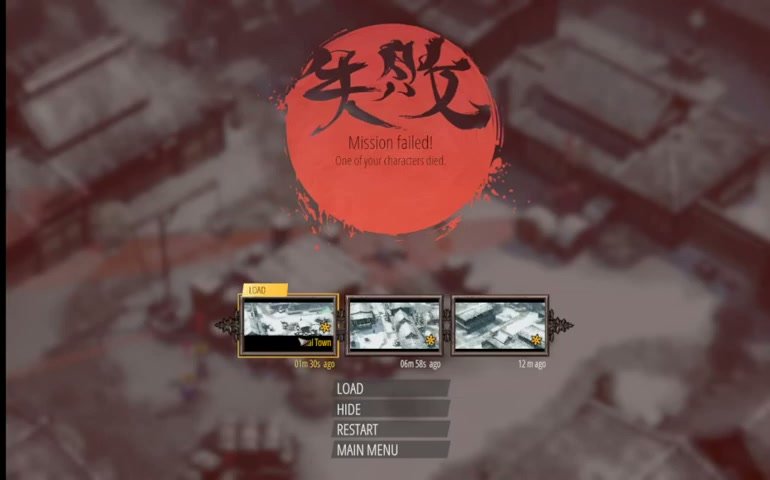
The full menu options are:
- LOAD — Loads the selected save and returns to gameplay
- HIDE — Dismisses the menu overlay while keeping the darkened failure scene visible for inspection
- RESTART — Restarts the current mission from its beginning
- MAIN MENU — Exits to the main menu
Context in Gameplay
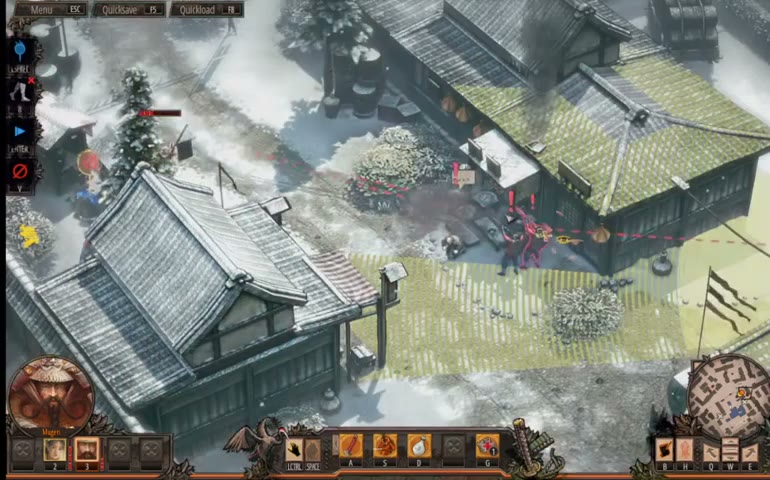
The Mission Failed Screen appears in the center of the gameplay view, overlaying the isometric tactical map where the failure occurred.
Failure Triggers
The screen can be triggered by:
- Hero death (health reduced to zero by enemy attack, fall damage, or environmental hazard)
- Critical mission failure conditions (on higher difficulties, being fully detected may trigger immediate failure)
- Death of an essential NPC or objective target in certain missions
Audio Behavior
Upon failure, all gameplay audio is muted or significantly reduced. A dramatic failure sting or musical cue plays to emphasize the negative outcome. Menu navigation produces subtle UI click sounds. When a save is loaded, a distinct confirmation sound plays before the loading transition begins.
Job Story
When one of my heroes dies or the mission fails, I want to see a clear failure message with immediate options to reload or retry, so that I can quickly get back into the game without frustration.
Classification
- diegesis: Non-diegetic
- functional_type: Frontend shell
Wireframe
[Full-Screen Overlay - Blurred/darkened red-tinted gameplay background]

        +-----------------------------+
        |                             |
        |    [Red circular seal]      |
        |    [Japanese kanji: 失敗]   |
        |                             |
        |    Mission failed!          |
        |    One of your characters   |
        |    died.                    |
        |                             |
        +-----------------------------+
        |                             |
        |  [Save slot 1] [2] [3]      |
        |  01m 30s ago  06m 55s ago  |
        |                             |
        |  > LOAD       (highlighted) |
        |    HIDE                     |
        |    RESTART                  |
        |    MAIN MENU                |
        |                             |
        +-----------------------------+
Components
- Red circular seal: Large central graphic element with Japanese kanji (失敗 — "failure/defeat") rendered in brush-stroke calligraphy style, set against a solid red circular background with paint-splatter edges
- Failure headline: Text "Mission failed!" displayed prominently below the seal
- Failure reason subtitle: Secondary text explaining the cause, e.g. "One of your characters died."
- Save slot thumbnails: Three horizontally arranged preview images of recent save states, each labeled with elapsed time since save (e.g. "01m 30s ago")
- Load button (LOAD): Highlighted in yellow/gold by default; loads the selected save and returns to gameplay
- Hide button (HIDE): Dismisses the overlay menu while keeping the failure state visible in the background, allowing the player to inspect the scene
- Restart button (RESTART): Restarts the current mission from the beginning
- Main Menu button (MAIN MENU): Exits to the main menu screen
- Background dim: The gameplay view behind the overlay is blurred, darkened, and tinted red to emphasize the failure state
Parameters & Audio
| Parameter | Value | Type | Notes |
|---|---|---|---|
| Failure sting | A dramatic musical cue or sound effect plays immediately upon mission failure to reinforce the negative outcome | Text | — |
| Menu navigation sounds | Subtle UI click/hover sounds when moving between save slots and menu options | Text | — |
| Load confirmation sound | Distinct audio cue when the player selects "LOAD" to reload a save | Text | — |
| Ambient muting | Background gameplay audio (environment, enemy patrol sounds) is muted or significantly reduced while the overlay is active | Text | — |
| Voiceover/bark cessation | All character and enemy voice lines stop immediately upon failure trigger | Text | — |
Dependencies & Logic
- Hero health state: Triggered when any controllable hero's health reaches zero
- Mission failure conditions: May also trigger on critical objective failure, essential NPC death, or detection on harder difficulties
- Save system: The load menu depends on existing save data; slots show timestamps relative to the current session
- Gameplay pause: The game world is frozen while the overlay is active; time does not advance and enemy AI is halted
- Difficulty setting: On some difficulties, being fully detected may immediately trigger failure; on others, only hero death causes failure
- Localization system: Failure text and menu labels must support the player's selected language
BDD Scenarios
Scenario: Hero dies in combat
- Given
- the player is controlling a hero in active gameplay
- When
- the hero's health is reduced to zero by enemy attack
- Then
- the Mission Failed Screen appears with the message "One of your characters died" and the recovery menu is displayed
Scenario: Player reloads last save after failure
- Given
- the Mission Failed Screen is visible
- When
- the player presses the highlighted "LOAD" button
- Then
- the game loads the selected save and gameplay resumes from that saved state
Scenario: Player hides the failure overlay to inspect the scene
- Given
- the Mission Failed Screen is visible with the menu open
- When
- the player selects "HIDE"
- Then
- the menu disappears and the darkened failure scene remains visible for inspection
Scenario: Player restarts the mission from beginning
- Given
- the Mission Failed Screen is visible
- When
- the player selects "RESTART"
- Then
- the current mission reloads from its starting state
Scenario: Player exits to main menu after failure
- Given
- the Mission Failed Screen is visible
- When
- the player selects "MAIN MENU"
- Then
- the game transitions to the Main Menu screen
Scenario: Multiple recent saves are available
- Given
- the player has created multiple saves during the mission
- When
- the Mission Failed Screen appears
- Then
- three recent save thumbnails are displayed with their relative timestamps
Edge Cases
- No quicksaves available: If the player has not created any quicksaves, the load slots may be empty or disabled, forcing a mission restart
- Quicksave corruption or missing data: If the quicksave file is corrupted, the load operation may fail and fallback to mission restart
- Multiple simultaneous hero deaths: If two heroes die at the same time (e.g., from an explosion), the failure screen still triggers once with a single message
- Failure during cutscene or scripted event: The screen may be delayed until the scripted sequence completes, or may interrupt it abruptly
- Hide overlay then exit game: If the player hides the overlay and then exits the game, progress since the last quicksave is lost
- Rapid successive failures: If the player repeatedly fails and reloads in quick succession, the quicksave slots may show very close timestamps; the UI should handle millisecond-level distinctions gracefully
- Controller vs keyboard navigation: The menu must support both mouse clicking and keyboard/controller navigation with clear focus indicators
- Localization overflow: The failure message and menu labels may vary in length across languages; the layout must accommodate longer strings without clipping
QA Notes
- Verify the Mission Failed Screen appears immediately upon hero death with no delay or stutter
- Verify the red seal with Japanese kanji (失敗) is centered and clearly visible at all resolutions
- Verify the failure message is correctly localized for all supported languages
- Verify three recent save thumbnails are displayed with accurate relative timestamps
- Verify the default selected option is "LOAD" and it is visually highlighted
- Verify clicking "LOAD" loads the selected save and resumes gameplay
- Verify clicking "HIDE" removes the menu overlay but keeps the darkened background
- Verify clicking "RESTART" restarts the mission from the beginning
- Verify clicking "MAIN MENU" exits to the main menu
- Verify keyboard/controller navigation works for all menu options
- Verify the screen handles cases with fewer than three recent saves gracefully
- Verify the screen does not appear on difficulty settings where detection only triggers alarm (not immediate failure)
- Verify the failure screen does not stack — if multiple heroes die simultaneously, only one screen appears
- Verify audio transitions correctly: gameplay audio mutes, failure sting plays, UI sounds are audible
- Verify the background gameplay view is properly blurred, darkened, and red-tinted
Mechanic Links
- Quicksave and Reload Iteration Loop - The Quicksave and Reload Iteration Loop is the primary recovery mechanism; the load menu displays recent quicksave slots
References
- 1.
Shadow Tactics Blades of the Shogun PC Gameplay Imai Town (23:52-23:54)
- 2.
Shadow Tactics Blades of the Shogun PC Gameplay Imai Town (23:54-23:55)
- 3.
Shadow Tactics Blades of the Shogun PC Gameplay Imai Town (52:25-52:37)