
Post-Mission Results Screen
Shadow Tactics: Blades of the Shogun
- Status
- Released
- Year
- 2016
- Genre
- Indie, Strategy
- Platforms
- Windows, macOS, Linux
1. Summary
A full-screen post-mission results overlay that appears immediately after the player completes a mission objective. It displays two tabs — Statistics and Characters — summarizing mission performance data including completion time, difficulty, save/load counts, alarm signals, enemy and civilian casualties, body discoveries, earned challenge badges, and per-character ability usage statistics. A Continue button dismisses the screen and advances the player to the next mission or the campaign hub.
Overview
Post-Mission Results Screen (ui_6)
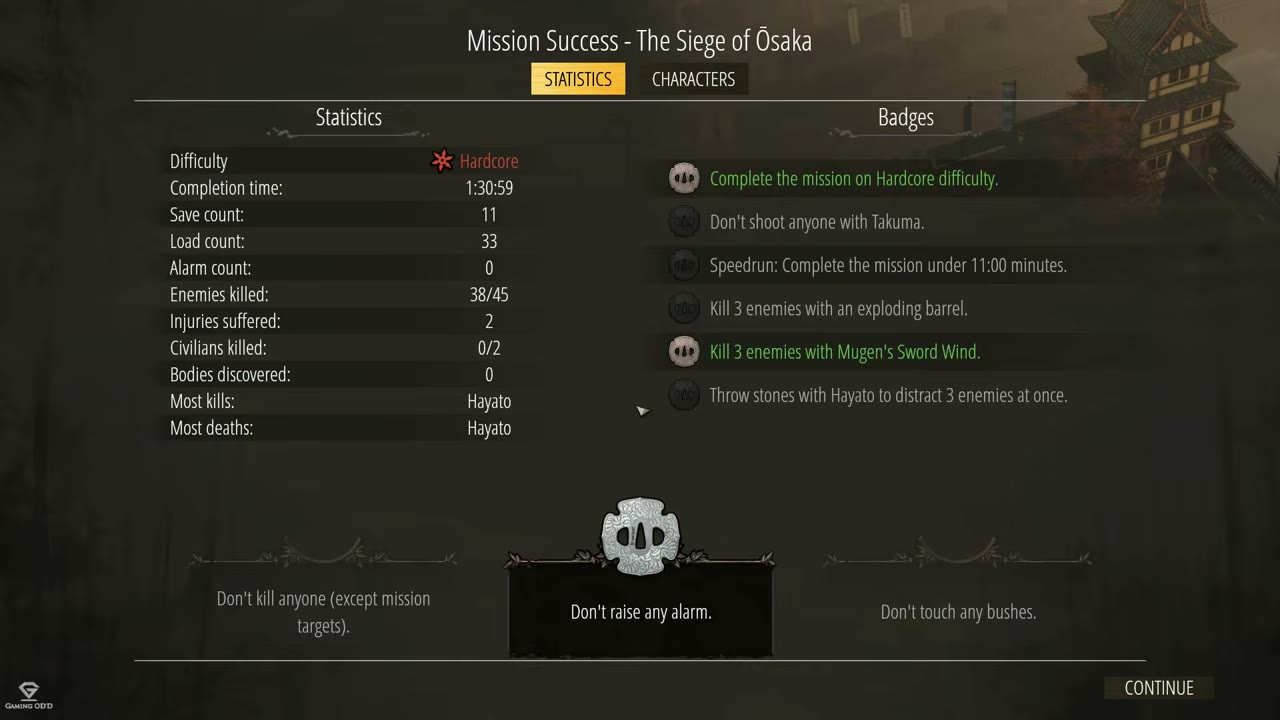
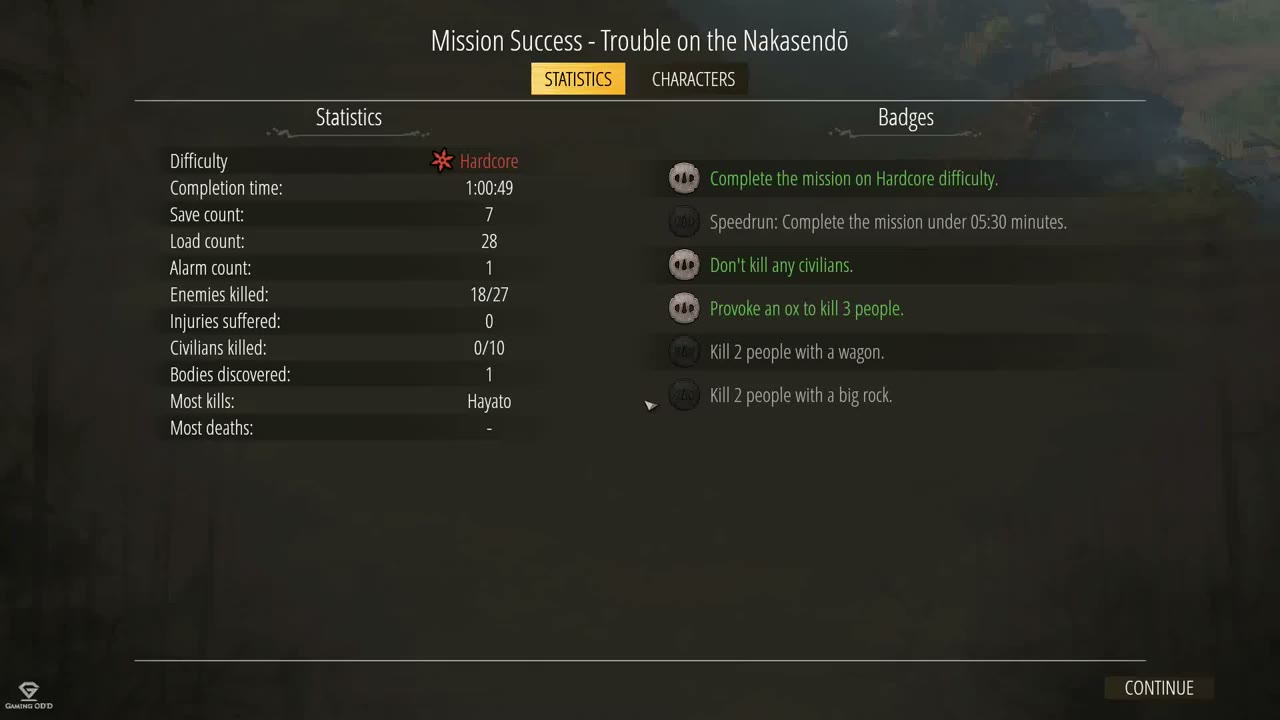
The Post-Mission Results Screen is a full-screen non-diegetic overlay that appears immediately after the player successfully completes a mission in Shadow Tactics: Blades of the Shogun. It serves as a session summary, presenting performance statistics, earned challenge badges, and per-character usage data across two tabs: Statistics and Characters.
Full Screen Context
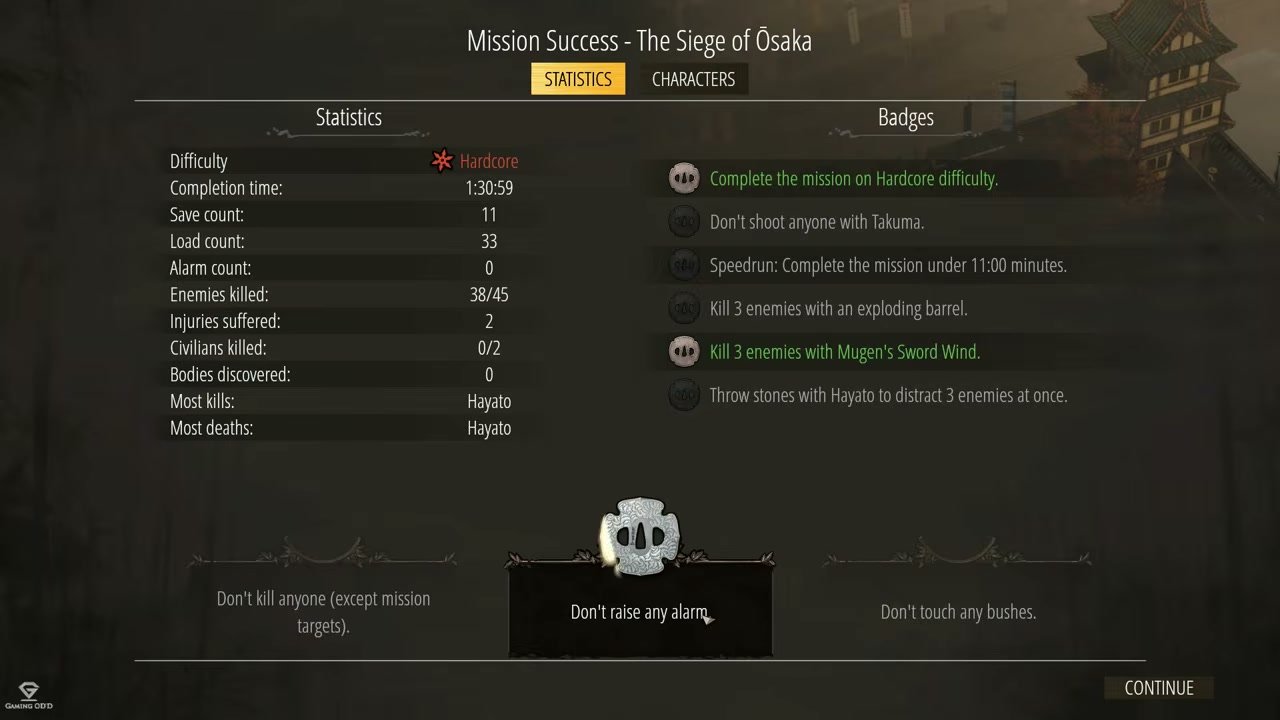
The screen uses a dark semi-transparent overlay that dims the underlying mission artwork while keeping it faintly visible. Decorative Japanese-style ornamental dividers separate the statistics list, badge list, and challenge cards. The title “Mission Success - [Mission Name]” is centered at the top in white serif-style text.
Statistics Tab
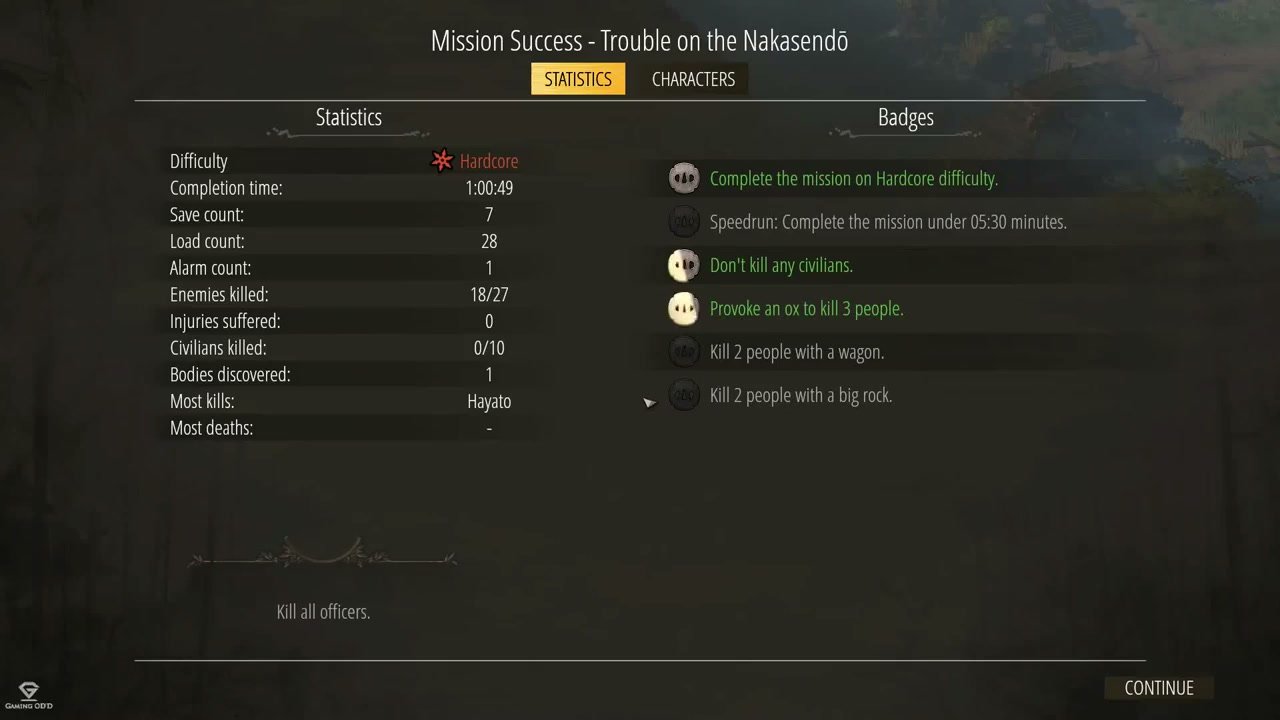
The Statistics tab is active by default and displays a two-column layout:
Left column - Mission Performance Metrics:
- Difficulty - Shows the active difficulty with a colored icon, such as a red star for Hardcore
- Completion time - Total elapsed time in H:MM:SS format
- Save count - Total quicksaves performed
- Load count - Total quickloads/reloads performed
- Alarm count - Number of alarm states triggered
- Enemies killed - Format X/Y (killed / total in mission)
- Injuries suffered - Times characters were wounded
- Civilians killed - Format X/Y
- Bodies discovered - Enemy bodies found by other enemies
- Most kills - Character with the most kills
- Most deaths - Character who died most often, or “-”
Right column - Badges:
- Each badge shows a skull-like icon and descriptive text
- Earned badges use brighter icon treatment and green text
- Unearned badges use dark or dimmed icons and muted text
- Badges are mission-specific; each mission has a unique set of challenge conditions
Bottom row - Challenge Condition Cards:
- Decorative framed cards with Japanese ornamental borders
- Display additional optional challenges or restrictions
- Examples include “Don’t kill anyone (except mission targets)”, “Don’t raise any alarm”, “Don’t touch any bushes”, and mission-specific restrictions such as “Kill all officers”
Characters Tab
The Characters tab is available next to Statistics and is used for per-character post-mission review. It displays the characters that participated in the mission and summarizes character-specific performance such as time used, kill contribution, and ability usage counters.
Each character row contains:
- Portrait - Square character artwork on the left
- Name - Character name in signature color
- Time - Time controlled or active, with percentage share where available
- Killed - Number of enemies killed by this character
- Ability Icons - Circular icons with number badges showing usage counts
Characters may include playable heroes such as Yuki, Takuma, Mugen, Hayato, and Aiko, and some missions may include NPC or civilian rows with 0% time and 0 kills.
Continue Button
The Continue button is positioned at the bottom-right of the screen. Clicking it dismisses the results screen and advances the player to the next mission briefing, campaign hub, or main menu depending on campaign progression.
Job Story
When I have just completed a mission in Shadow Tactics, I want to review my performance statistics, see which challenge badges I earned, and compare how much I used each character and their abilities, so that I can understand my playstyle, identify missed challenges for future replay attempts, and feel a sense of accomplishment before moving on.
Classification
- diegesis: Non-diegetic
- functional_type: Frontend shell
- component_type: Progress bar/slider
Wireframe
┌──────────────────────────────────────────────────────────────┐
│  [Faint mission artwork visible in background]                │
│                                                               │
│        Mission Success - [Mission Name]                       │
│                                                               │
│     ┌──────────┐  ┌───────────┐                              │
│     │STATISTICS│  │CHARACTERS │  <- Active tab is gold        │
│     └──────────┘  └───────────┘                              │
│  ─────────────────────────────────────────────────────────   │
│                                                               │
│  ┌─────────────────────┐  ┌─────────────────────────────┐   │
│  │ Statistics          │  │ Badges                      │   │
│  │                     │  │                             │   │
│  │ Difficulty    * Hrd │  │ [skull] Badge text...       │   │
│  │ Completion    1:30:59│ │ [skull] Badge text...       │   │
│  │ Save count       11 │  │ [dim]   Locked badge...     │   │
│  │ Load count       33 │  │ [skull] Badge text...       │   │
│  │ Alarm count       0 │  │ [dim]   Locked badge...     │   │
│  │ Enemies      38/45 │  │ [dim]   Locked badge...     │   │
│  │ Injuries         2 │  │                             │   │
│  │ Civilians      0/2│  │                             │   │
│  │ Bodies           0│  │                             │   │
│  │ Most kills: Hayato│  │                             │   │
│  │ Most deaths: Hayato│ │                             │   │
│  └─────────────────────┘  └─────────────────────────────┘   │
│                                                               │
│  ┌─────────────────┐ ┌─────────────────┐ ┌─────────────────┐ │
│  │ Challenge text  │ │ Challenge text  │ │ Challenge text  │ │
│  └─────────────────┘ └─────────────────┘ └─────────────────┘ │
│                                                               │
│                                          ┌──────────────┐    │
│                                          │ CONTINUE     │    │
│                                          └──────────────┘    │
└──────────────────────────────────────────────────────────────┘

CHARACTERS TAB:
┌──────────────────────────────────────────────────────────────┐
│        Mission Success - [Mission Name]                       │
│     [STATISTICS]  [CHARACTERS]  <- Characters is active       │
│  ─────────────────────────────────────────────────────────   │
│  ┌────┬───────────────────────────────────────────────────┐  │
│  │[P] │ Yuki                                              │  │
│  │    │ Time: 31:50 (32%)    Killed: 12                   │  │
│  │    │ [ability 2] [ability 10] [ability 1] [ability 2] │  │
│  ├────┼───────────────────────────────────────────────────┤  │
│  │[P] │ Takuma                                            │  │
│  │    │ Time: 13:50 (14%)    Killed: 3                    │  │
│  │    │ [ability 6]                                      │  │
│  ├────┼───────────────────────────────────────────────────┤  │
│  │[P] │ Mugen                                             │  │
│  │    │ Time: 34:11 (34%)    Killed: 30                   │  │
│  │    │ [ability 6] [ability 18] [ability 5]             │  │
│  ├────┼───────────────────────────────────────────────────┤  │
│  │[P] │ Hayato                                            │  │
│  │    │ Time: 20:48 (21%)    Killed: 10                   │  │
│  │    │ [ability 7] [ability 2] [ability 10]             │  │
│  └────┴───────────────────────────────────────────────────┘  │
│                                          ┌──────────────┐    │
│                                          │ CONTINUE     │    │
│                                          └──────────────┘    │
└──────────────────────────────────────────────────────────────┘
Layout notes:
- Title centered at top: “Mission Success - [Mission Name]”
- Two tabs centered below title: “STATISTICS” and “CHARACTERS”
- Active tab is highlighted in gold/yellow with decorative underline
- Statistics tab: Two-column layout
- Left column (~45% width): Mission performance statistics list
- Right column (~55% width): Badge list with skull-like icons
- Bottom section: Challenge condition cards in decorative frames
- Bottom-right: “CONTINUE” button
- Characters tab: Single-column list of characters
- Each row: portrait, name, time and percentage, kill count, ability icons with usage counts
- Background: Faint mission artwork visible through semi-transparent dark overlay
- Decorative Japanese-style ornamental dividers separate sections
Components
- Mission Title - "Mission Success - [Mission Name]" centered at the top of the screen in white serif-style text. The mission name is dynamic based on the completed mission.
- Tab Navigation - Two horizontally aligned tabs centered below the title:
- STATISTICS - Default active tab, highlighted in gold/yellow with decorative underline flourishes
- CHARACTERS - Inactive state is dark/grey text; becomes gold when selected
- Clicking a tab switches the panel content below without transitioning the entire screen
- Statistics Panel (Left Column) - Vertical list of mission performance metrics:
- Difficulty - Difficulty name with a colored star/shuriken icon, such as a red star for Hardcore
- Completion time - Displayed as H:MM:SS
- Save count - Total number of quicksaves made during the mission
- Load count - Total number of quickloads/reloads performed
- Alarm count - Number of times an alarm was triggered
- Enemies killed - Format: X/Y where X = killed, Y = total enemies in mission
- Injuries suffered - Number of times characters were wounded
- Civilians killed - Format: X/Y where X = killed, Y = total civilians
- Bodies discovered - Number of enemy bodies found by other enemies
- Most kills - Name of the character with the most kills
- Most deaths - Name of the character who died most often, or "-" if none
- Badges Panel (Right Column) - List of mission-specific challenge badges:
- Each badge shows a skull-like icon on the left and descriptive text on the right
- Earned badges use brighter icon treatment and green text
- Unearned badges use dimmed icons and muted text
- Badges are mission-specific; each mission has a unique set of challenge conditions
- Challenge Condition Cards (Bottom Row) - Decorative framed cards displaying additional optional challenges:
- Each card has ornamental Japanese-style borders
- Text describes a specific restriction or alternate approach, such as "Don't kill anyone (except mission targets)", "Don't raise any alarm", "Don't touch any bushes", or "Kill all officers"
- Earned conditions may show a highlighted emblem; unearned conditions remain dimmed
- Characters Tab Panel - Single-column list of all characters that participated in the mission:
- Each character row contains:
- Portrait - Square character artwork on the left side
- Name - Character name in colored text, with each character using a signature color
- Time - Time spent controlling or using the character, with percentage share where available
- Killed - Number of enemies killed by this character
- Ability Icons - Circular icons representing each ability/skill used, with a number badge showing usage count
- Characters may include playable heroes such as Yuki, Takuma, Mugen, Hayato, and Aiko, and some missions may include NPC/civilian rows with 0% time and 0 kills
- Continue Button - "CONTINUE" rectangular button positioned at the bottom-right of the screen:
- Dark background with white text
- Clicking dismisses the results screen and advances to the next mission briefing or campaign hub
- Background Overlay - Dark semi-transparent full-screen overlay that dims the underlying mission artwork while keeping it faintly visible
- Decorative Dividers - Japanese-style ornamental flourishes used as horizontal dividers between the statistics list, badge list, and challenge cards
Parameters & Audio
| Parameter | Value | Type | Notes |
|---|---|---|---|
| Screen Open | Orchestral sting or triumphant musical flourish when the results screen appears after mission completion, reinforcing the sense of accomplishment | Text | — |
| Tab Switch | Subtle click or paper-rustle sound when switching between Statistics and Characters tabs | Text | — |
| Badge Earned | Distinct positive chime or fanfare sound that plays when an earned badge is displayed; it may play sequentially as badges animate in | Text | — |
| Badge Locked | Muted dull thud or no sound for unearned badges, creating audio contrast with earned ones | Text | — |
| Continue Hover | Subtle hover sound when mousing over the Continue button | Text | — |
| Continue Click | Confirmation sound that transitions into the next screen's audio, such as mission briefing music or campaign hub ambience | Text | — |
| Background Music | The mission's background music fades out as the results screen opens; a short post-mission musical theme may play during results review | Text | — |
| Character Row Reveal | If character rows animate in sequentially, each row may have a soft whoosh or page-turn sound | Text | — |
Dependencies & Logic
- Mission completion state: The screen can only appear after the mission objective system confirms all primary objectives are fulfilled; it is not shown during gameplay or on mission failure
- Difficulty setting: The displayed difficulty, such as "Hardcore", must match the difficulty selected at campaign start or changed via the mission menu
- Statistics tracking: The game must continuously track during gameplay: elapsed time, save/load counts, alarm triggers, enemy/civilian kill counts, body discoveries, character deaths, and character-specific kill counts
- Badge evaluation: Each mission's badge conditions must be evaluated against the play session data to determine earned vs. unearned status; badge definitions are mission-specific
- Character ability tracking: The Characters tab requires per-character ability usage counters to be incremented each time an ability is activated during gameplay
- Character roster: The Characters tab displays only characters that were available in the completed mission; some missions restrict the roster to a subset of heroes
- Localization: All text elements (stat labels, badge descriptions, challenge conditions, button text) must be localized for the player's selected language
- Save data: Statistics and badge progress may need to be persisted to save data for later review or achievement tracking
- Campaign progression: The Continue button destination depends on whether the completed mission was the final mission or if more missions follow
BDD Scenarios
Scenario: Results screen appears after mission completion
- Given
- the player has just completed the final objective of a mission
- When
- the end-of-mission cutscene and dialogue conclude
- Then
- the post-mission results screen appears with the title "Mission Success - [Mission Name]"
- And
- the Statistics tab is active by default
Scenario: Review mission statistics
- Given
- the post-mission results screen is displayed
- When
- the player views the Statistics tab
- Then
- the left column displays: difficulty, completion time, save count, load count, alarm count, enemies killed, injuries suffered, civilians killed, bodies discovered, most kills, and most deaths
- And
- the right column displays the mission's challenge badges with earned badges highlighted
Scenario: Review earned badges
- Given
- the Statistics tab is visible
- When
- the player looks at the badge list
- Then
- earned badges display brighter icons with green text
- And
- unearned badges display dimmed icons with muted text
- And
- the bottom row shows additional challenge condition cards
Scenario: Switch to Characters tab
- Given
- the post-mission results screen is on the Statistics tab
- When
- the player clicks the "CHARACTERS" tab
- Then
- the panel updates to show a list of all characters that participated in the mission
- And
- each character row shows: portrait, name, time played with percentage where available, kill count, and ability usage icons with counts
Scenario: Continue to next mission
- Given
- the player has reviewed the mission results
- When
- the player clicks the "CONTINUE" button
- Then
- the results screen dismisses
- And
- the game transitions to the next mission briefing or campaign hub
Scenario: Perfect stealth run results
- Given
- the player completed a mission without triggering any alarms
- When
- the results screen appears
- Then
- "Alarm count" shows 0
- And
- the no-alarm badge is earned and highlighted in the badge list
Scenario: Review character ability usage
- Given
- the Characters tab is active
- When
- the player examines a character row
- Then
- each ability icon displays a number indicating how many times that ability was used during the mission
- And
- the character with the highest usage time is shown at the top or clearly identifiable
Scenario: Missed badge identification for replay planning
- Given
- the player has completed a mission and earned some but not all badges
- When
- the player reviews the unearned badges on the Statistics tab
- Then
- the greyed-out badge descriptions inform the player what conditions to meet on a future replay
Edge Cases
- Mission completed with 0 kills: If the player completes a mission without killing any enemies (ghost run), "Enemies killed" shows 0/Y and "Most kills" may show "-" or the first character in roster; the UI should handle this gracefully
- All characters died at least once: If every character died during the mission, "Most deaths" shows the character with the highest death count; if no deaths occurred, it shows "-"
- No civilians in mission: Some missions have 0 civilians; the "Civilians killed" field should display "0/0" and not divide by zero
- Badge condition edge cases: Badge evaluation must handle corner cases such as "kill within X seconds" where the timer starts from an event that may not have occurred
- Tab switch during data load: If the player rapidly clicks between Statistics and Characters tabs while data is still being calculated, the UI should debounce and not show stale or mixed data
- Continue button spam: Rapidly clicking Continue should only trigger the transition once; subsequent clicks should be ignored
- Resolution/aspect ratio changes: The results screen should remain readable and properly aligned if the display resolution changes while the screen is open, such as Alt+Tab on multi-monitor setups
- Missing character portrait: If a character portrait asset fails to load, the Characters tab should show a placeholder silhouette rather than breaking the layout
- Localization fallback: If a badge description is missing for the player's language, it should fall back to English or show a generic placeholder
- Alarm stat overflow: In theory, alarm count could exceed single-digit display space on very long missions; the UI should handle double-digit values
- Timer overflow: Completion time exceeding 9:59:59 should still display correctly, such as 12:34:56
- Ability usage count overflow: Ability counts exceeding 99 should still display legibly within the circular icon badge
- Campaign final mission: On the last mission, the Continue button should transition to the campaign completion flow rather than the next mission loading screen
- Co-op or multiplayer (if applicable): If the game supports co-op, the Characters tab may need to distinguish between player-controlled and AI-controlled characters
QA Notes
- Verify the results screen appears automatically after every mission completion, without requiring manual input
- Test that the Statistics tab is active by default when the screen first appears
- Confirm all 11 statistics fields display correct values that match actual gameplay; cross-reference with internal telemetry if available
- Verify the difficulty displayed matches the active difficulty setting, including mid-mission changes
- Test badge evaluation: complete missions with specific conditions met/unmet and verify earned/unearned badge states
- Confirm earned and unearned badge icon treatments are visually distinct
- Test the Characters tab: verify all characters present in the mission appear, with correct time percentages summing to 100% where percentages are shown
- Verify ability usage counts in the Characters tab match actual ability activations during gameplay
- Test tab switching: click between Statistics and Characters repeatedly; verify no visual glitches or data corruption
- Test the Continue button at different resolutions: 720p, 1080p, 4K, and ultrawide
- Verify the Continue button advances to the correct next screen, such as next mission loading versus campaign completion
- Test keyboard navigation: Enter/Space to continue, arrow keys or Tab to switch tabs
- Verify the screen is dismissible only via Continue, with no Escape or click-outside close behavior unless explicitly supported
- Test with different UI scale settings if available
- Confirm all text elements are localized correctly and display without truncation
- Verify decorative dividers and background artwork render correctly at all supported aspect ratios
- Test rapid Continue button clicking to ensure no double-transition occurs
- Verify statistics are persisted to save data for potential future review or leaderboard integration
- Test edge case: complete a mission with 0 saves/0 loads and verify the display
- Test edge case: complete a mission with 0 alarm count and verify the perfect stealth badge state
Mechanic Links
- Stealth Detection System - the Alarm signals statistic reflects how many times the stealth detection system triggered an alarm state; a value of 0 indicates a perfect stealth run
- Character Ability System - the Heroes tab displays per-character ability usage counts as numbered circular icons next to each character's portrait, showing how frequently each ability was activated during the mission
- Stealth Elimination Mechanics - the Enemies killed and Bodies discovered statistics are derived from the stealth elimination mechanics, tracking successful kills and body concealment failures
- Mission Badge System - the UI displays mission-specific challenge badges in the right column of the Statistics tab, showing earned badges with gold skull icons and unearned badges with grey icons; badge conditions are evaluated from play session data
- Mission Objective Variety - the UI shows mission completion confirmation and statistics derived from the mission objective system, including whether primary and secondary objectives were fulfilled
- Character Movement System - the Heroes tab shows time played per character as MM:SS with percentage, reflecting how much each character was actively selected and moved during the mission
- Quicksave and Reload Iteration Loop - the Statistics tab displays the total number of quicksaves and quickloads performed during the mission, reflecting the player's iteration loop behavior