![Visual reference from Desperados 3 Let's Play Gameplay Walkthrough Pt 1 Prologue & Byers Pass [1440p w/ Commentary] at 35:00-35:10](/published/media/desperados-3/source-322-preview-769003917f.jpg)

Gameplay Minimap

Desperados 3
- Status
- Released
- Year
- 2020
- Genre
- Strategy
- Platforms
- Windows, macOS, Linux
1. Summary
Circular lower-right gameplay HUD minimap that gives the player a compact tactical overview of nearby terrain, paths, and unit/objective markers. It remains visible during active play alongside character controls and right-side alert/hint buttons.
Overview
The Gameplay Minimap is a persistent circular HUD element in the bottom-right corner of active mission play. It uses a parchment-style round map face to summarize nearby terrain and route context while overlaying colored party/player markers for quick orientation.
In live gameplay, the minimap sits inside the ornate bottom-right HUD frame and remains visible while the player controls characters, sees enemy vision cones, and receives adjacent hint/alert notifications. It is not the full area map; it is a compact glanceable tactical aid designed to preserve spatial awareness without interrupting movement or ability use.
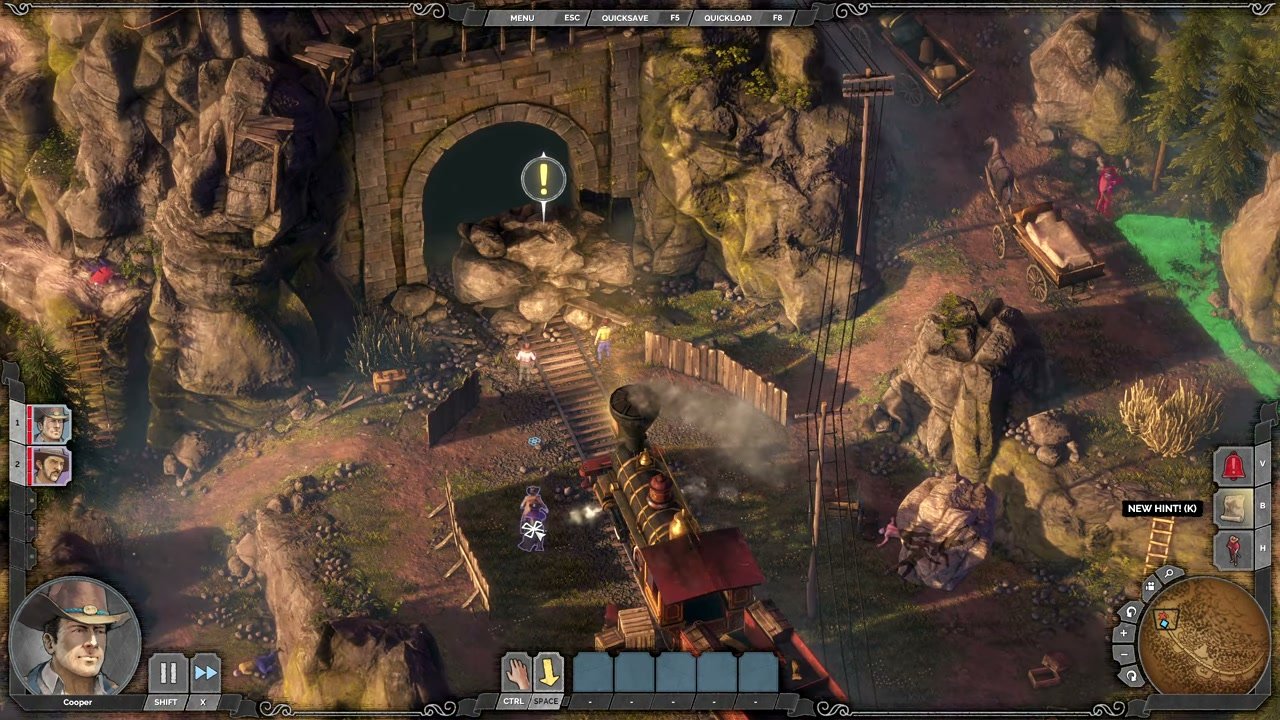
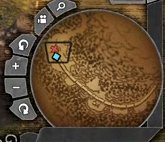
The tight crop shows the core structure: a circular parchment-textured terrain display, a dark rim, colored position markers, and small attached side controls. The wider context shows how the minimap shares the right edge of the HUD with alert and hint affordances while staying visually separated from the character portrait and action bar.
Job Story
When I am moving through an active tactical mission, I want a persistent minimap in the gameplay HUD, so that I can maintain spatial awareness without opening the full area map or losing control of the squad.
Classification
- diegesis: Non-diegetic
- functional_type: HUD
- component_type: List/grid
Wireframe
┌──────────────────────────────── gameplay view ────────────────────────────────┐
│                                                                                │
│                                                       [right alerts / hints]   │
│                                                                  [!]           │
│                                                                  [?]           │
│                                                        ┌───────────────┐       │
│ [portrait]        [character action bar]              │   circular    │       │
│                                                        │   minimap     │       │
└────────────────────────────────────────────────────────┴───────────────┴───────┘
Components
- Circular parchment map face showing local terrain/route texture.
- Dark circular rim/frame integrated into the ornate HUD border.
- Colored player/party marker shown over the map.
- Small curved side buttons on the left edge of the minimap cluster, likely for map zoom or related map controls.
- Adjacent right-side alert/hint button stack, visually grouped near the minimap but functioning as separate notification controls.
Parameters & Audio
| Parameter | Value | Type | Notes |
|---|---|---|---|
| No direct minimap-specific audio was observed. Visual feedback parameters are persistent opacity, high-contrast parchment texture, colored marker overlays, and stable bottom-right anchoring during gameplay. | No direct minimap-specific audio was observed. Visual feedback parameters are persistent opacity, high-contrast parchment texture, colored marker overlays, and stable bottom-right anchoring during gameplay. | Text | — |
Dependencies & Logic
- Depends on the current mission map and the player's current camera/party context.
- Depends on live squad position data to place colored markers on the parchment map.
- Shares layout constraints with the right-side alert/hint stack and the bottom HUD frame.
- Must coexist with tactical overlays such as enemy vision cones, objective markers, and Showdown/action-bar controls without obscuring critical gameplay space.
BDD Scenarios
Scenario: Minimap remains visible during active gameplay
- Given
- the player is in an active mission
- When
- the player moves the camera or controls a character
- Then
- the circular minimap remains anchored in the bottom-right HUD
Scenario: Player marker appears on the minimap
- Given
- the player has a character selected in the mission
- When
- the minimap is visible
- Then
- a colored marker indicates the character or party position on the map
Scenario: Alerts do not replace the minimap
- Given
- a hint or alert button appears in the right-side HUD stack
- When
- the alert is visible beside the minimap
- Then
- the minimap remains readable and keeps its bottom-right position
Edge Cases
- Right-side hint/alert buttons can crowd the minimap cluster; verify the map remains readable when multiple buttons are present.
- Very bright terrain or vision-cone overlays in the game world should not reduce the minimap's contrast against the HUD frame.
- If the player opens a larger map or pause menu, the compact minimap should not conflict with the full-screen map presentation.
- Colored markers must remain distinguishable against the parchment terrain texture.
QA Notes
- Verify the minimap remains anchored at the bottom-right at supported aspect ratios and safe-area settings.
- Verify player/party markers update when switching selected characters or moving the squad.
- Verify adjacent alert/hint buttons do not overlap or occlude the circular map face.
- Verify Showdown Mode and standard gameplay both preserve minimap readability.
Mechanic Links
- Tactical Stealth Mission Loop - The gameplay minimap preserves route and spatial awareness while the player navigates guarded mission areas.
- Takedown and Body Control - The gameplay minimap supports body-control planning by keeping patrol/objective context visible while the player relocates or cleans up bodies.
- Movement, Terrain, and Cover Navigation - The Gameplay Minimap gives compact route and position awareness while characters traverse active mission spaces.
References
- 1.
Desperados 3 Let's Play Gameplay Walkthrough Pt 1 Prologue & Byers Pass [1440p w/ Commentary] (35:00-35:10)
- 2.
Desperados III (L260-282 of 283)