![Visual reference from Desperados 3 Let's Play Gameplay Walkthrough Pt 8 Back Alley Jazz [1440p w/ Commentary] at 7:39-7:50](/published/media/desperados-3/source-331-preview-f70b55aea9.jpg)
![Visual reference from Desperados 3 Let's Play Gameplay Walkthrough Pt 8 Back Alley Jazz [1440p w/ Commentary] at 25:00-25:01](/published/media/desperados-3/source-331-preview-2527fe326a.jpg)

Right Side Alert And Hint Buttons

Desperados 3
- Status
- Released
- Year
- 2020
- Genre
- Strategy
- Platforms
- Windows, macOS, Linux
1. Summary
Compact right-edge HUD buttons that surface alert and hint/tutorial availability during live tactical play. The stack sits directly above the minimap and can display a black `NEW HINT! (K)` callout beside the hint button when new guidance is available.
Overview
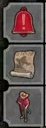
The right-side alert and hint buttons are a compact gameplay HUD rail anchored directly above the minimap. In the inspected mission footage, the rail presents a red warning triangle at the top, a gold hint/tutorial button beneath it, another red context/alert button below, and small hotkey letters aligned on the outer right edge. When new guidance is available, the hint state expands into a black NEW HINT! (K) callout that points back toward the right-side rail without displacing the minimap.
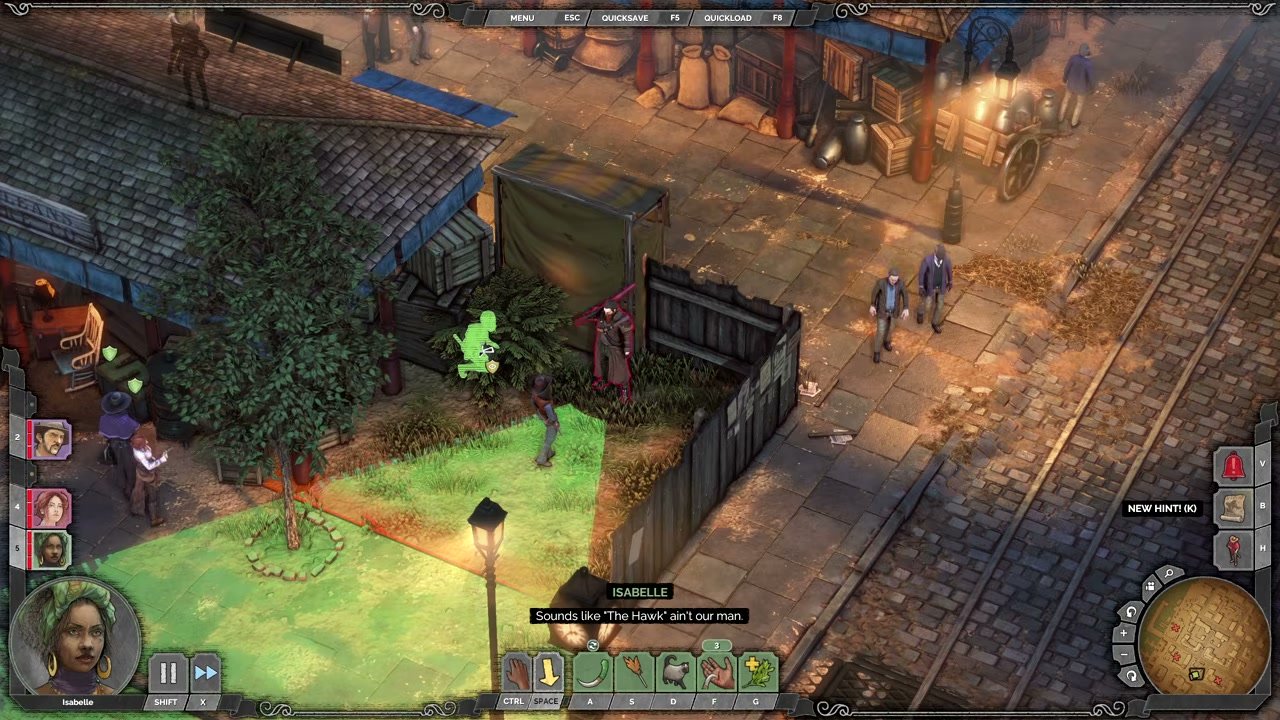
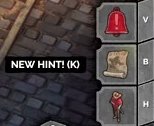
The buttons remain visible as part of the normal HUD even when the side callout is not present, preserving a stable location for warning and guidance affordances during live tactical play.
Job Story
When I am controlling the squad during a mission and the game has optional guidance or an alert to surface, I want a small right-edge button stack near the minimap, so that I can notice and open contextual information without losing tactical awareness.
Classification
- diegesis: Non-diegetic
- functional_type: Feedback notification
- component_type: Button
Wireframe
Gameplay viewport
+------------------------------------------------------------+
|                                                            |
|                                      [alert] V             |
|                                      [hint ] B  < NEW HINT!|
|                                      [other] H             |
|                                      +---------+           |
|                                      | minimap |           |
|                                      +---------+           |
+------------------------------------------------------------+
The stack is a slim vertical rail attached to the right HUD border, with callouts expanding leftward so they do not push the minimap or overlap the screen edge.
Components
- Red warning triangle button at the top of the stack.
- Gold hint/tutorial button that can trigger the NEW HINT! (K) callout.
- Lower red icon button for an additional alert/context channel.
- Small right-aligned hotkey labels, visible as V, B, and H in the inspected frames.
- Black hint callout label with white uppercase text.
- Shared right-side decorative frame/background integrated with the minimap HUD cluster.
Parameters & Audio
| Parameter | Value | Type | Notes |
|---|---|---|---|
| Visual emphasis uses saturated red for warning/alert actions and parchment gold for hints/tutorial information. | Visual emphasis uses saturated red for warning/alert actions and parchment gold for hints/tutorial information. | Text | — |
| The NEW HINT! (K) callout is a high-contrast black label with white uppercase text and a small parenthesized hotkey. | The NEW HINT! (K) callout is a high-contrast black label with white uppercase text and a small parenthesized hotkey. | Text | — |
| No distinct audio cue was evident from the visual source frames; treat sound as optional unless confirmed by audio review. | No distinct audio cue was evident from the visual source frames; treat sound as optional unless confirmed by audio review. | Text | — |
| If animated, the callout should appear/disappear without shifting the underlying minimap or button positions. | If animated, the callout should appear/disappear without shifting the underlying minimap or button positions. | Text | — |
Dependencies & Logic
- Requires the live gameplay HUD and minimap cluster to be active.
- Hint callout depends on game logic determining that a new contextual hint is available.
- Alert/warning icons depend on tactical state, mission scripting, or enemy/attention systems that need to notify the player.
- Hotkey labels depend on the current input binding profile and must update if bindings are remapped.
- Overlay opening depends on the tutorial/hints content registry for the current mission context.
BDD Scenarios
Scenario: New Hint Callout Appears
- Given
- the player is in live mission gameplay
- When
- the HUD refreshes the right-side notification stack
- Then
- the hint button displays a `NEW HINT! (K)` callout beside the right-edge button rail
- And
- a new contextual hint is available
Scenario: Player Opens Hints From The Right Rail
- Given
- the `NEW HINT! (K)` callout is visible
- When
- the player activates the hint button or its hotkey
- Then
- the translucent `HINTS` overlay opens over the gameplay scene
- And
- the player can review the available hint entries
Scenario: Normal Notification Rail Persists
- Given
- no new hint callout is currently being shown
- When
- the player continues live tactical control
- Then
- the right-side alert and hint buttons remain anchored above the minimap
- And
- the minimap layout does not shift
Edge Cases
- The callout should not overlap or obscure critical minimap information.
- Long localized hint labels must fit the available left-expanding callout area or truncate gracefully.
- Remapped hotkeys must update both the icon-adjacent label and the parenthesized callout key.
- Multiple simultaneous notifications should preserve a predictable button order instead of stacking callouts over each other.
- If the hints content is unavailable, activation should fail gracefully without leaving the button in a highlighted or stuck state.
QA Notes
- Verify the right-side rail remains anchored above the minimap at common 16:9 resolutions and does not collide with minimap controls.
- Trigger a new hint and confirm the NEW HINT! (K) callout appears beside the hint button, then disappears or changes state after the hint is opened.
- Activate the hint via mouse/controller focus and via keyboard hotkey; confirm both routes open the same HINTS overlay.
- Confirm remapped input bindings update the visible hotkey text.
- Test an alert/warning state and confirm the red icon remains legible over bright and dark gameplay backgrounds.
Mechanic Links
- Takedown and Body Control - Right-side alert and hint buttons surface warning or guidance states that can be triggered by detection, alerts, or contextual stealth/body-control tutorials.
- Enemy Perception and Alarm AI - Right Side Alert And Hint Buttons provide persistent HUD affordances for warning or guidance states related to tactical danger and player attention.
- Hector's Brute Trapper Kit - Alert and hint buttons surface warnings or tutorial prompts when loud actions, enemy reactions, or learnable kit interactions need player attention.