
Detection Feedback Overlay
Shadow Tactics: Blades of the Shogun
- Status
- Released
- Year
- 2016
- Genre
- Indie, Strategy
- Platforms
- Windows, macOS, Linux
1. Summary
A dynamic world-space feedback system that communicates the player's detection state through color-coded enemy vision cones and overhead status icons. The overlay transitions from green (safe) through yellow (buildup) to red (detected), giving players tactical warning before full alarm activation.
Overview
The Detection Feedback Overlay is a world-space visual feedback system that communicates stealth risk directly on top of the isometric battlefield. It uses enemy vision cones, colored outlines, and overhead status icons so the player can read whether a character is safe, suspicious, or about to trigger a broader alarm without opening a separate menu.
Gameplay Evidence
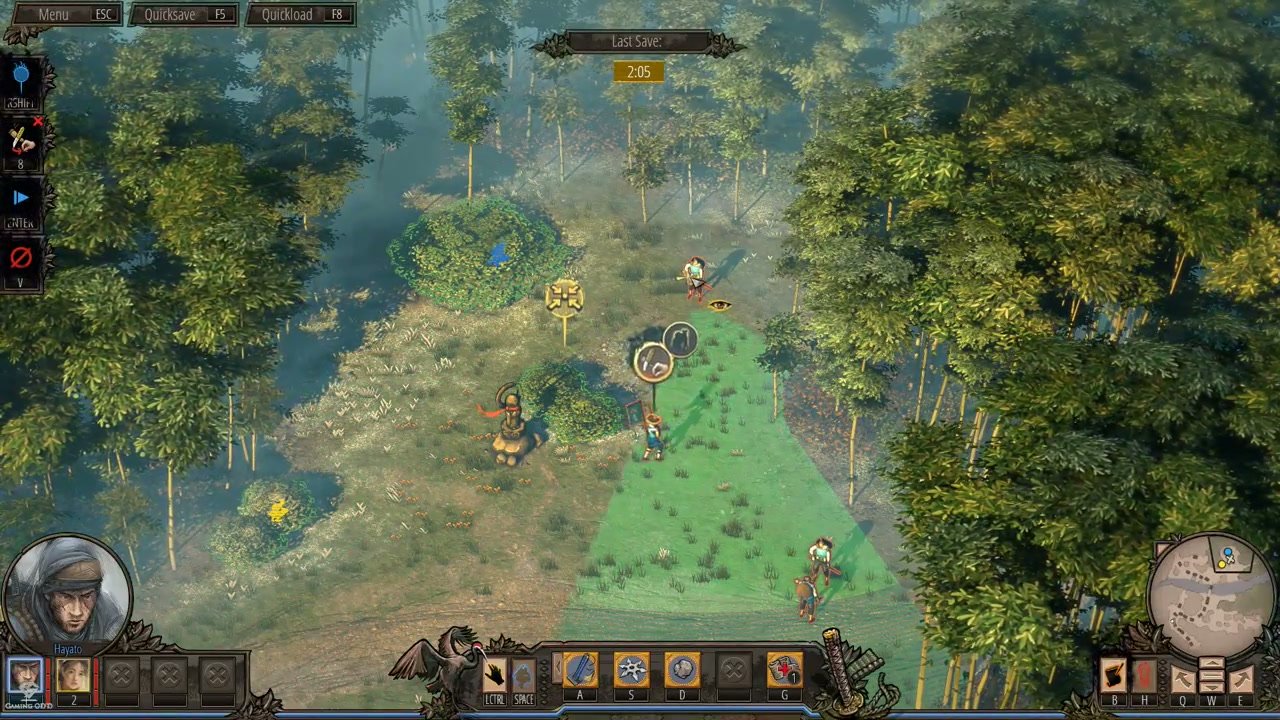
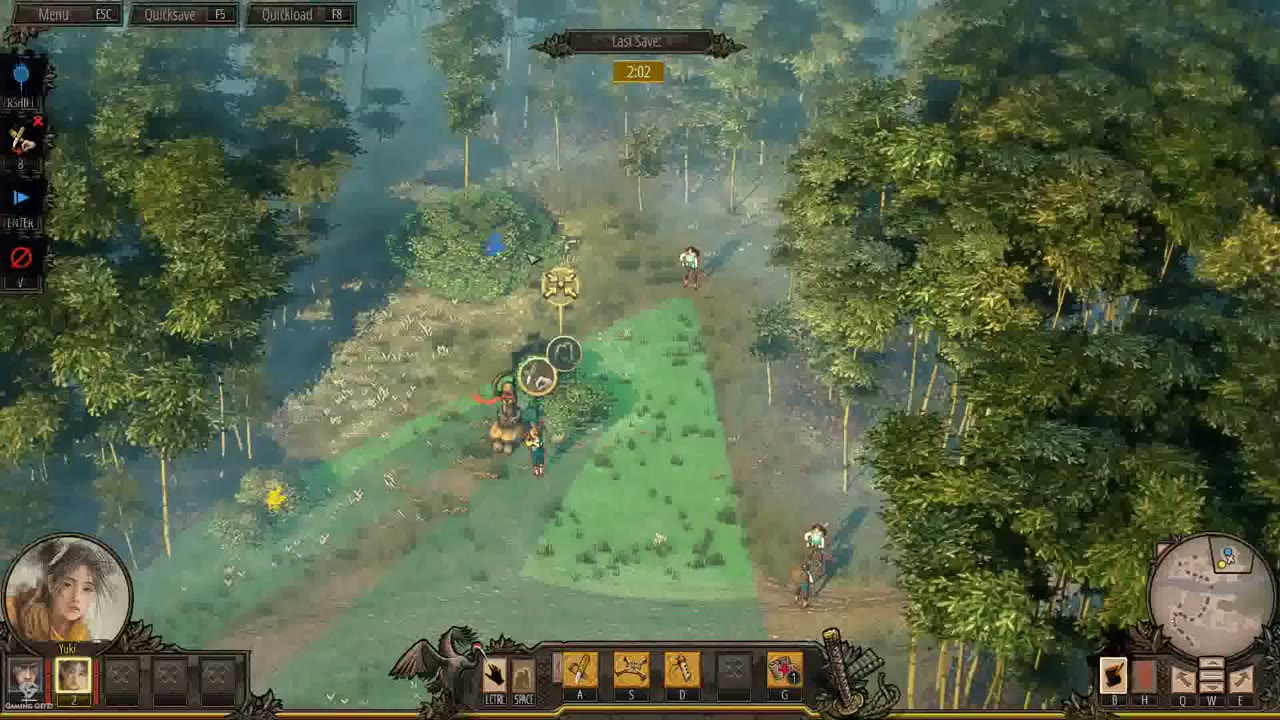
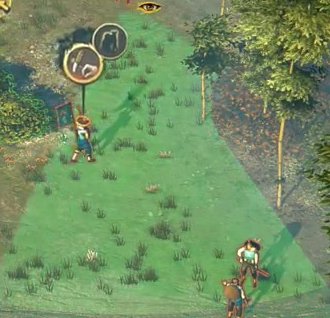
The green cone is projected from the enemy’s facing direction onto the ground plane. It functions as the main readable footprint for visual detection: the player can plan movement around the cone while keeping the rest of the HUD in peripheral view.
Suspicion Feedback
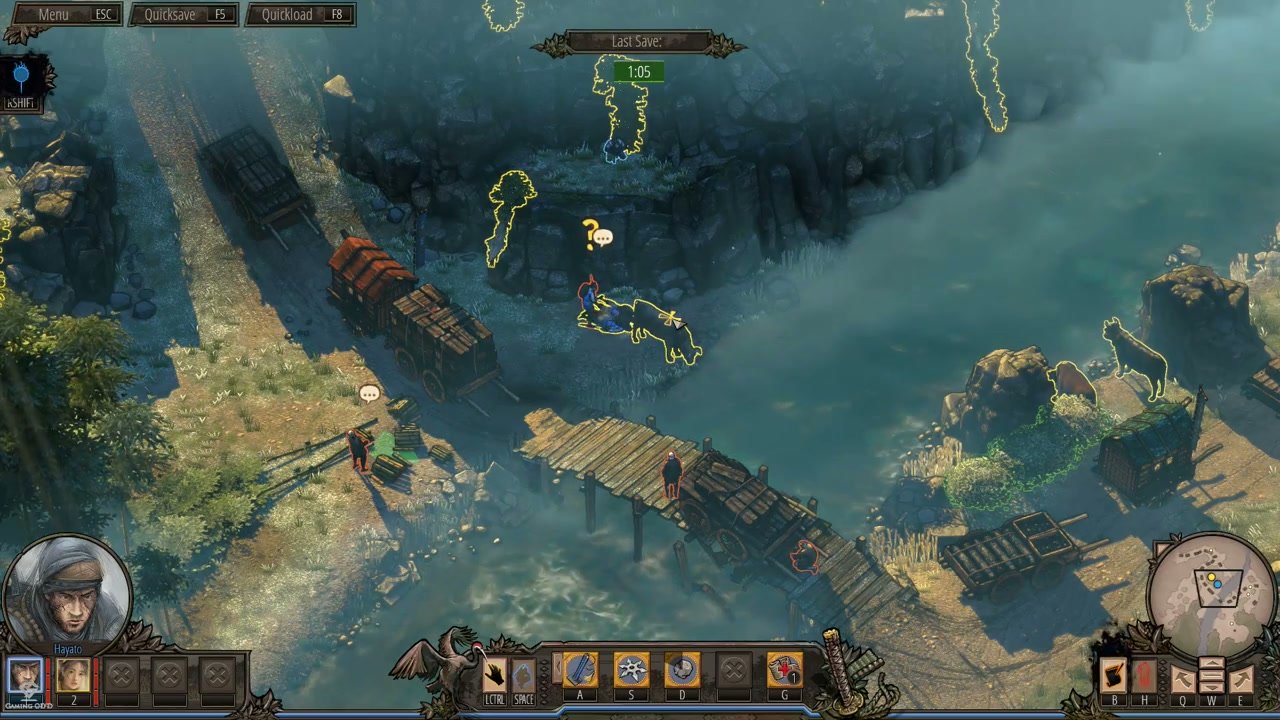
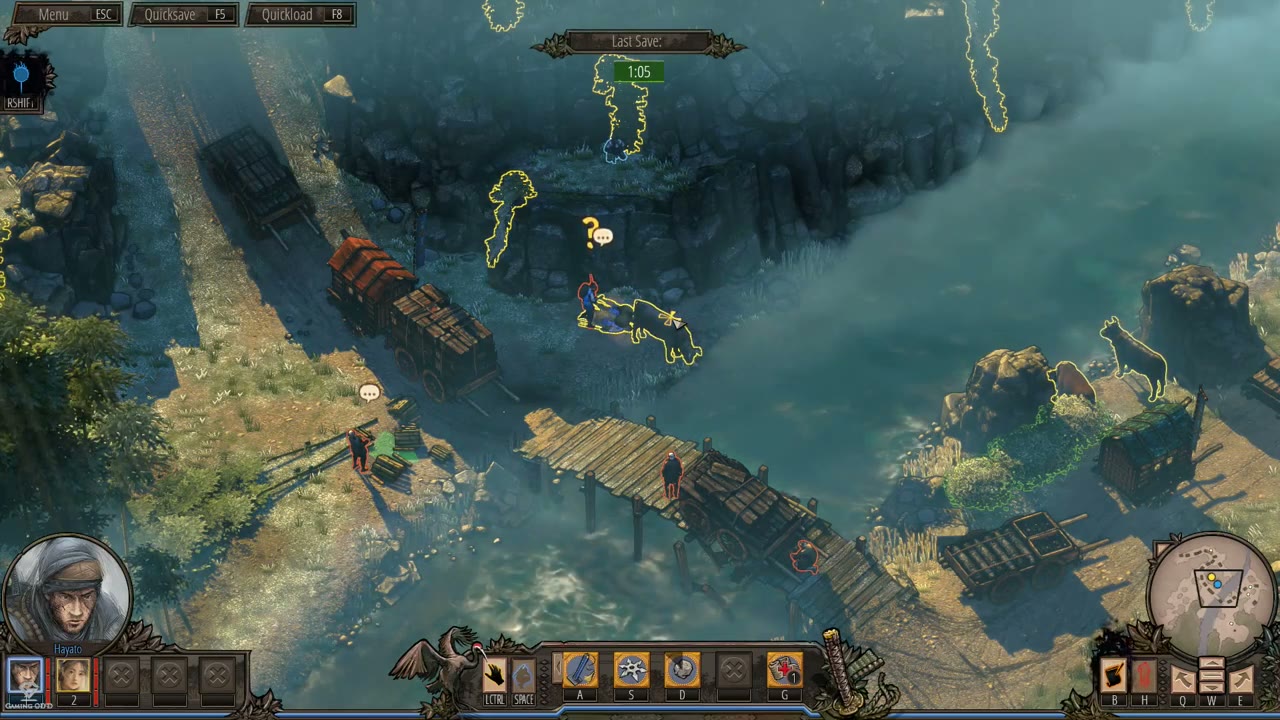
When suspicion is triggered, the overlay adds a yellow question mark icon above the relevant world-space actor. This icon is small but high-contrast, using bright yellow against the environment to indicate that the situation has escalated from normal patrol reading to active suspicion.

Core Visual Language
- Green cone: normal readable enemy sight area; used for planning safe routes and timing.
- Yellow question mark / warning state: suspicion or investigation feedback; tells the player the AI has noticed something and may escalate.
- Red alert state: confirmed detection/alarm feedback; the cone and enemy status indicator communicate that stealth has failed and alarm behavior has begun.
Integration With Gameplay
The overlay is not a separate screen. It sits in the world layer above terrain, characters, and patrol routes while coexisting with the bottom action bar, character portraits, save timer, and minimap. This keeps detection feedback spatial: the player reads the risk at the exact enemy and ground area that creates it.
The Detection Feedback Overlay is tightly coupled with Enemy Vision Cones (ui_11), because the cone is the primary carrier of visual detection information. It also depends on the stealth detection logic, character stance and movement, enemy facing direction, and alarm response behavior.
Job Story
When my character is approaching an enemy patrol, I want to see exactly when I am entering their vision cone and how close I am to being detected, so that I can retreat, crouch, or break line of sight before the alarm is raised.
Classification
- diegesis: Spatial
- functional_type: Feedback notification
Wireframe
[World Space - Isometric View]

     Enemy NPC
         |
    [?!]  <-- Overhead status icon (?, !, or none)
         |
    \\   /
     \\ /     <-- Vision cone projected on ground
      \/
   [GREEN]  = Safe/undetected zone
   [YELLOW] = Detection buildup zone (inner cone)
   [RED]    = Confirmed detection zone

Character stance affects which zone activates:
- Standing in outer cone → may trigger yellow
- Crouching in outer cone → stays green
- Running through any cone → faster yellow→red transition
Components
- Vision cone overlay: Triangular area projected on the ground from each enemy's facing direction, color-coded to detection state
- Green safe zone: Outer portion of vision cone where the player is undetected; visible by default when enemy is selected or vision mode is active
- Yellow buildup zone: Inner portion of vision cone that fills when player enters detection range; indicates time remaining before full detection
- Red detection zone: Appears when player is fully detected; vision cone turns red and enemy enters alert state
- Suspicion icon (?): Yellow question mark appearing above enemy head during detection buildup/suspicion state
- Alert icon (!): Red exclamation mark appearing above enemy head when detection is confirmed and alarm triggers
- Noise radius indicator: Blue circular overlay showing sound propagation range from player actions (abilities, footsteps, combat)
- Enemy type modifiers: Straw hat guards show extended vision cones; samurai have disguise-penetrating detection
Parameters & Audio
| Parameter | Value | Type | Notes |
|---|---|---|---|
| Suspicion audio cue | Subtle rising tension sound or musical sting when yellow buildup begins | Text | — |
| Alert audio cue | Distinct alarm bell or combat shout when detection transitions to red/confirmed state | Text | — |
| Enemy vocal barks | Guards announce suspicion ("What was that?") during yellow phase and shout alarm ("Intruder!") during red phase | Text | — |
| Footstep audio feedback | Louder footstep sounds correlate with faster detection buildup; silent movement produces minimal audio | Text | — |
| Dynamic music layer | Soundtrack intensity increases during detection buildup and peaks during alarm state | Text | — |
Dependencies & Logic
- Enemy position and facing direction: Vision cones are aligned to enemy NPC transform and update with patrol rotations
- Player character position and stance: Detection buildup rate depends on whether character is standing, crouching, or running
- Environmental lighting: Darkness reduces vision cone size; torchlight extends vision range in dark areas
- Concealment state: Entering bushes, buildings, or other concealment spots pauses or resets detection even within geometric vision cone overlap
- Enemy type: Normal guards, straw hat guards, and samurai each apply different detection modifiers
- Mission alarm state: Once alarm is triggered, detection feedback persists in red until mission reload or completion
- Character ability usage: Noise-producing abilities (stones, combat, abilities) generate blue sound radius indicators that trigger separate auditory detection
- Snow footprint visibility: Footprints in snow extend detection risk beyond current position as enemies can follow trails
BDD Scenarios
Scenario: Player enters enemy vision cone undetected
- Given
- the player character is crouching in the outer portion of an enemy vision cone
- When
- the character remains stationary or moves slowly while crouched
- Then
- the vision cone remains green and no detection buildup occurs
Scenario: Detection buildup warns player before alarm
- Given
- the player character is standing inside an enemy vision cone
- When
- the character remains within the cone for a short duration
- Then
- the inner portion of the vision cone turns yellow and a question mark icon appears above the enemy's head
Scenario: Full detection triggers alarm feedback
- Given
- the player character stays within the yellow detection buildup zone
- When
- the buildup timer completes without breaking line of sight or entering concealment
- Then
- the vision cone turns red, an exclamation mark appears above the enemy, and the alarm propagates to all enemies
Scenario: Detection resets after breaking line of sight
- Given
- the player character has triggered yellow suspicion buildup
- When
- the character moves behind cover or into a concealment spot to break line of sight
- Then
- the yellow buildup fades, the question mark disappears, and the enemy returns to patrol after an investigation cooldown
Scenario: Crouching reduces detection speed
- Given
- the player character is inside an enemy vision cone
- When
- the player presses the crouch key to enter low stance
- Then
- the yellow buildup zone shrinks or the buildup rate decreases compared to standing
Scenario: Noise triggers auditory detection feedback
- Given
- the player character throws a distraction stone or performs a noisy action
- When
- the noise radius overlaps with an enemy's auditory detection range
- Then
- a blue circular indicator appears at the noise source and the enemy turns to investigate, showing a temporary yellow suspicion state
Scenario: Stealth kill avoids detection feedback
- Given
- an enemy is unaware of the player character
- When
- the player performs a silent takedown from behind or from concealment
- Then
- the enemy is eliminated without any vision cone color change or alarm trigger
Edge Cases
- Overlapping vision cones from multiple enemies: Detection buildup may stack or accelerate when a character stands in the intersection of multiple enemy vision cones
- Carrying a body increases detection risk: A player character carrying a body may be spotted at greater distance or through partial cover, with vision cones showing yellow buildup earlier than normal
- Noise investigation chains: One guard moving toward a noise source may enter another guard's vision cone, creating unintended detection cascades
- Concealment spot within vision cone: Entering a bush or building interior pauses detection buildup even if the character remains geometrically inside the vision cone
- Samurai disguise penetration: Samurai enemies bypass normal yellow buildup and attack immediately when spotting a disguised character, with no warning transition
- Darkness and torchlight interaction: A character standing in a torch's bright zone is visible at full detection range even if the surrounding area grants reduced visibility
- Snow footprint trail detection: Enemies may follow footprint trails to the player's last known position, extending detection risk beyond current vision cone overlap
- Civilian panic without alarm: Civilian NPCs who detect the player show yellow/red feedback but trigger panic/flee instead of mission alarm
- Alarm persistence: Once alarm is triggered, vision cones remain red for all enemies until mission reload or completion, even if the player eliminates all enemies
- Straw Hat projectile spotting: Straw Hat Guards can spot thrown projectiles in flight and raise alarm immediately, bypassing normal detection buildup
QA Notes
- Verify vision cone color transitions correctly through green → yellow → red on all graphics settings and resolutions
- Verify yellow question mark icon appears above enemy head during suspicion state and red exclamation mark during alert state
- Verify crouching in outer portion of vision cone prevents yellow buildup across all enemy types
- Verify detection buildup rate differs between standing, crouching, and running states
- Verify concealment spots (bushes, buildings, barrels, wells) pause or reset detection buildup even within geometric vision cone overlap
- Verify alarm state turns all enemy vision cones red and adds alert icons consistently
- Verify darkness reduces vision cone size and torchlight extends vision range in dark areas
- Verify noise radius indicators (blue circles) appear correctly for all noise-producing abilities and actions
- Verify civilian detection shows yellow/red feedback but does not trigger mission alarm
- Verify samurai enemies bypass yellow buildup and attack disguised characters immediately
- Verify detection resets correctly after breaking line of sight and completing enemy investigation cooldown
- Verify reload from quicksave clears all detection feedback and returns enemies to green patrol state
- Verify straw hat guards show extended vision cones and can spot projectiles in flight
- Verify snow footprint trails cause enemies to enter yellow suspicion when following trails
- Verify body carrying increases visual detection range or probability
Mechanic Links
- Stealth Detection System - The Stealth Detection System produces the enemy sight, suspicion buildup, and alert states that this overlay visualizes through cone color and overhead icons.
- Alarm Response System - The Alarm Response System is triggered by confirmed detection and is represented by the overlay escalating from warning feedback to alert feedback.
- Character Movement System - Character stance and movement speed affect whether the player remains safe in a cone or causes suspicion buildup, making movement state a direct input to the overlay.
- Normal Guards - Detection Feedback Overlay displays the Normal Guard's green/yellow/red detection state and suspicion or alert icons when the guard notices the player or suspicious evidence.
- Straw Hat Guards - Detection feedback communicates suspicion, alert, and alarm risk when a player mistimes a bypass or elimination against a Straw Hat Guard.
- Samurai - The Detection Feedback Overlay communicates Samurai detection, suspicion, and alert states, including the special case where disguise can be bypassed immediately.
- Ranged Elimination Abilities - Detection feedback communicates the consequences of noisy shots, observed bodies, and alert escalation after ranged eliminations.
- Disguise and Social Infiltration System - The Detection Feedback Overlay shows suspicion, alert, and Samurai exposure feedback when disguise protection fails or is bypassed.
- Deployable Pressure Trap Mechanic - Detection and alarm feedback communicates failures caused by noisy setup, visible death states, or discovered evidence.