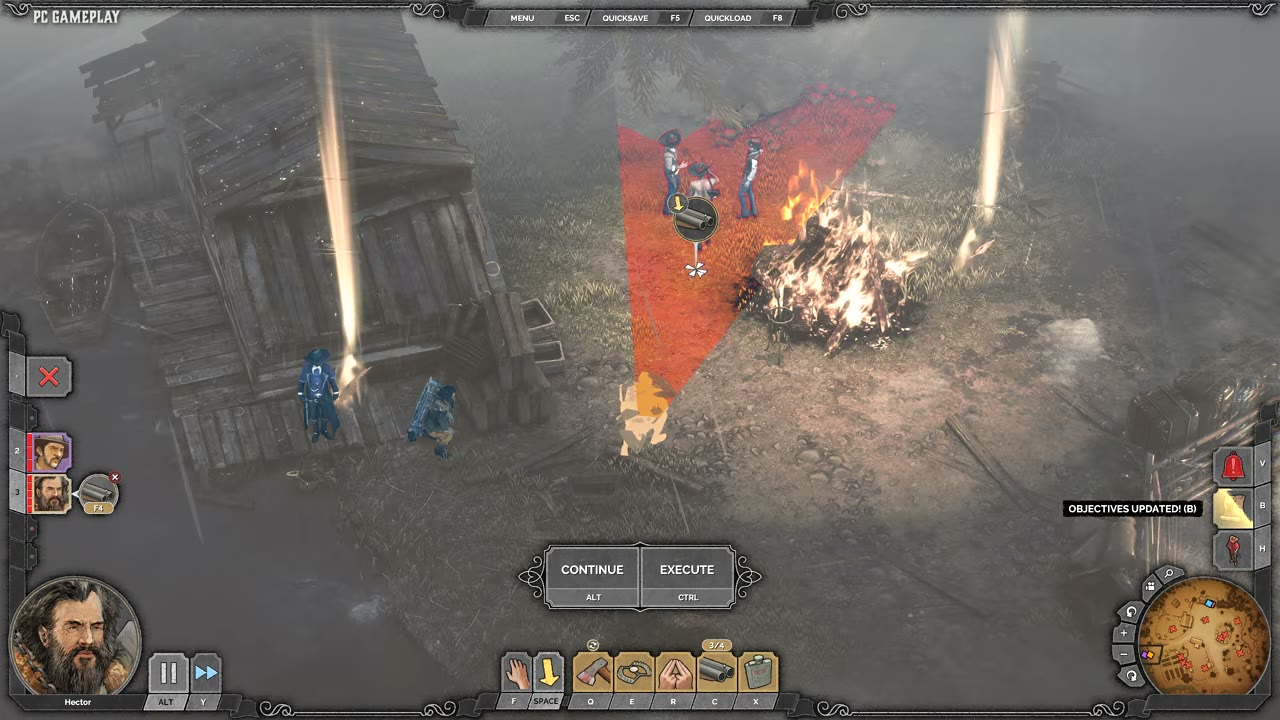

Showdown Mode Execution Interface

Desperados 3
- Status
- Released
- Year
- 2020
- Genre
- Strategy
- Platforms
- Windows, macOS, Linux
1. Summary
Showdown Mode execution interface overlays the live tactical HUD with a lower-center Continue/Execute prompt and playfield markers for queued character actions. It lets the player leave planning or fire synchronized commands while keeping character selection, ability slots, minimap, and spatial targeting information visible.
Overview
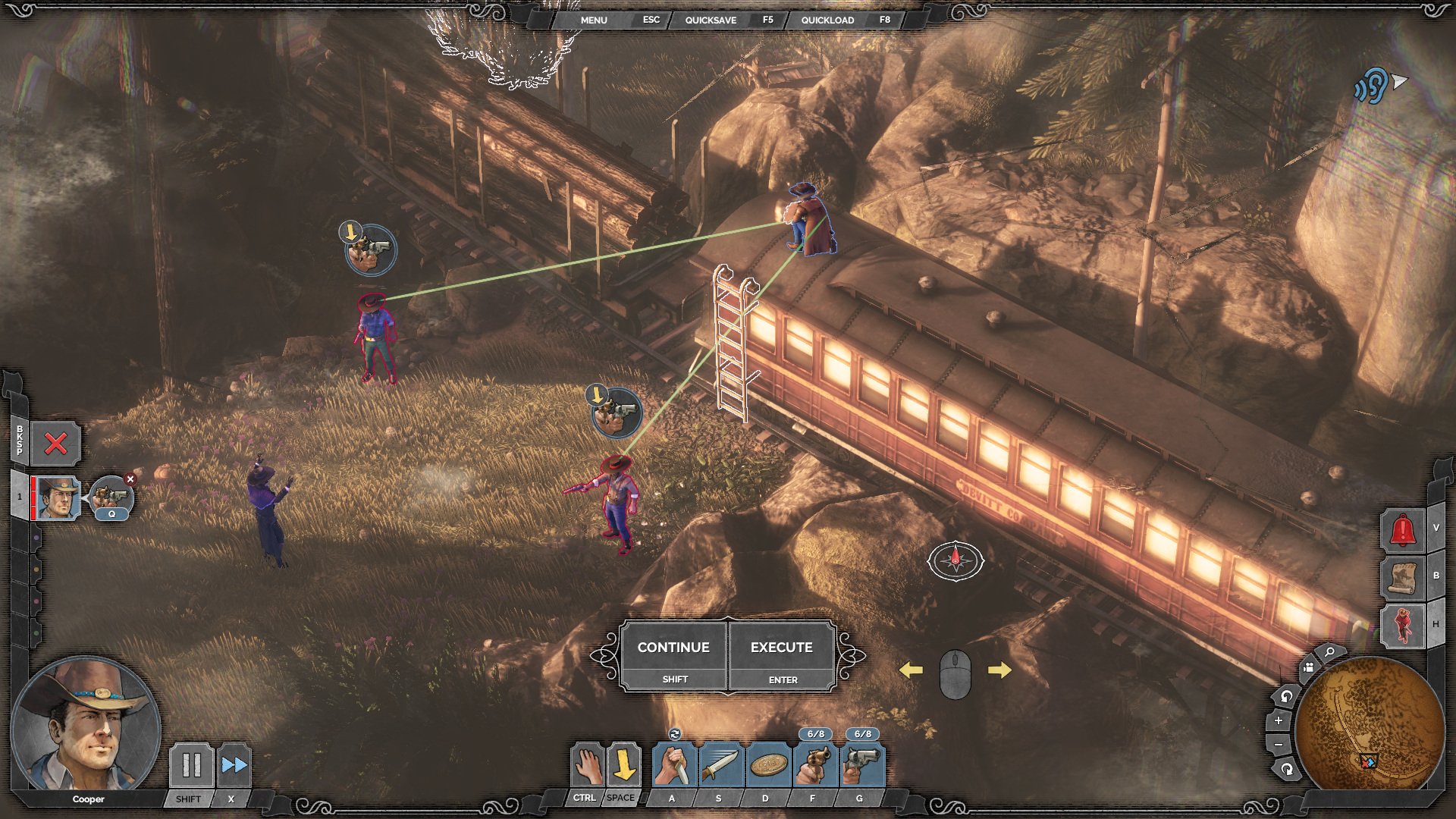
Showdown Mode overlays the live tactical view with a planning/execution layer. The key execution UI is the lower-center Continue/Execute prompt, while planned commands are represented in the playfield as circular queued-action markers connected by targeting lines. The surrounding gameplay HUD remains intact so the player can still read character state, ability options, minimap, alerts, and quick menu controls while preparing a synchronized sequence.
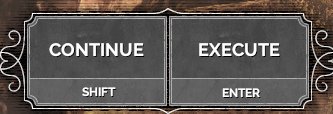
The execution prompt is a compact two-button panel placed just above the ability bar. Continue and Execute are equal-sized adjacent buttons, each with a keyboard binding label below the command text. This makes the commitment action visually explicit without replacing the normal character controls.
Queued commands are visible directly in the world. The marker sits near the intended target or destination and is connected by a targeting line, letting the player confirm which planned action will fire when Execute is pressed.

Job Story
When I have paused the encounter in Showdown Mode and assigned commands to one or more characters, I want a clear Execute control and visible queued-action markers, so that I can confirm the synchronized plan before returning to real-time stealth action.
Classification
- diegesis: Non-diegetic
- functional_type: HUD
- component_type: Button
Wireframe
+--------------------------------------------------------------------------------+
| Top quick menu: Menu | Esc | Quicksave | F5 | Quickload | F8                  |
|                                                                                |
|             [queued marker] ---- targeting line ---- [target/enemy]            |
|                                                                                |
| Left roster / portrait                                      Alert / hint stack |
| [selected character]                                       +----------------+ |
|                                                           | Minimap        | |
|                         +--------------------------+      +----------------+ |
|                         | CONTINUE    | EXECUTE    |                         |
|                         | key hint    | key hint   |                         |
|                         +--------------------------+                         |
|                         [selected character ability bar]                       |
+--------------------------------------------------------------------------------+
Components
- Continue button: lower-center command for leaving/resuming the planning state.
- Execute button: lower-center command for firing queued Showdown actions.
- Keyboard hint labels: small labels below each command button showing the current input binding.
- Queued action markers: circular icons in the playfield above targets or destinations.
- Targeting lines: green lines connecting queued actions to targets or actors.
- Character roster and portrait: left-side selected-character context that remains visible during planning.
- Ability bar: bottom-center abilities used to create queued actions.
- Minimap: bottom-right tactical overview retained while Showdown is active.
- Top quick menu strip: persistent menu/save/load controls.
Parameters & Audio
| Parameter | Value | Type | Notes |
|---|---|---|---|
| Visual state shift | the scene is darkened/desaturated during Showdown planning, helping queued markers and command buttons stand out from the terrain. | Text | — |
| Button emphasis | Continue and Execute use bordered rectangular panels with brighter label text and small key labels beneath. | Text | — |
| Spatial feedback | queued actions use circular markers and green targeting lines to indicate target linkage before execution. | Text | — |
| Audio feedback | expected short confirmation cues for entering Showdown, queuing actions, canceling queued actions, and pressing Execute; exact sounds are not visible in the source frame. | Text | — |
Dependencies & Logic
- Requires Showdown Mode to be active.
- Requires at least one controllable squad character; selected character context drives the portrait and ability bar.
- Queued markers depend on valid ability/target combinations and line-of-sight/range rules.
- Execute depends on queued command data stored per character/action.
- Enemy perception, patrol state, alarms, and environmental hazards determine the result after execution but remain represented spatially during planning.
- Input binding data supplies the key labels shown under Continue and Execute.
BDD Scenarios
Scenario: Execute a queued Showdown action
- Given
- Showdown Mode is active
- When
- the player presses Execute
- Then
- the queued action is triggered in real time
- And
- at least one character has a valid queued action marker in the playfield
- And
- the spatial marker for that action is consumed or updated
Scenario: Continue without executing
- Given
- Showdown Mode is active
- When
- the player presses Continue
- Then
- the interface returns toward live control without firing all queued actions as a synchronized execution
- And
- queued actions are visible
- And
- the normal HUD remains available
Scenario: Queue action feedback
- Given
- Showdown Mode is active
- When
- the player assigns an ability to a target
- Then
- a circular queued action marker appears near the target
- And
- a targeting line communicates the planned relationship between character, target, and action
Scenario: Input hints reflect controls
- Given
- Showdown Mode is active
- When
- the Continue and Execute prompt is shown
- Then
- each command displays its current keyboard binding beneath the label
Edge Cases
- No selected character: Showdown controls should not allow queuing an action without valid character context.
- Invalid target or blocked line-of-sight: queued marker should not appear, or should be removed if the target becomes invalid before execution.
- Multiple queued actions overlap visually: markers and lines must remain distinguishable enough to understand the plan.
- Execute pressed with no queued actions: command should either be disabled, ignored, or provide clear feedback without causing unintended behavior.
- Character becomes incapacitated or unavailable before execution: that character's queued action should be canceled or skipped cleanly.
- Rebound controls: key labels under Continue and Execute must update to match current bindings.
QA Notes
- Verify the lower-center Continue/Execute panel appears only while Showdown Mode is active.
- Verify queued actions create visible playfield markers and targeting lines before execution.
- Verify Execute triggers all eligible queued actions simultaneously or according to the game's synchronized-action rules.
- Verify Continue does not accidentally execute queued actions.
- Verify key labels update after input rebinding.
- Verify the prompt does not obscure essential ability cooldown/ammo indicators in the bottom HUD.
- Verify minimap, right-side alerts, and quick menu remain readable under the Showdown visual treatment.
Mechanic Links
- Tactical Stealth Mission Loop - The Showdown execution interface displays and controls queued multi-character actions for synchronized plan execution.
- Showdown Synchronized Planning - The Showdown Mode Execution Interface exposes the core Continue/Execute controls, queued-action markers, and targeting lines used to review and commit synchronized plans.
- Squad Character Ability System - The Showdown execution interface uses the selected character's ability loadout to queue and execute synchronized squad actions.
- Takedown and Body Control - The Showdown Mode execution interface lets players queue synchronized takedowns and verify planned targets before executing them in real time.
- Lethal and Non-Lethal Combat Resource Limits - The Showdown Mode Execution Interface lets players queue and execute resource-consuming combat actions while showing queued markers and execution controls.
- Distraction and Noise Manipulation - The Showdown execution interface displays queued distraction actions and lets the player execute them with synchronized follow-up moves.
- Movement, Terrain, and Cover Navigation - The Showdown execution interface displays queued movement/action planning that must respect posture, path, speed, and detection rules.
- Cooper's Gunslinger Kit - The Showdown Mode Execution Interface is required to queue and execute dual revolver shots or broader synchronized gun/knife plans from this kit.
- Doc McCoy's Apothecary Sniper Kit - The Showdown Mode Execution Interface allows kit actions such as sniper shots, gas throws, and setup actions to be queued and executed with synchronized squad plans.
- Hector's Brute Trapper Kit - The Showdown Mode interface queues and executes this kit's timed actions alongside other squad abilities for synchronized takedowns and lures.
- Kate's Femme Fatale Kit - The Showdown Mode Execution Interface lets Kate's eligible actions be queued with other squad actions for synchronized social manipulation, shots, or takedown follow-ups.
- Isabelle's Voodoo Witch Kit - Showdown interface supports queued/synchronized Isabelle actions such as Stella targeting and linked takedown plans.
References
- 1.
Desperados III (L250-256 of 283)
- 2.
Desperados III (L266-270 of 283)
- 3.
- 4.
DESPERADOS III - Know THESE Important Tips Before Playing (1:23-1:28)