
Shadow Mode Command UI
Shadow Tactics: Blades of the Shogun
- Status
- Released
- Year
- 2016
- Genre
- Indie, Strategy
- Platforms
- Windows, macOS, Linux
1. Summary
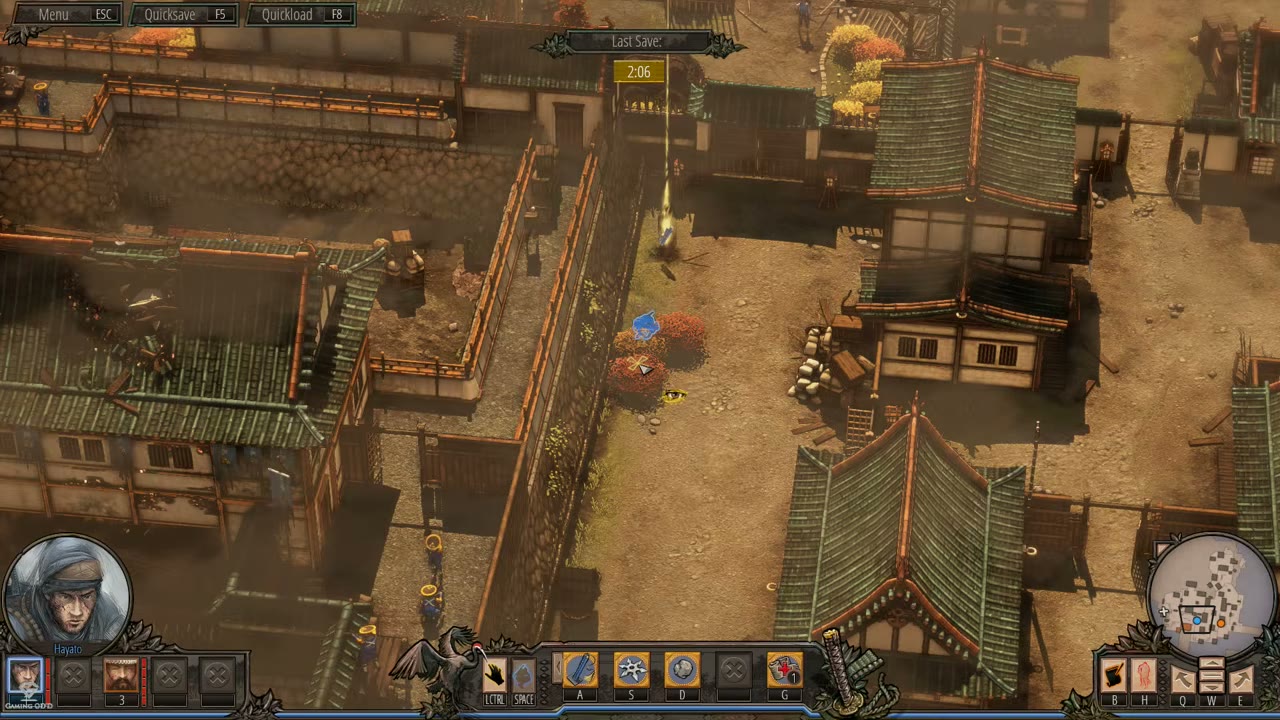
The Shadow Mode Command UI is a non-diegetic overlay that activates when the player presses LSHIFT to enter Shadow Mode. It allows the player to queue one action per character and then execute all queued actions simultaneously with the on-screen execute prompt. The UI provides visual feedback through the left-side Shadow Mode command stack, queued action icons floating above character positions, the active-character ground overlay, and a modified action bar that keeps the Shadow Mode controls visible while normal ability slots remain available for planning.
Overview
The Shadow Mode Command UI is a non-diegetic modal overlay that activates during gameplay to enable coordinated simultaneous actions across multiple characters. It is the primary interface for the Shadow Mode Coordination System (m_15), one of the most important mechanics in the game.
Activation and Mode Indicator
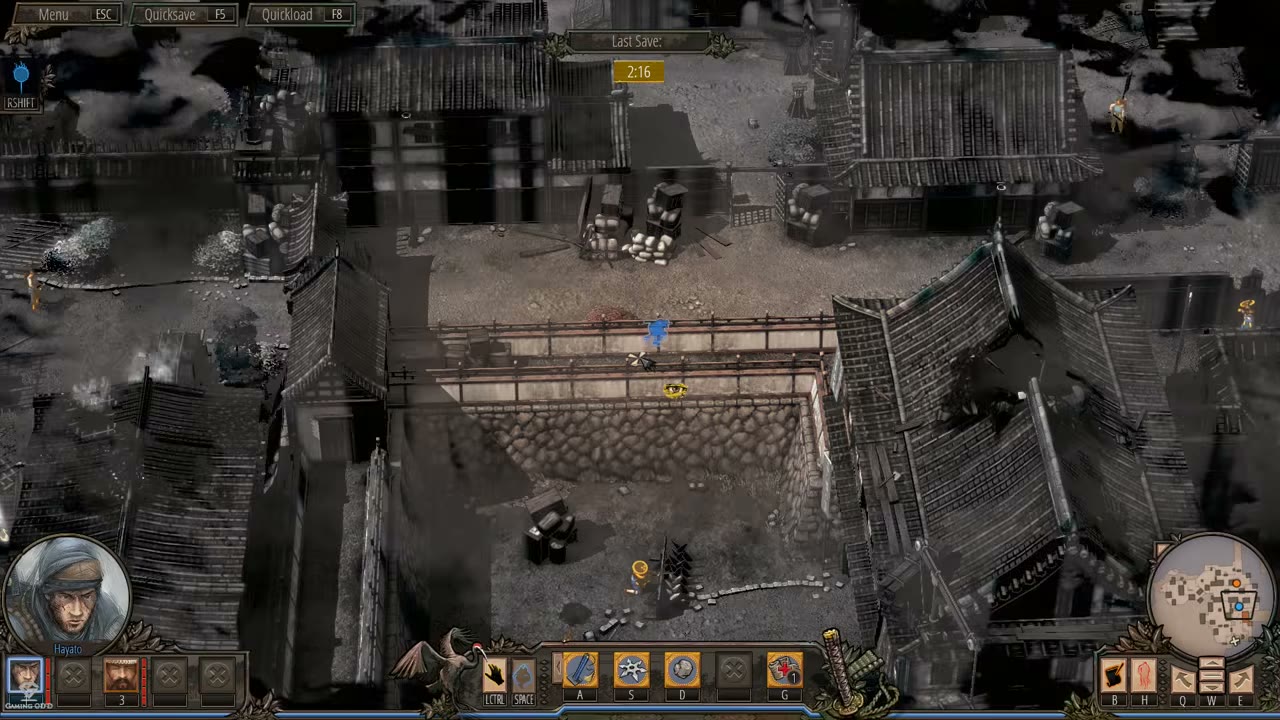
When Shadow Mode is active, a vertical command stack appears on the left side of the screen. It shows the Shadow Mode state, the LSHIFT toggle prompt, and the execute prompt for saved actions:
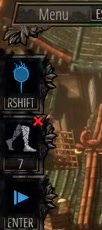
Full HUD in Shadow Mode
The complete HUD layout during active Shadow Mode planning shows the left command stack, queued action indicators, active-character overlay, portraits, action bar, and minimap:
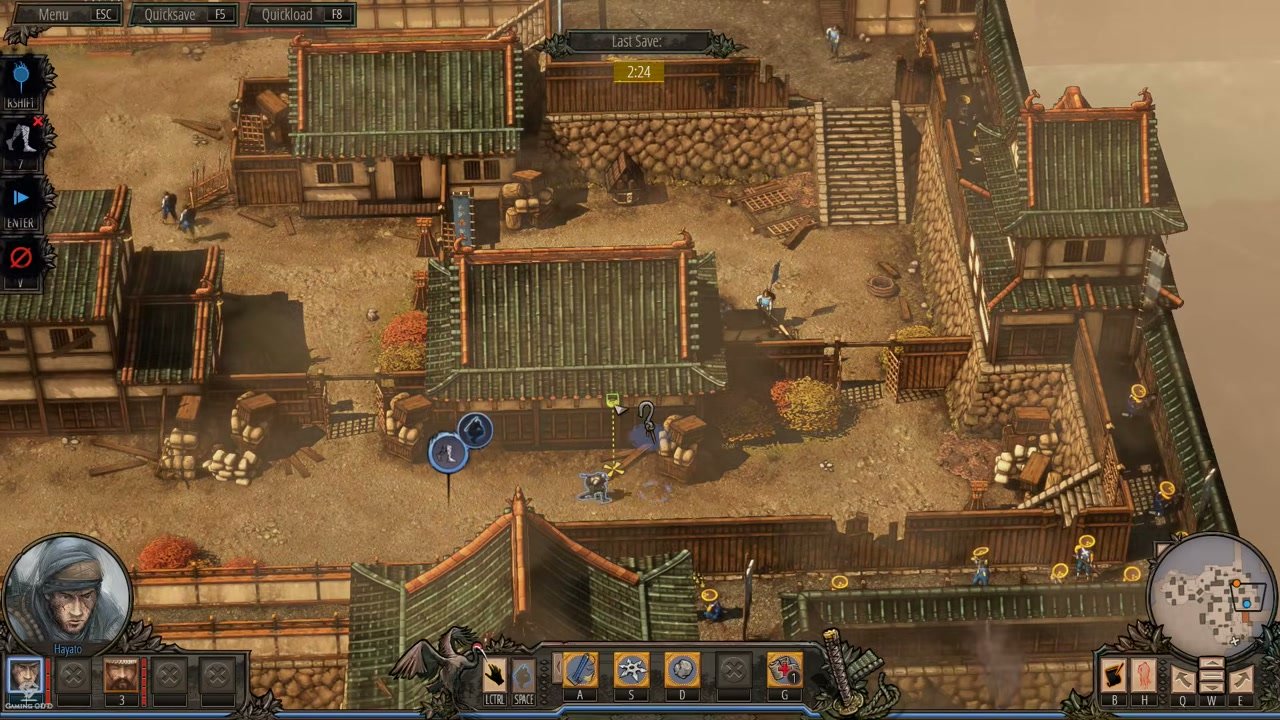
When Shadow Mode is active, the screen gains a subtle darkened planning overlay. The left command stack exposes the mode state and execute prompt, while saved commands appear as blue circular icons above the planned character positions.
Character Portraits and Action Bar
The character portrait strip at the bottom-left shows all available squad members. During Shadow Mode, the player switches between characters to assign one queued action per character:
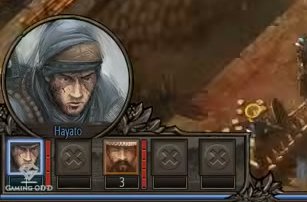
The action bar at the bottom center shows Shadow Mode controls and character-specific abilities. During planning, the player uses this command surface to select abilities and save actions:
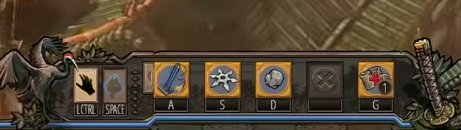
Queued Action Visual Feedback
When actions are queued, colored circular icons float above the planned character positions, indicating the saved command for each character. The icon stack uses blue circular frames in the observed HUD, and the active-character overlay marks where the current command is being planned.
Tutorial Pop-up
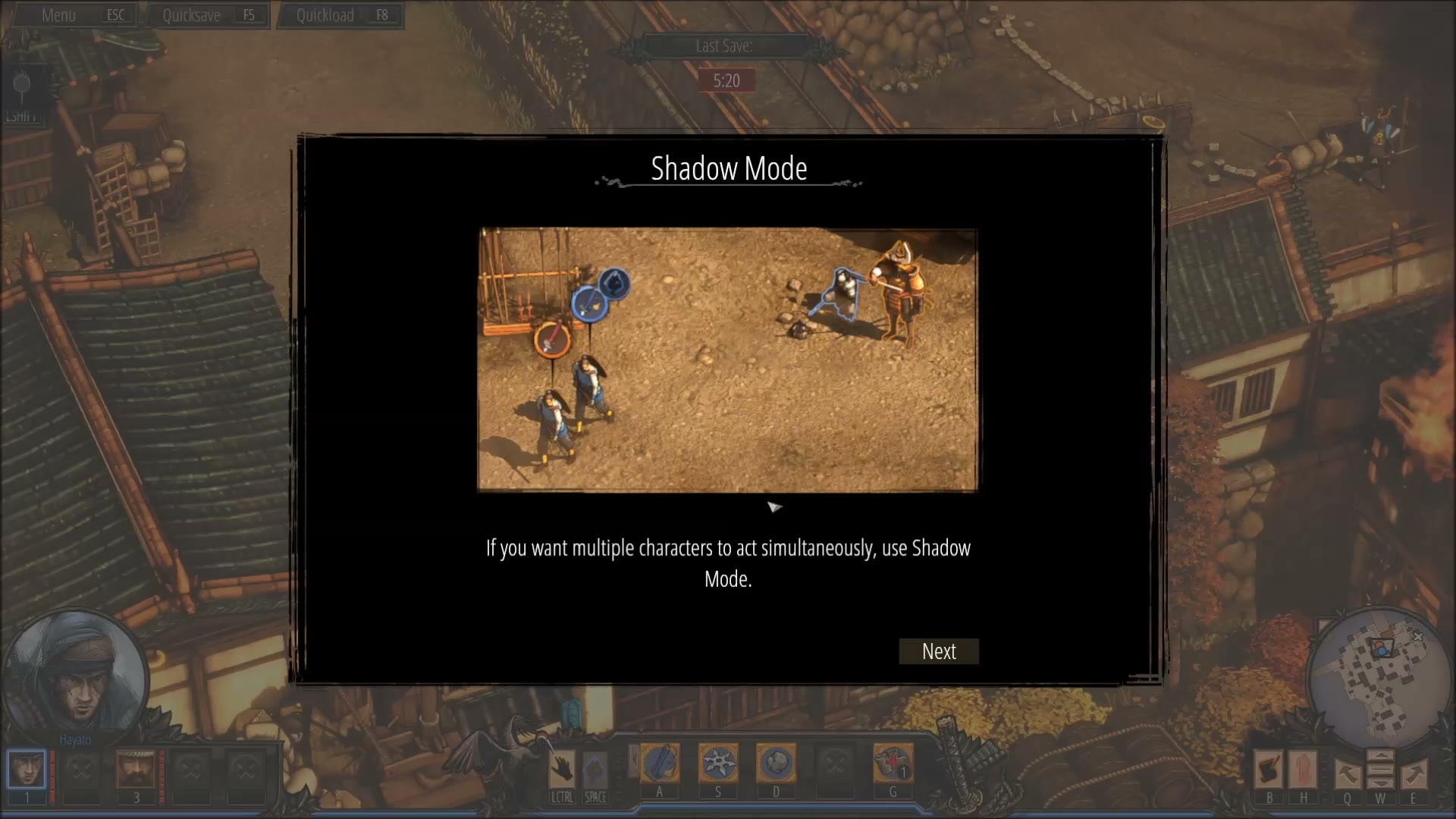
On first encounter with Shadow Mode, a centered modal tutorial window appears:
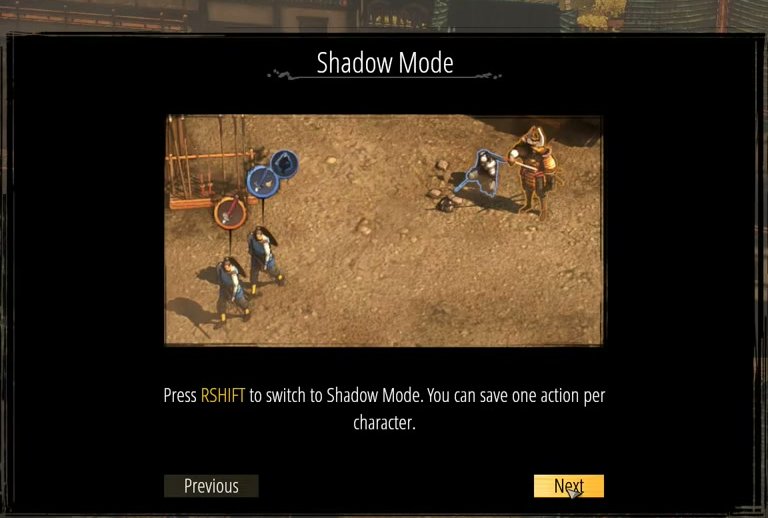
The tutorial explains that Shadow Mode is used when multiple characters need to act simultaneously. It instructs the player to press LSHIFT to switch to Shadow Mode and save one action per character. A later tutorial page shows ENTER as the execute prompt for all saved actions.
Execution Flow
- Player presses LSHIFT to enter Shadow Mode
- The left Shadow Mode command stack appears and the screen enters a planning presentation
- Player switches between characters using the portrait panel or number keys
- Player assigns one ability/action to each character
- Queued action icons appear above the relevant character positions
- Player uses the execute prompt to trigger all saved actions simultaneously
- Shadow Mode deactivates; the HUD returns to normal gameplay
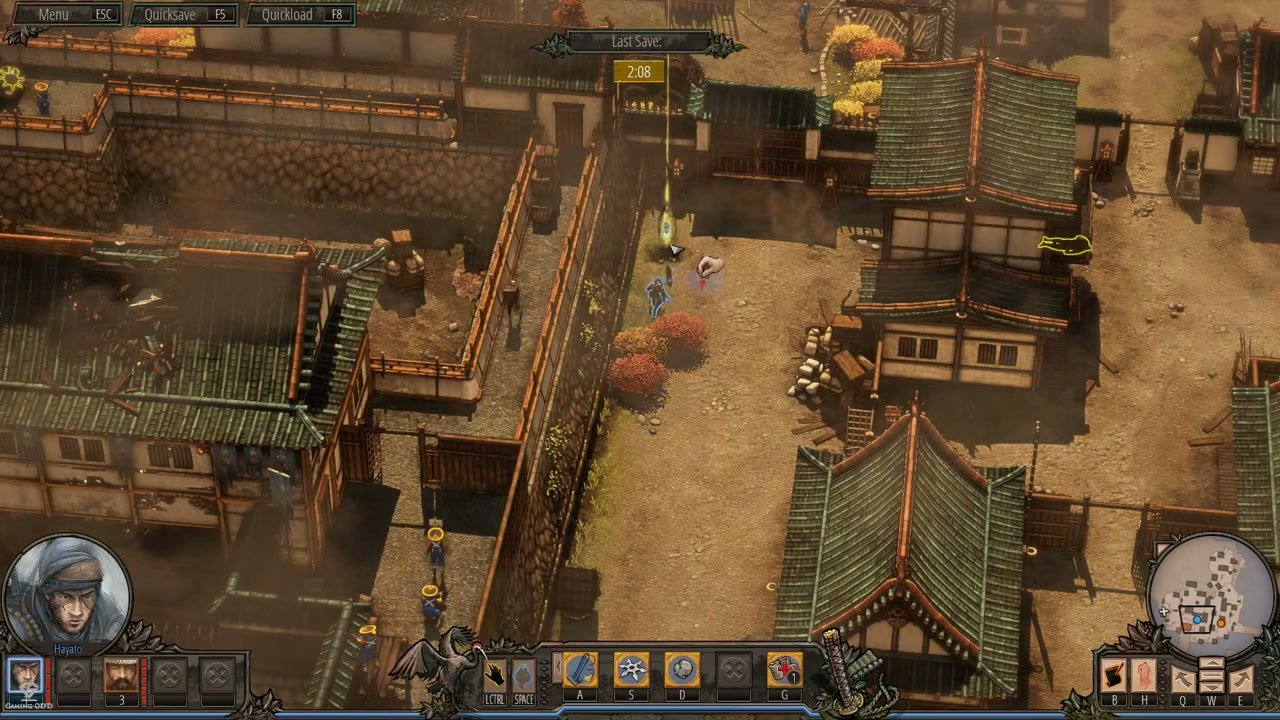
The Shadow Mode Command UI is the critical interface element that makes multi-character tactical coordination possible, serving as the bridge between the Shadow Mode Coordination System mechanic and the player’s ability to plan and execute synchronized stealth operations.
Job Story
When multiple enemies are guarding each other and cannot be eliminated one at a time without triggering an alarm, I want to queue coordinated actions for multiple characters and execute them simultaneously, so that I can silently eliminate all guards in perfect synchronization without detection.
Classification
- diegesis: Non-diegetic
- functional_type: HUD
Wireframe
+--------------------------------------------------------------+
| [Menu] [Quicksave] [Quickload]        Last Save       [Menu] |
|                                                              |
| [Shadow Mode stack]                                          |
|   [LSHIFT toggle]                                            |
|   [queued character slot]                                    |
|   [ENTER execute]                                            |
|                                                              |
|        ISOMETRIC GAME WORLD                                  |
|                                                              |
|        [queued action icon]   [active-character overlay]      |
|                 [planned target / path marker]               |
|                                                              |
| [Selected portrait] [party slots] [Shadow controls][A/S/D/G]  |
|                                                   [Minimap]  |
+--------------------------------------------------------------+
When Shadow Mode is active:
- The screen gains a subtle darkened planning presentation
- A vertical command stack appears on the left side with LSHIFT and execute prompts
- Queued action icons float as blue circular markers above the planned character positions
- The active character shows a ground/target overlay for the command being planned
- The bottom action bar keeps Shadow Mode controls and ability slots visible
- The character portrait panel remains available for switching between squad members
Components
- Shadow Mode Command Stack (left side): A vertical stack shown during Shadow Mode with the mode icon, LSHIFT toggle prompt, saved-action slots, and execute prompt. Confirms that the player is in planning mode.
- Active-Character Ground Overlay: A translucent ground/target marker around the currently planned command. Indicates where the active character's saved action or movement command is being placed.
- Queued Action Icons (per character): Circular blue icons floating above planned character positions after actions have been saved. Each icon represents a queued command waiting for synchronized execution.
- Execute Prompt: The command stack shows the key used to execute saved actions in the observed keyboard footage (ENTER). Activating it executes all saved actions simultaneously.
- Action Bar: The bottom command surface remains visible with Shadow Mode controls and character ability slots. The player uses it to choose abilities and save planned actions.
- Character Portrait Panel: The bottom-left portrait panel remains visible and supports switching between squad members while queuing actions.
- Shadow Mode Tutorial Pop-up: A centered modal window titled "Shadow Mode" with a diagram showing multiple characters and queued action icons, explanatory text, and Previous/Next navigation buttons.
Parameters & Audio
| Parameter | Value | Type | Notes |
|---|---|---|---|
| Shadow Mode Enter | A distinct atmospheric sound cue (whoosh or ethereal tone) when pressing LSHIFT to enter Shadow Mode. | Text | — |
| Action Queued | A subtle click or confirmation sound when an action is assigned to a character. | Text | — |
| Execute All | A dramatic synchronized sound cue when the execute prompt is activated to run all saved actions, possibly with a brief slow-motion audio effect. | Text | — |
| Shadow Mode Exit | A softer deactivation tone when pressing LSHIFT again to cancel Shadow Mode without executing. | Text | — |
| Tutorial Open | A neutral notification chime when the tutorial pop-up first appears. | Text | — |
| Ambient Shift | Subtle ambient audio filter applied during Shadow Mode to emphasize the planning/tactical state. | Text | — |
Dependencies & Logic
- Minimum Squad Size: Shadow Mode requires at least 2 characters in the current mission squad to be meaningful (queuing one action per character).
- Character State: Each character must be in a state that allows the queued action (e.g., not already mid-animation, not incapacitated).
- Action Availability: The queued action must be available (not on cooldown, sufficient resources, etc.) at the time of execution, not just at the time of queuing.
- Game State: Shadow Mode cannot be activated during cutscenes, dialogue sequences, or menu screens.
- Campaign Progression: Available from the mission where the tutorial is triggered (typically the first mission where multiple characters are available).
BDD Scenarios
Scenario: Enter Shadow Mode
- Given
- the player is in active gameplay with at least 2 characters in the squad
- When
- the player presses LSHIFT
- Then
- Shadow Mode activates with the left-side command stack visible
- And
- the HUD enters its planning presentation
- And
- the ability bar remains available for selecting actions
Scenario: Queue action for first character
- Given
- Shadow Mode is active
- When
- the player switches to Character A and assigns an ability
- Then
- a queued action icon appears above Character A's planned position
- And
- the execute prompt is available in the command stack
Scenario: Queue action for second character
- Given
- Shadow Mode is active with one action already queued for Character A
- When
- the player switches to Character B and assigns a different ability
- Then
- a queued action icon appears above Character B's planned position
- And
- both queued actions are now visible
Scenario: Execute queued actions
- Given
- Shadow Mode is active with actions queued for multiple characters
- When
- the player activates the execute prompt shown in the command stack
- Then
- all queued actions execute simultaneously in real time
- And
- Shadow Mode deactivates
- And
- the command stack disappears
- And
- the HUD returns to normal gameplay
Scenario: Cancel Shadow Mode
- Given
- Shadow Mode is active with actions queued
- When
- the player presses LSHIFT or ESC
- Then
- all queued actions are cleared
- And
- Shadow Mode deactivates
- And
- no actions are executed
Scenario: Tutorial pop-up on first use
- Given
- the player has not yet encountered Shadow Mode
- When
- Shadow Mode is first introduced
- Then
- a tutorial pop-up appears explaining the mechanic
- And
- the pop-up shows a diagram of multiple characters with action icons
- And
- the player can navigate the tutorial with Previous/Next buttons
- And
- gameplay is paused until the tutorial is dismissed
Edge Cases
- Only one character in squad: Shadow Mode button should be disabled or hidden when only one character is available, as simultaneous coordination is meaningless.
- Character incapacitated during planning: If a queued character dies or becomes incapacitated before execution, their action is silently dropped and remaining actions execute.
- Action becomes invalid between queue and execute: If a target moves out of range or dies before execution, the queued action fails gracefully with a visual/audio cue.
- No actions queued before execute: Activating the execute prompt with no saved actions should be a no-op or produce a feedback sound.
- Shadow Mode during active enemy alert: Shadow Mode may be blocked or limited during combat/alert states.
- Quick Load during Shadow Mode: Loading a save should cleanly exit Shadow Mode.
- All queued actions fail: If every queued action is invalid at execution time, the player should receive feedback and return to normal play.
QA Notes
- Verify the Shadow Mode command stack appears on the left side when active.
- Verify LSHIFT correctly toggles Shadow Mode according to the displayed prompt.
- Verify queued action icons appear above the correct planned character positions.
- Verify each character receives exactly one queued action unless the game explicitly allows replacement.
- Verify the active-character ground/target overlay renders correctly on different terrain types.
- Verify the action bar remains usable for selecting abilities while planning saved actions.
- Verify the execute prompt only executes saved actions when at least one action is queued.
- Verify LSHIFT/ESC correctly cancels Shadow Mode and clears queued actions.
- Verify simultaneous execution triggers all saved actions at the same frame/tick.
- Verify the tutorial pop-up appears only once and can be dismissed with Previous/Next or Close controls.
- Verify audio cues play for enter, queue, execute, and cancel events.
- Verify Shadow Mode cannot be activated during cutscenes or dialogue.
- Verify the UI scales correctly at different resolutions.
- Verify Shadow Mode works correctly with all supported squad combinations.
Mechanic Links
- Character Ability System - The Character Ability System determines which actions are available for queuing in Shadow Mode. Each character's four abilities (displayed on the Ability Command Bar) become the possible queued actions.
- Character Movement System - The Character Movement System is used when the player positions characters before activating Shadow Mode. Movement commands can also be queued as the single action for a character in Shadow Mode.
- Shadow Mode Coordination System - The Shadow Mode Command UI is the primary interface for the Shadow Mode Coordination System mechanic. It enables the player to queue one action per character and execute them simultaneously, providing the visual feedback layer for the coordination mechanic.
- Normal Guards - Shadow Mode Command UI lets players queue synchronized takedowns or movement around multiple Normal Guards and their overlapping sightlines.
- Samurai - Shadow Mode Command UI supports coordinated stun-and-follow-up sequences needed when a Samurai is disabled but not killed by the first action.
- Four-Slot Ability Binding Framework - The Shadow Mode Command UI is entered from the adjacent G command and uses selected-character abilities for planned coordinated execution.
- Melee Takedown Variations - Shadow Mode Command UI can queue melee takedowns for simultaneous execution, requiring the UI to preserve owner-specific target validity and timing.
- Ranged Elimination Abilities - Shadow Mode command UI can queue ranged eliminations as part of synchronized execution plans while still showing command targets and timing.
- Area-of-Effect Crowd Control Attack - Shadow Mode Command UI can be used to plan coordinated timing around this high-commitment area attack alongside other character actions.
- Disguise and Social Infiltration System - Shadow Mode can coordinate other squad members to exploit the attention window created by conversation distraction.
- Vision Cone Debuff Ability - Shadow Mode Command UI can stage the throw alongside synchronized movement or follow-up actions during the short effect window.
References
- 1.
Shadow Tactics: Blades of the Shogun Review – Is This the Best Version Yet? (4:11-4:40)
- 2.
Osaka Castle Mission 1 - Shadow Tactics-Blades of The Shogun (Hardcore) (19:12-19:30)
- 3.
Osaka Castle Mission 1 - Shadow Tactics-Blades of The Shogun (Hardcore) (19:35-20:00)
- 4.
Let's Play Shadow Tactics Blades Of The Shogun - Ep. 1 - Silent Gameplay & Death! (29:46-29:57)