
Enemy Vision Cones
Shadow Tactics: Blades of the Shogun
- Status
- Released
- Year
- 2016
- Genre
- Indie, Strategy
- Platforms
- Windows, macOS, Linux
1. Summary
A world-space tactical HUD overlay that renders semi-transparent, two-zone vision cones projecting from each enemy's facing direction onto the ground plane. Players inspect enemy fields of view by right-clicking, revealing cone geometry that dynamically responds to enemy head-turning, patrol movement, and environmental occlusion (walls, fences, rocks). The cones communicate safe vs. danger zones and serve as the spatial carrier for detection state colors (green/yellow/red).
Overview
Overview
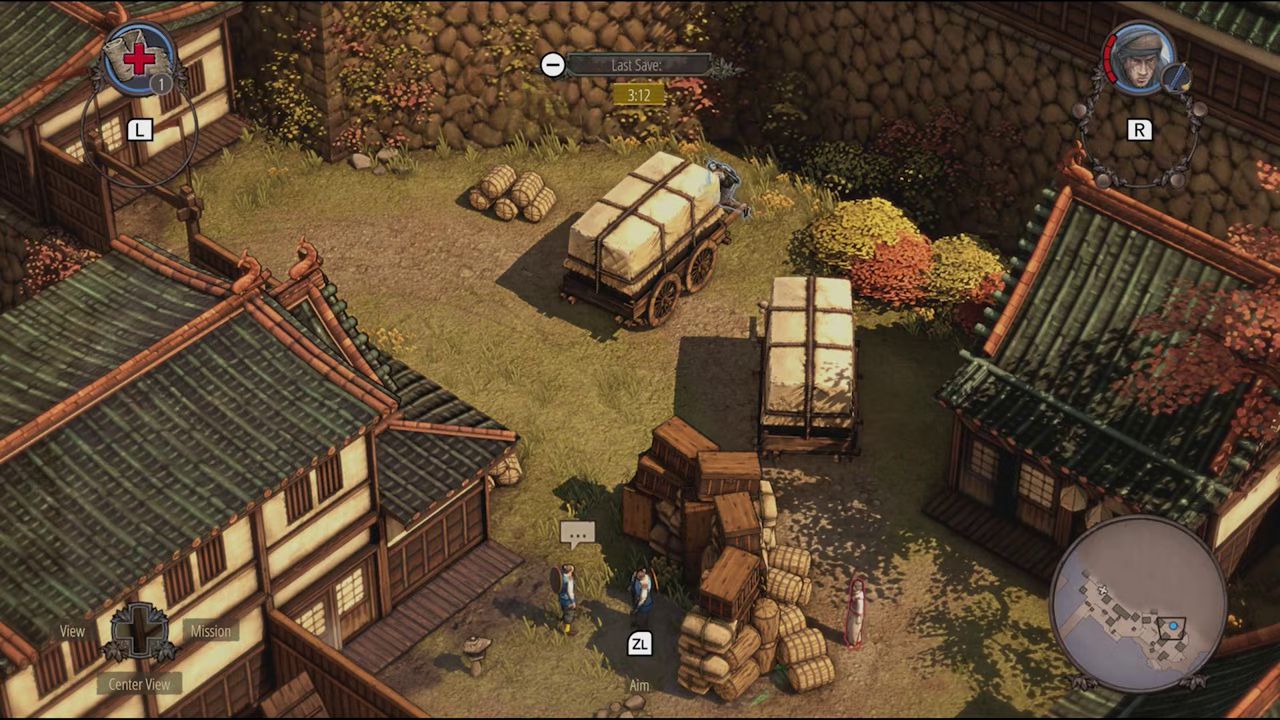
Enemy Vision Cones are the foundational tactical overlay in Shadow Tactics: Blades of the Shogun. They project semi-transparent field-of-view shapes onto the ground plane from each enemy’s facing direction, communicating where the enemy can see and how detection will build if a character enters the watched area.
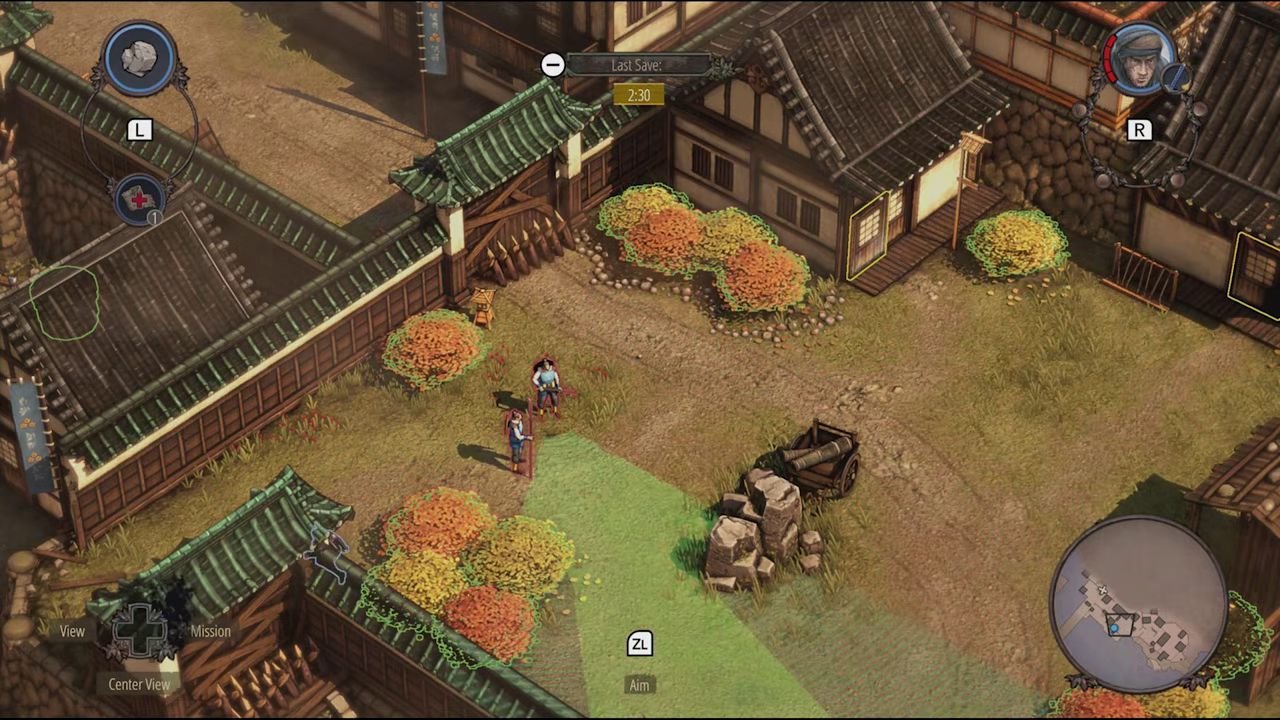
Vision Cone Geometry
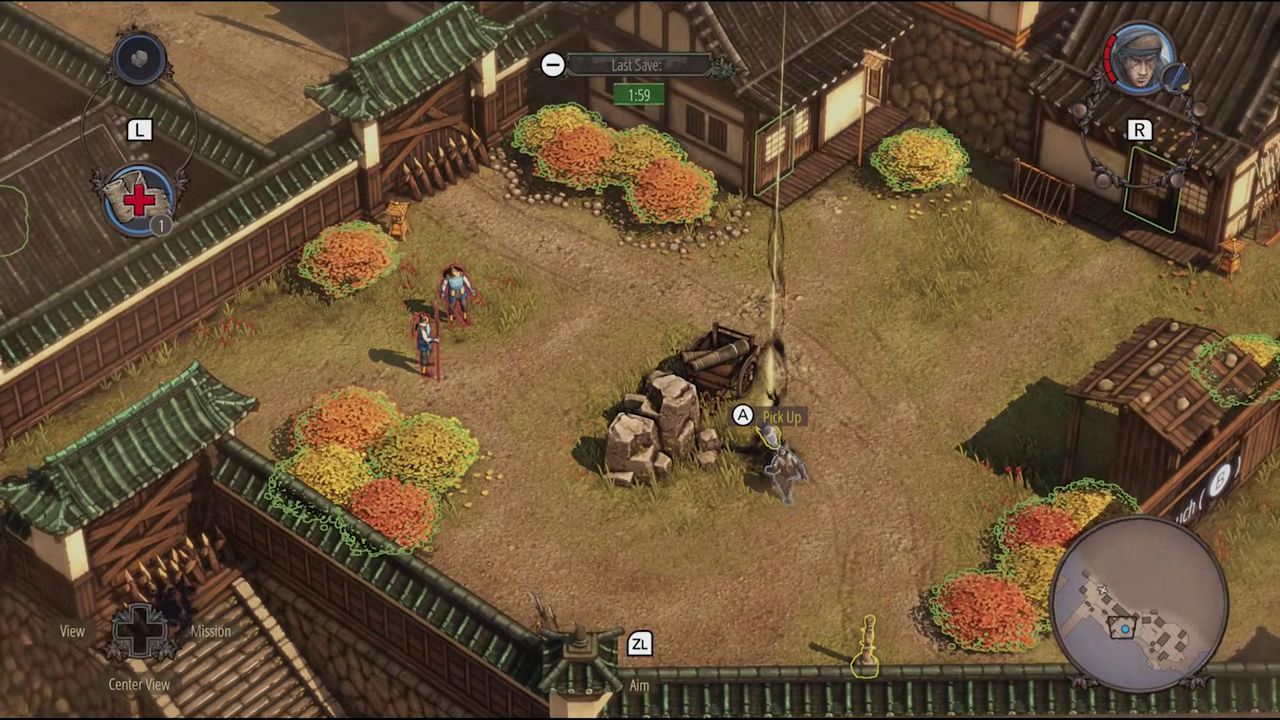
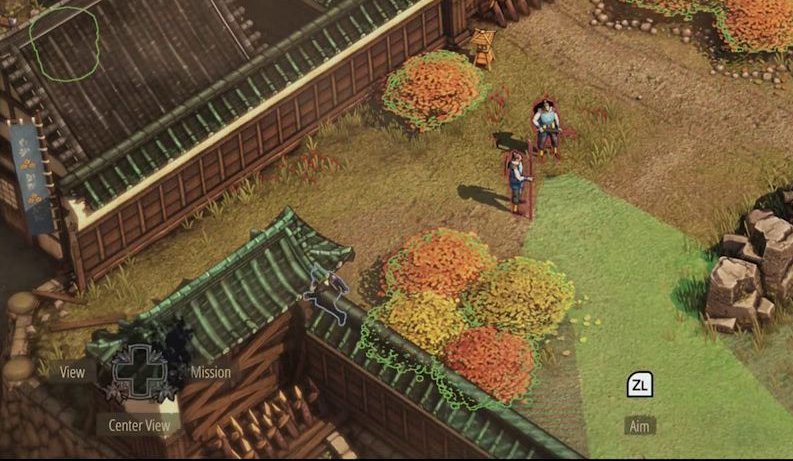
Each vision cone is a semi-transparent wedge projected from the enemy’s position onto the ground plane. The cone is divided into two distinct visual zones:
Inner Zone (Solid Fill): A darker, solid-colored region closest to the enemy character. This represents the primary detection zone — standing characters within this area trigger detection buildup.
Outer Zone (Striped/Hatch Pattern): A lighter region with a striped or hatched texture extending further from the enemy. Crouching characters remain undetected in this zone, providing a tactical margin for stealth movement.
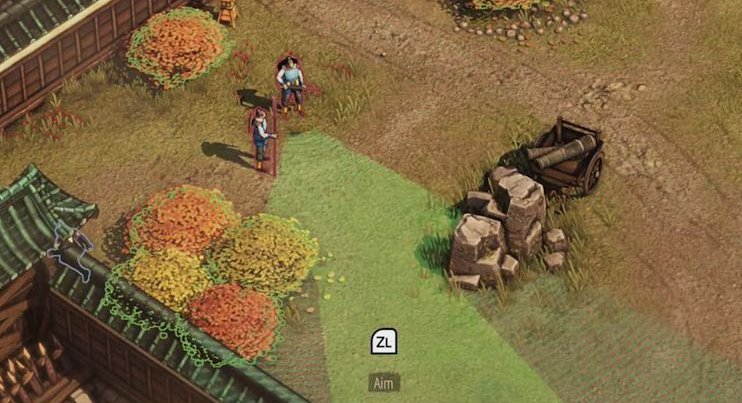
Environmental Occlusion
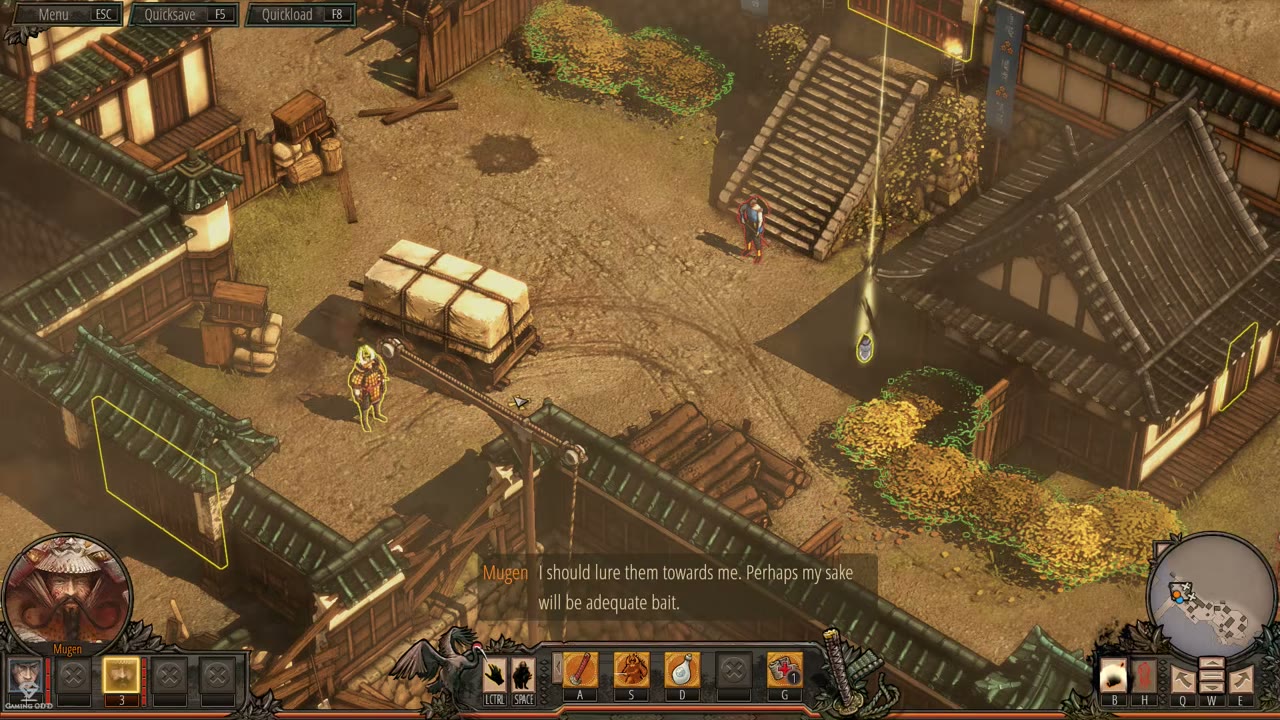
Vision cones are dynamically clipped by environmental geometry. Walls, fences, rocks, buildings, and carts all block the cone’s projection, creating irregular polygon shapes and blind spots behind obstacles. This is a core tactical element — players exploit these occlusion-generated blind spots to move characters safely.
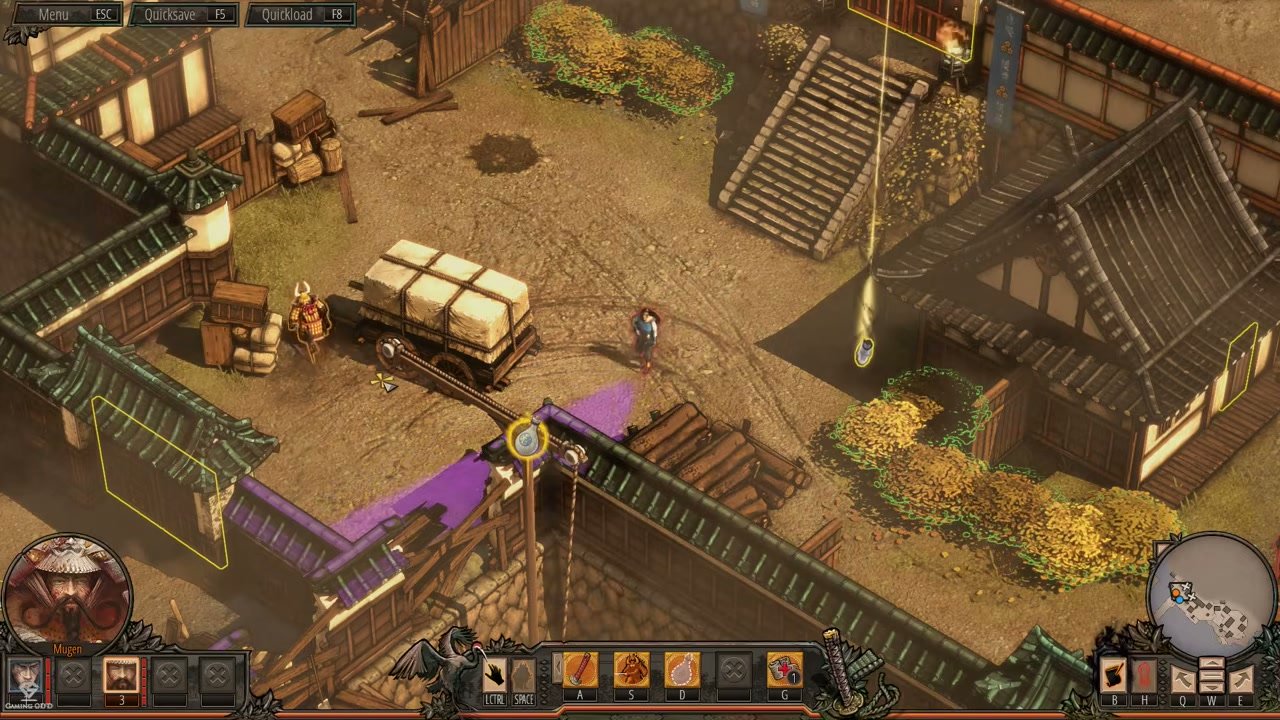
Inspection via Right-Click
Players can right-click (MOUSE R) on an enemy to select them and inspect their field of view. This action highlights the inspected enemy and confirms which cone is being evaluated, allowing the player to observe how the visible sight area relates to the enemy’s position and facing direction.
Dynamic Cone Rotation
Enemies physically turn their heads during patrol, and the vision cone smoothly rotates to match their facing direction in real-time. This creates a dynamic, living field of view that players must account for when timing movement through guarded areas.
Detection Color States
The vision cone’s fill color transitions dynamically based on the stealth detection state:
| State | Cone Color | Overhead Icon | Meaning |
|---|---|---|---|
| Undetected | Green | Eye icon (passive) | Safe — no detection in progress |
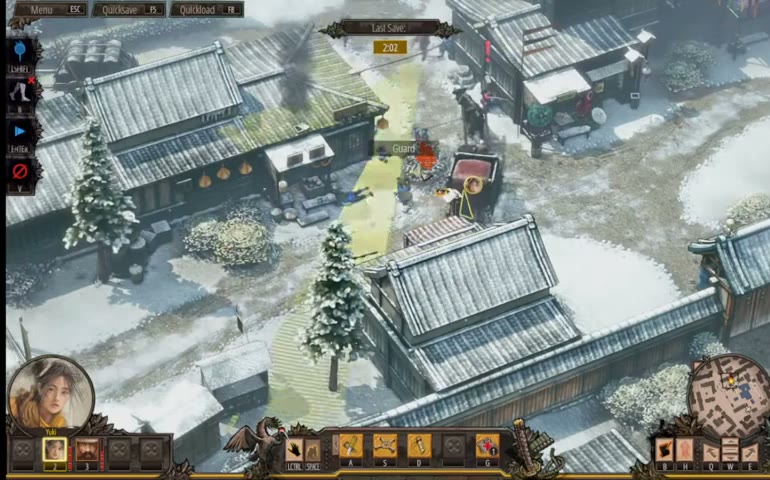
| Suspicion | Yellow fill | Yellow question mark | Detection buildup or investigation — enemy is reacting to suspicious input |
| Alert | Red | Red exclamation mark | Full detection — alarm triggered |
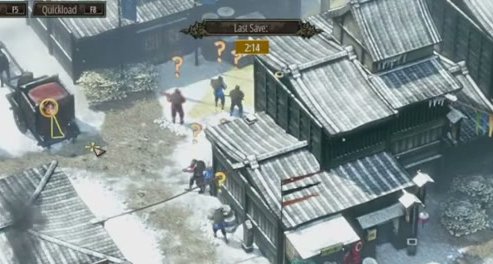
The yellow detection buildup begins as a fill animation that progresses from the enemy outward through the cone. If the yellow fill reaches the player character, full detection occurs and the cone turns red.
Relationship to Detection Feedback Overlay (ui_13)
Enemy Vision Cones (ui_11) and the Detection Feedback Overlay (ui_13) are tightly coupled:
- ui_11 defines the geometric shape, zones, environmental interaction, and inspection mechanic of the cone itself
- ui_13 defines the color states (green→yellow→red) and overhead icons that communicate detection progress
The vision cone is the spatial carrier for detection feedback — the color transitions described in ui_13 are rendered directly onto the cone geometry defined in ui_11.
Job Story
When I am planning a stealth approach through a guarded area, I want to inspect each enemy's field of view to identify safe movement paths and blind spots, so that I can position my characters without triggering detection.
Classification
- diegesis: Non-diegetic
- functional_type: HUD
Wireframe
┌──────────────────────────────────────────────┐
│              ISOMETRIC GAME VIEW              │
│                                              │
│            ┌─────┐                           │
│            │ EYE │  ← Eye icon (toggleable)  │
│            └──┬──┘                           │
│               │                              │
│            [ENEMY]                           │
│            /     \                           │
│     Inner /  Outer\  ← Two-zone cone         │
│     zone /   zone  \    projected on ground  │
│    (solid) (striped)                         │
│          /         \                         │
│         /           \                        │
│        /             \                       │
│                                              │
│  ENVIRONMENT BLOCKS:  ┌──────┐               │
│  Cone truncated at →  │WALL  │← occlusion    │
│  solid objects        └──────┘   edge         │
└──────────────────────────────────────────────┘
Ground-plane projection layout:
- Cone originates from enemy position, fans outward in a wedge shape
- Inner zone: solid, darker green fill (primary detection zone)
- Outer zone: lighter green with striped/hatch pattern (safe when crouching)
- Cone is dynamically clipped by environmental geometry (walls, rocks, fences, buildings)
- Cone rotates in real-time as enemy turns their head during patrol
Components
- Vision Cone Geometry — Semi-transparent wedge projected onto the ground plane from the enemy's facing direction. Composed of two visual zones:
- Inner Zone (Solid Fill): Darker, solid-colored region closest to the enemy. Standing characters in this zone trigger detection buildup (yellow).
- Outer Zone (Striped/Hatch Pattern): Lighter, patterned region extending further from the enemy. Crouching characters remain undetected here.
- Environmental Occlusion Edge — The cone's outer boundary is dynamically clipped at solid environmental objects (walls, fences, rocks, buildings, carts), creating irregular non-symmetrical polygon shapes rather than perfect wedges. Blind spots form behind obstacles.
- Eye Icon Indicator — A small stylized eye icon appears near the enemy when the player selects/right-clicks them to activate vision cone visualization. The icon persists while the cone is displayed. Its color may indicate the enemy's current detection state.
- Cone Rotation Animation — The cone smoothly rotates as enemies physically turn their heads during patrol. Players observe real-time field-of-view changes as enemies scan their surroundings.
- Detection Color Overlay — The cone's fill color transitions dynamically based on the stealth detection state (detailed in ui_13 Detection Feedback Overlay):
- Green = Undetected (default)
- Yellow fill = Detection buildup (player is inside detection zone)
- Red = Full detection/alert
- Overhead Suspicion Icon — A yellow question mark (❓) appears above the enemy's head during investigation/suspicion states. Transitions to a red exclamation mark (❗) upon full detection.
Parameters & Audio
| Parameter | Value | Type | Notes |
|---|---|---|---|
| Vision cone inspection | No dedicated audio when toggling vision cone visibility via right-click | Text | — |
| Detection buildup (yellow state) | Subtle rising tension sound or musical sting as cone fills with yellow | Text | — |
| Full detection (red state) | Sharp alert sound, enemy vocal bark ("What was that?" during suspicion, "Intruder!" during alert) | Text | — |
| Enemy head-turn | No audible cue — vision cone rotation is purely visual | Text | — |
| The audio feedback for detection states is managed by the Detection Feedback Overlay (ui_13) | The audio feedback for detection states is managed by the Detection Feedback Overlay (ui_13) | Text | — |
Dependencies & Logic
- Stealth Detection System (m_2): Vision cones are the spatial projection of the detection system. Cone angle, length, and detection zones are driven by detection parameters.
- Enemy Type Hierarchy (m_12): Different enemy types (Normal Guard, Straw Hat Guard, Samurai) may have different cone sizes and detection sensitivities.
- Character Movement System (m_11): Player stance (crouching vs. standing) determines whether the character is detected within the inner/outer cone zones.
- Environmental Interaction System (m_6): Darkness reduces cone size; torchlight extends it; rain reduces vision range; bushes and concealment spots hide characters within cones.
- Difficulty Selection (m2 via ui3): Detection speed within cones scales with difficulty (Novice = slower, Professional = nearly instant).
- Shadow Mode Coordination System (m_15): Vision cones remain visible during Shadow Mode planning to support tactical coordination.
- Alarm Response System (m_7): Full detection (red cone state) triggers the alarm response system, spawning additional patrols.
BDD Scenarios
Scenario: Default green vision cone visibility
- Given
- the player is in a stealth mission with enemies on screen
- When
- the player observes an enemy's field of view
- Then
- a green semi-transparent cone is visible on the ground projecting from the enemy's facing direction
- And
- the cone has two zones: a solid inner zone and a striped outer zone
Scenario: Environmental occlusion of vision cones
- Given
- an enemy is standing near a wall or obstacle
- When
- the player observes the enemy's vision cone
- Then
- the cone is truncated at the wall, creating a blind spot behind the obstacle
- And
- the cone boundary conforms to the shape of the environmental object
Scenario: Vision cone inspection via right-click
- Given
- the player wants to inspect a specific enemy's field of view
- When
- the player right-clicks on the enemy
- Then
- an eye icon appears near the enemy
- And
- the enemy's vision cone is highlighted or confirmed as the selected cone
Scenario: Vision cone rotation with enemy patrol
- Given
- an enemy is patrolling or turning their head
- When
- the enemy changes facing direction
- Then
- the vision cone smoothly rotates to match the enemy's new facing direction
Scenario: Detection buildup color change
- Given
- the player character enters the inner zone of an enemy's vision cone while standing
- When
- the detection timer accumulates
- Then
- the vision cone begins filling with yellow from the enemy outward
- And
- a yellow question mark appears above the enemy's head
Scenario: Crouching avoids detection in outer zone
- Given
- the player character is crouching
- When
- the character enters only the outer (striped) zone of a vision cone
- Then
- the character remains undetected
- And
- the vision cone remains green
Scenario: Full detection triggers alert
- Given
- the player character is detected by an enemy (yellow fills completely)
- When
- the detection threshold is reached
- Then
- the vision cone turns red
- And
- a red exclamation mark appears above the enemy
- And
- the alarm response system activates
Scenario: Multiple independent enemy cones
- Given
- multiple enemies are on screen
- When
- the player observes the game world
- Then
- each enemy displays its own independent vision cone
- And
- cones do not visually merge or overlap — each is rendered separately
Scenario: Cone blocked by darkness or environment
- Given
- an enemy is in a dark area without torchlight
- When
- the player observes the enemy's vision cone
- Then
- the cone appears shorter or smaller than in well-lit conditions
- And
- environmental darkness dynamically affects cone size
Edge Cases
- Cone in darkness vs. bright areas: Vision cones may be smaller in dark environments and larger near torches (per Environmental Interaction System m_6). Verify this dynamic scaling works across all mission types.
- Cones during cutscene transitions: Vision cones should be hidden during scripted cutscenes and reappear when gameplay resumes.
- Cone rendering at extreme camera angles: At very high zoom levels, cone geometry may appear compressed. Verify readability at all supported zoom levels.
- Multiple enemies with overlapping patrol paths: When enemies share the same patrol area, their cones overlap visually. Each cone maintains independent color state.
- Cone flickering during fast head-turn: Enemies with rapid patrol transitions may cause cone visual flicker. Should use smooth interpolation.
QA Notes
- Verify vision cone geometry accuracy: inner zone should be solid fill, outer zone should be striped/hatched
- Test cone truncation against all environmental object types (walls, fences, rocks, buildings, carts, water features)
- Confirm cone rotation is smooth and matches enemy head-turning animation timing
- Test detection color transition: green → yellow fill → red across all difficulty settings
- Verify right-click (MOUSE R) inspection toggle works correctly for selecting/deselecting enemy cones
- Test cone visibility in both bright (daylight/snow) and dark (cave/night) environments
- Confirm vision cones disappear immediately when enemies are eliminated or knocked unconscious
- Test that multiple overlapping cones render correctly without z-fighting or visual artifacts
- Verify cone behavior at mission start, during cutscene transitions, and at mission end
- Check that cone colors match detection feedback states defined in ui_13
- Confirm that vision cones respect the difficulty setting's detection speed parameter
Mechanic Links
- Stealth Detection System - The vision cone is the primary spatial projection of the Stealth Detection System. Cone geometry, angle, length, detection zones, and color states are all driven by detection parameters. The cone's inner/outer zones map directly to detection buildup mechanics.
- Environmental Interaction System - The Environmental Interaction System dynamically modifies vision cone properties: darkness shrinks cones, torchlight extends them, rain reduces vision range, and bushes/concealment spots hide characters within active cones. Environmental occlusion (walls, fences, rocks) clips cone geometry in real-time.
- Alarm Response System - The Alarm Response System is triggered when full detection (red cone state) occurs. Vision cones serve as the early warning system — the transition from green to yellow to red communicates escalating threat before the alarm propagates.
- Character Movement System - The Character Movement System determines how players interact with vision cones. Standing characters are detected in the inner zone; crouching characters are only detected in the outer zone. Movement speed and stance directly affect detection buildup within the cone.
- Enemy Type Hierarchy - The Enemy Type Hierarchy determines vision cone properties per enemy tier. Normal Guards have standard cones, Straw Hat Guards may have different detection sensitivity, and Samurai elites have enhanced vision ranges. Different enemy types' cones are visually identical but may differ in size and detection speed.
- Shadow Mode Coordination System - The Shadow Mode Coordination System requires vision cones to remain visible during tactical planning. Vision cones support the multi-character coordination by showing enemy awareness during Shadow Mode execution.
- Normal Guards - Enemy Vision Cones expose the Normal Guard's current facing, line of sight, cone zones, and occluded blind spots for player planning.
- Straw Hat Guards - Enemy vision cones expose each Straw Hat Guard's watched area and facing changes, which are critical because direct lure repositioning is limited.
- Samurai - Enemy Vision Cones show Samurai sight coverage and support route planning around their detection and disguise-countering presence.
- Ranged Elimination Abilities - Enemy vision cones and line-of-sight feedback help the player judge whether using a ranged elimination will be observed or blocked.
- Sound-Based Distraction Abilities - Enemy Vision Cones remain active while guards react to sound, making it visible whether the distraction has opened or created dangerous sight coverage.
- Area-of-Effect Crowd Control Attack - Enemy Vision Cones inform the safe-use decision because the attacker is vulnerable if enemies can see and shoot during the committed animation.
- Disguise and Social Infiltration System - Enemy Vision Cones remain the spatial planning layer for judging whether activation, movement, or Samurai proximity will expose the disguised character.
- Deployable Pressure Trap Mechanic - Enemy vision cones are essential feedback for choosing trap setup locations, avoiding witness lines, and planning lure paths.
- Companion Command System - Enemy vision cones remain visible while the companion lure is planned and executed, showing whether the created opening is actually safe.
- Vision Cone Debuff Ability - Enemy Vision Cones visually show the mechanic's output by shrinking or otherwise reducing the affected enemy's sight area during the debuff.
References
- 1.
Shadow Tactics: Blades of the Shogun Review – Is This the Best Version Yet? (3:02-3:20)
- 2.
Shadow Tactics: Blades of the Shogun Review – Is This the Best Version Yet? (3:20-3:50)
- 3.
Osaka Castle Mission 1 - Shadow Tactics-Blades of The Shogun (Hardcore) (10:50-11:10)
- 4.
Shadow Tactics Blades of the Shogun PC Gameplay Imai Town (1:19:50-1:20:10)