
Four-Slot Ability Binding Framework
Advanced
Shadow Tactics: Blades of the Shogun
- Status
- Released
- Year
- 2016
- Genre
- Indie, Strategy
- Platforms
- Windows, macOS, Linux
1. Summary
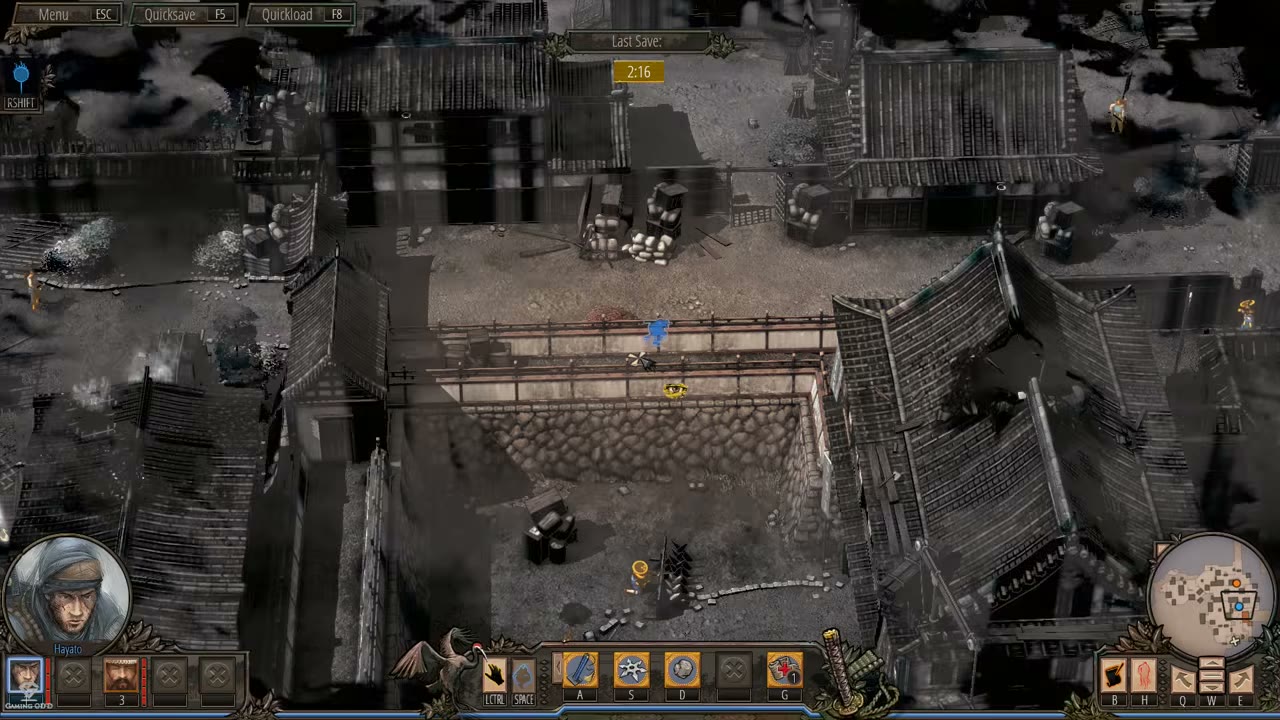
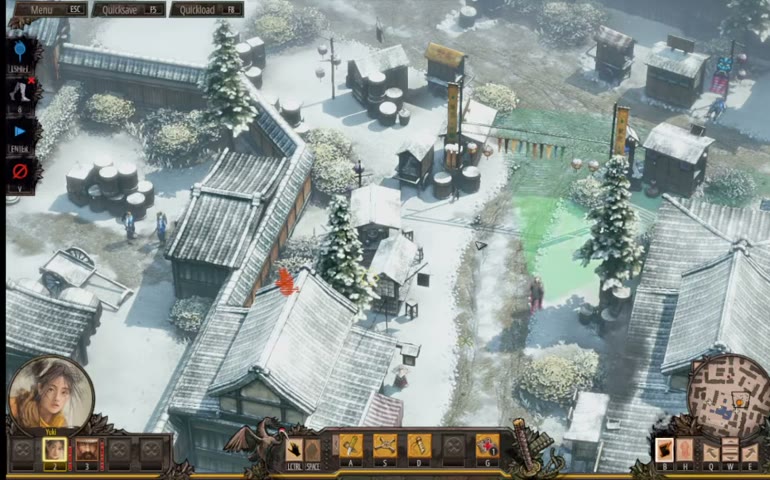
The Four-Slot Ability Binding Framework organizes the selected character's actionable loadout into four command slots shown on the Ability Command Bar. In the observed/default PC layout these slots are labeled A, S, D, and F: the first slot is the character's core close-range attack or primary weapon, the middle slots hold character-specific tools, and the last slot commonly holds a firearm or late-game ranged weapon. Switching characters swaps the slot contents while preserving the same four-position command structure.
3. Design Intent / Job Story
When I switch between squad members during an active infiltration, I want each character's tools to appear in the same four command positions, so that I can rapidly select the right ability without relearning the HUD layout for every character.
4. Role in Gameplay Loop
- Provides the input and HUD structure for the Character Ability System.
- Keeps character-specialized toolkits comparable by mapping them into four consistent command positions.
- Reduces tactical execution friction during character switching, Shadow Mode planning, and time-sensitive stealth actions.
- Separates core ability slots from peripheral context actions such as sneak, jump/climb, and Shadow Mode.
5. Preconditions
- A mission is active.
- At least one playable character is present and selectable.
- A playable character is currently selected.
- The selected character has an ability loadout available for the current mission/progression state.
- The game is not in a menu, loading screen, or cutscene state that hides gameplay controls.
6. Parameters
| Parameter | Value | Type | Notes |
|---|---|---|---|
| Ability slot count | 4 | integer | Number of primary ability command positions exposed for the selected character. |
| Default slot labels | A, S, D, F | key labels | Observed/default PC labels shown beneath the four ability icons. |
| Slot 1 role | Primary attack / primary weapon | enum | Usually the character's melee takedown or primary direct-attack command. |
| Slot 2 role | Character tool | enum | Character-specific ability such as a thrown weapon, trap, crowd-control attack, powder, grenade, or similar tool. |
| Slot 3 role | Character tool | enum | Character-specific utility or secondary tool such as distraction, disguise/conversation, companion command, or lure. |
| Slot 4 role | Firearm / ranged weapon / progression-dependent tool | enum | Commonly a firearm or heavy ranged weapon where available; may depend on campaign progression or character loadout. |
| Loadout source | Selected character | state reference | Determines which four ability icons and commands occupy the bar. |
| Peripheral controls | LCTRL, SPACE, G observed | key labels | Adjacent context actions for sneak, jump/climb, and Shadow Mode; excluded from the four-slot count. |
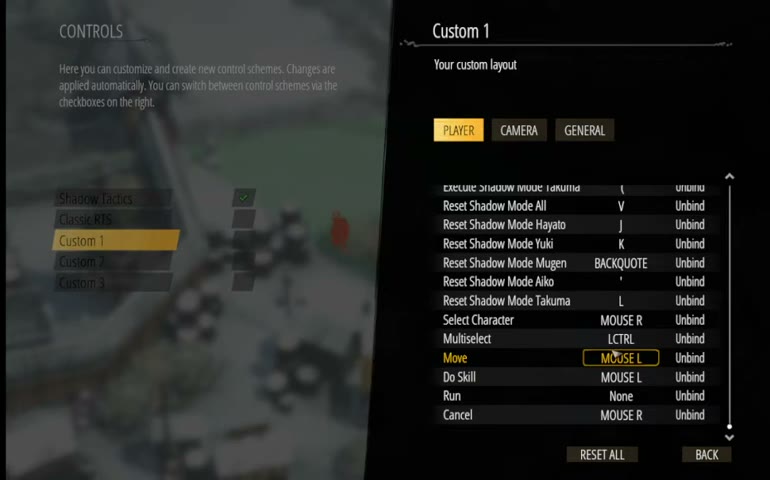
| Binding customization scope | Global control scheme | setting | Options menu evidence shows control schemes can be customized; slot identity remains four-position loadout presentation. |
7. Core Rules
- The selected character exposes exactly four primary ability command slots in the Ability Command Bar.
- The observed/default PC slot labels are A, S, D, and F.
- Slot contents are determined by the currently selected character and current progression state.
- Changing the selected character replaces all four slot contents with that character's loadout while preserving the four-slot layout.
- The first slot is reserved for the selected character's primary close-range attack or primary weapon role.
- The middle slots hold character-defining tools such as distractions, traps, area attacks, disguise actions, or companion commands.
- The fourth slot is commonly used for firearm or heavy ranged weapon access when that weapon is unlocked or available.
- Peripheral context controls such as sneak, jump/climb, and Shadow Mode are displayed near the ability row but are not counted as ability slots.
- An ability slot can be visible but unavailable when blocked by cooldown, ammunition/resource state, item retrieval state, character state, or progression lock.
- Global control customization may alter input bindings, but it does not change the systemic requirement that the selected loadout is presented as four command slots.
8. BDD Scenarios
Scenario: Selected character displays four ability slots
- Given
- an active mission is running
- When
- the Ability Command Bar is visible
- Then
- four primary ability command slots are shown for the selected character
- And
- a playable character is selected
- And
- the default PC labels are A, S, D, and F
Scenario: Character switch swaps the loadout
- Given
- an active mission contains multiple playable characters
- When
- the player selects a different character
- Then
- the four ability slots update to that character's loadout
- And
- the first character's four ability slots are visible
- And
- the four-slot layout remains in the same HUD position
Scenario: Ability slot is unavailable due to resource state
- Given
- the selected character has a reusable item ability assigned to one of the four slots
- When
- the player attempts to use that slot again
- Then
- the ability does not execute
- And
- that item has been deployed and not retrieved
- And
- the slot communicates that the ability is unavailable
Scenario: Global controls are customized
- Given
- the player has changed controls in the Options menu
- When
- the player returns to an active mission
- Then
- the selected character still has four primary ability slots
- And
- each slot's input behavior follows the active control scheme
Scenario: Peripheral command is not an ability slot
- Given
- the Ability Command Bar shows context controls near the ability row
- When
- the player counts primary ability commands
- Then
- sneak, jump/climb, and Shadow Mode are excluded
- And
- only the four character loadout slots are treated as ability bindings
9. Edge Cases
- A character is selected before all campaign abilities are unlocked; the affected slot should show the correct locked, empty, or unavailable state.
- A remapped global control scheme changes the input key; the command bar must still expose four ability positions and keep labels consistent with the active scheme.
- A character is carrying a body, climbing, swimming, disguised, incapacitated, or otherwise state-blocked; ability slots should not execute invalid actions.
- A reusable item ability has been thrown or placed and not retrieved; its slot should remain unavailable until the item is recovered.
- A multi-character mission switches between characters with very different loadouts; the bar must replace icons without leaving stale availability, cooldown, or targeting state.
- A queued or armed ability is active when the player switches character or enters Shadow Mode; targeting should cancel or transfer only if that behavior is explicitly supported.
10. QA Notes
- Verify each playable character presents four primary ability slots in active gameplay.
- Verify default PC labels appear as A, S, D, and F on the four central ability icons.
- Verify switching selected character updates all four ability icons and availability states without stale data.
- Verify peripheral controls such as LCTRL, SPACE, and G are not counted as ability slots.
- Verify unavailable states for cooldowns, ammunition, placed/retrievable items, progression locks, and state-blocked actions.
- Verify remapped controls in the Options menu keep command labels and actual inputs synchronized.
- Verify mouse-clicking a slot and pressing its bound key arm or execute the same command.
- Verify ability targeting previews open from the correct slot and cancel cleanly on invalid state changes.
11. Mechanic Dependencies
- Character Ability System (The four-slot framework is the presentation and input binding layer for the Character Ability System; it depends on character ability definitions to populate each slot.)
- Character Specialization System (Character specialization determines which distinct tools fill the shared four-slot structure for each playable character.)
- Shadow Mode Coordination System (Shadow Mode is adjacent to the ability row and uses the same selected-character command context when planning coordinated actions.)
- Melee Takedown Variations (Melee takedown variations commonly occupy the first ability slot and define the slot's primary attack behavior.)
- Ranged Elimination Abilities (Ranged elimination abilities and firearms commonly occupy later slots, especially the fourth slot where matchlock or heavy ranged weapons appear.)
- Sound-Based Distraction Abilities (Sound-based distraction abilities are examples of character-specific tools assigned into the middle ability slots.)
12. UI Links
- Options Menu - The Options Menu exposes control customization, which can affect the input bindings associated with ability commands.
- Bottom Gameplay HUD Bar - The Bottom Gameplay HUD Bar anchors the Ability Command Bar and keeps the slot row positioned consistently during active gameplay.
- Character Portrait And Selection Panel - The Character Portrait And Selection Panel changes the selected character, which causes the four-slot loadout to update.
- Ability Command Bar - The Ability Command Bar is the HUD surface that displays and activates the four ability slots with hotkey labels.
- Shadow Mode Command UI - The Shadow Mode Command UI is entered from the adjacent G command and uses selected-character abilities for planned coordinated execution.
References
- 1.
Steam Community :: Guide :: Shadow Tactics: Full Character Guides and Tricks (L4-130 of 116)
- 2.
Osaka Castle Mission 1 - Shadow Tactics-Blades of The Shogun (Hardcore) (19:38-20:52)
- 3.
Shadow Tactics Blades of the Shogun PC Gameplay Imai Town (1:03:40-1:04:00)
- 4.
Shadow Tactics Blades of the Shogun PC Gameplay Imai Town (1:36:12-1:36:42)